What matters when choosing
Start with the devices you will take on the trip, then decide whether easy packing or an integrated tablet setup matters more. For repeated corrections, consider typing comfort as a separate decision from keyboard size.
| Concern |
What to check |
Who this matters to |
| Carrying and protection |
Check the packed shape and key cover, then plan how you will protect and support the tablet. |
When moving between field-trip stops, I want the keyboard to fit in my bag without leaving the device exposed. Around 31% of consumers put carrying and protection first. |
| Tablet setup and navigation |
Match a case to the exact tablet model and check its stand, trackpad and detachable parts. |
For editing links and moving entries on my iPad, I want the screen supported while I type and navigate. Around 25% of consumers prioritise this tablet setup. |
| Switching devices |
Check each device’s operating-system support, pairing capacity and switching controls. |
I may capture a title on my phone and finish the list on a tablet or laptop, so changing devices matters more than having a fitted case. Around 19% of consumers make device switching their primary concern. |
| Repeated text editing |
Check the keyboard layout and whether its key spacing and shortcuts suit the corrections you expect to make. |
If I will revise many entries rather than type an occasional title, I need a layout I can use comfortably for the session. Around 25% of consumers put repeated text editing first. |
Brands to consider
These brands illustrate different keyboard formats, not interchangeable products: the right route still depends on your device and how you plan to work away from a desk.
Logitech
Logitech offers standalone Bluetooth keyboards as well as model-specific iPad keyboard cases.
- Logitech describes a built-in key cover on Keys-To-Go 2 and three-device switching on Pebble Keys 2 K380s; its Combo Touch range offers tablet-case features for compatible iPads.
- A standalone keyboard does not protect the tablet. Check the exact iPad model before choosing a Combo Touch variant.
Apple
Apple’s iPad keyboards suit buyers seeking a keyboard designed for a particular compatible iPad.
- Apple describes keyboard options with magnetic attachment, trackpad control and adjustable viewing support, depending on the model.
- Compatibility and features vary across iPad sizes and generations; these are not keyboards for switching to an unrelated phone or laptop.
Microsoft
Microsoft’s Surface Pro keyboard route is relevant to owners of specified Surface Pro models rather than buyers seeking a universal tablet case.
- Microsoft describes the Surface Pro Signature Keyboard as a compact keyboard with a touchpad for compatible Surface Pro devices.
- Check the precise Surface Pro model. Other Microsoft keyboards can have different setup requirements; Microsoft Support specifies Windows 10 or 11 and Bluetooth 4.0 or later for Designer Compact Keyboard.
Joybuy keyboard choices
These choices include an iPad keyboard case and separate keyboards for editing on a compatible device. Decide which format fits your field-trip setup before comparing individual layouts and connections.
 No image available
Rexsun P11-2 iPad Pro 11-inch and Air 10.9-/11-inch keyboard case, white
For editing on a compatible iPad, this case combines a magnetic floating design, detachable protective cover and trackpad. Match your exact iPad model and generation to the case, and check the keyboard layout before ordering.
View on Joybuy
 No image available
VoxorAI B033 black Bluetooth keyboard
Consider this separate keyboard when you want to pack your typing device independently of a tablet case. Check compatibility with the device you will carry, the keyboard layout and how you will support the screen; protect the keyboard from excessive moisture.
View on Joybuy
 No image available
VoxorAI BOX1 black Bluetooth keyboard
This separate Bluetooth keyboard is worth considering if your reading-list edits move between locations. Confirm its compatibility and keyboard layout for your device, arrange screen support separately and keep it away from liquids.
View on Joybuy
 No image available
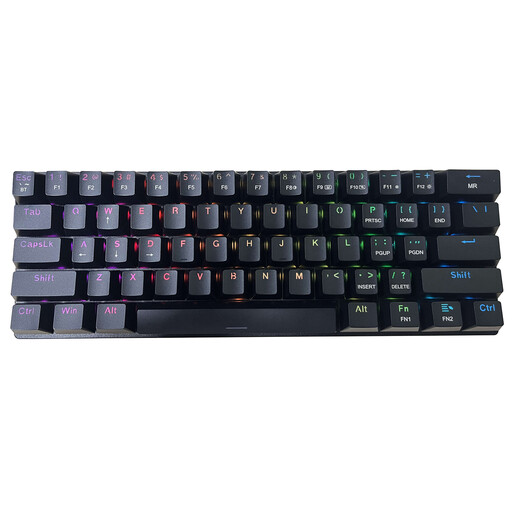
Free Gift Mouse ET 60% tri-mode keyboard, 61 keys, US QWERTY
For editing on a compatible iPad or phone, this is a separate keyboard rather than a fitted case. Its product name specifies a US QWERTY layout and clicky blue switches, which are worth considering if you will type near others; confirm device compatibility and keep it away from liquids.
View on Joybuy
 No image available
Free Gift Mouse Lofree OE907 65% keyboard, US QWERTY
Consider this separate keyboard if its layout suits your editing work and your device supports the intended connection. The product name specifies 68 keys, Bluetooth 5.1 and a wired mode; check device compatibility and avoid using it in damp conditions.
View on Joybuy
Common questions
Should I take a Bluetooth keyboard or a keyboard case on a field trip?
Take a standalone Bluetooth keyboard if you need to use it with several compatible devices or pack it separately from your tablet. Choose a keyboard case if you have an exactly compatible tablet and want its stand, trackpad or protection; remember that the case will not serve as a universal keyboard for your other devices.
How can I check whether an iPad keyboard case will fit?
Find your iPad’s model and generation, then check both against the keyboard maker’s compatibility list. Apple, for example, lists Magic Keyboard Folio for iPad (A16) and iPad (10th generation); other Magic Keyboard models have different compatibility.
Will a universal Bluetooth keyboard work with every tablet?
No: check the keyboard’s supported operating systems and your tablet’s Bluetooth capability before buying. Logitech lists Android, ChromeOS, Windows, iPadOS, iOS and macOS wireless-device support for Keys-To-Go 2, but that list does not establish compatibility for every individual tablet setup.
What if the field trip includes a flight?
Check your airline’s current battery instructions for the equipment you intend to carry. The UK Civil Aviation Authority says batteries showing damage, overheating or swelling should not be used or carried on an aircraft; this does not mean every portable keyboard uses the same battery type.


