What matters when choosing
Start with the space you have and whether the keyboard travels with you. Then match its connection method and typing layout to the devices and feedback tasks you use most.
| Concern | What to check | Who this matters to |
|---|
| Desk space and carrying |
Compare the exact dimensions and weight, then check whether the layout retains your frequently used keys and whether a cover is provided. |
If I work beside course notes or carry a tablet between locations, I need a keyboard that fits both the desk and my bag. Around 40% of consumers put usable space and portability first. |
| Device switching |
Check compatibility with each device, the available Bluetooth, receiver or wired connection, and the number of devices that can stay paired. |
Moving from a tablet to a laptop is easier when I can use a connection method both devices accept. Device switching is the primary concern for around 30% of consumers. |
| Typing and quiet use |
Check key feel and layout; look for stated quiet-key features or configurable shortcuts only where you need them. |
For detailed replies in a shared room, I care about comfortable typing without disrupting people nearby. Around 30% of consumers prioritise typing feel or quiet use. |
Joybuy products for this setup
These items include compact keyboards for writing course feedback and a handheld vacuum intended for cleaning desks and keyboards. The vacuum is a cleaning accessory, not an alternative keyboard; check each keyboard’s layout and connections against your setup.
 Image unavailable
HyperX Alloy Rise 75 Wireless Keyboard UK
Consider its 75% format if you want a compact keyboard for a small desk. Check the exact key arrangement and switch sound if familiar punctuation or quiet shared-space typing matters to you.
View on Joybuy
 Image unavailable
Lofree OE907 65% mechanical keyboard, US layout, with mouse gift listed
Its 68-key format may suit a desk where space is limited. The title specifies a US QWERTY layout, Jellyfish switches, Bluetooth 5.1, wired operation and white backlighting; confirm that the key placement suits your feedback work and that the listed mouse gift applies to the item you order.
View on Joybuy
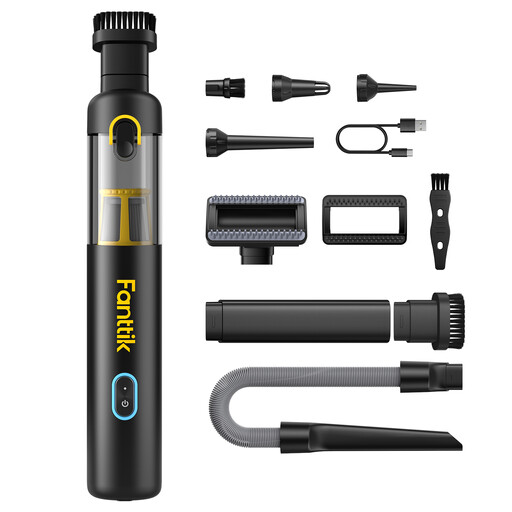 Image unavailable
Fanttik Slim V8 APEX 4-in-1 cordless handheld vacuum, black
This is a cleaning accessory for small jobs around a desk or keyboard, not a device for typing feedback. Its title specifies Type-C charging and two suction modes; check the supplied attachments for the surfaces you intend to clean.
View on Joybuy
 Image unavailable
ASUS ROG Falchion Ace HFX 65 Analog Gaming Keyboard, UK layout
The 65% format and stated UK layout are worth considering for a small desk where familiar key placement matters. Check whether its gaming-oriented controls and connection method suit the devices you use for course feedback.
View on Joybuy
Frequently asked questions
What keyboard should I choose for both a tablet and a laptop?
Start with a model that supports both devices and lets you switch between them in a way that suits your work. Logitech lists pairing with up to three devices for Keys-To-Go 2 and Pebble Keys 2 K380s; confirm compatibility with your exact devices and operating-system versions before ordering.
Should I use Bluetooth, a 2.4 GHz receiver or a cable?
Choose a connection method that your devices and workplace permit. Keychron lists all three methods for the B1 Pro, while its K3 Version 3 lists Bluetooth and wired use; check ports and any receiver requirements for the exact configuration.
Will a UK-ISO layout matter for writing feedback?
A UK-ISO layout is worth prioritising if you rely on familiar UK punctuation and key placement. Check the selected variant rather than assuming every keyboard in a product series has the same regional layout.
What should I check about returns and guarantees?
Check the terms for the exact seller and listing, particularly if you may return a keyboard because its layout or key feel does not suit you. Treat a seller’s change-of-mind policy separately from any remedy for goods that are faulty, damaged or misdescribed.
How should I dispose of an old keyboard?
Check the retailer’s electrical take-back information or your local authority’s recycling arrangements rather than putting the keyboard in general waste. GOV.UK identifies the Waste Electrical and Electronic Equipment Regulations 2013, as amended, as the framework for electrical-equipment waste in the UK.


