Mixed-device group organisers
You coordinate notes, agendas and shared documents across a laptop, tablet and phone. Switching between your own devices and checking support for each operating system matter more than having a full desktop layout.


Choose a compact keyboard with device switching if you move between your own laptop, tablet and phone while planning a group assignment. If you mainly work on a tablet and carry the keyboard between rooms, consider a covered portable model; if you expect to draft substantial sections, compare larger compact layouts and connection options instead. Check the exact layout and operating-system support before choosing a variant.
You coordinate notes, agendas and shared documents across a laptop, tablet and phone. Switching between your own devices and checking support for each operating system matter more than having a full desktop layout.
You plan or edit on a tablet or phone between classes and want a keyboard that packs away quickly, with protection for the keys while it is in your bag.
You expect to write substantial assignment sections away from your usual desk. A compact layout with more connection options may be worth considering alongside smaller travel keyboards.
Decide which device you will type on most, then weigh switching, carrying space and the amount of drafting you expect to do.
| Concern | What to check | Who this matters to |
|---|---|---|
| Device switching | Check support for your operating systems and how you select a paired device. | If I consult the brief on a tablet but draft on a laptop, I want to change devices without pairing again. Around 42% of consumers put switching between their own devices first. |
| Bag space and protection | Compare the keyboard’s dimensions with your bag and check whether it has a cover. | When I move between group meetings, I need a keyboard that is easy to pack without leaving its keys exposed. For around 33% of consumers, compact protected carrying is the primary need. |
| Longer drafting | Check the layout and whether the connection modes you need are offered. | If planning turns into writing a full section, I need a layout I can use for longer stretches and a suitable connection to my device. Around 25% of consumers prioritise drafting and connection flexibility. |
A portable keyboard may still have unfamiliar key legends or shortcuts, or lack support for one of your devices. Keychron offers different ISO layouts, while Logitech specifies operating-system support by model.
Check the exact UK or UK-ISO variant if that layout matters to you, along with the operating systems and connection method you will use.
Switching between paired devices lets one person move between their own screens; it does not let several group members type through one keyboard simultaneously.
Set up each member’s input device and document-sharing permissions separately.
A keyboard that packs neatly may offer less room for the keys you use when drafting and editing. Compare the layout with a 75% option if you expect to write full sections rather than just notes or comments.
Check the key arrangement and connection options for the device on which you will do most of the writing.
GOV.UK advises taking unwanted electrical products and batteries to an appropriate collection point rather than putting them in household rubbish.
Check local electrical-waste collection options when replacing a keyboard.
Its portable range includes tablet-focused keyboards and compact boards for switching between devices.
Its UK-ISO options include slim portable and 75% low-profile keyboards.
Its compact British-English Magic Keyboard is an option for work centred on compatible Apple devices.
These keyboards cover full-size and compact-layout options for group-assignment drafting. Choose by the space you can carry, the layout you need and the connection requirements of your own devices.
 No image available
Consider this full-size option if you expect to draft substantial sections and have room to carry it. Check its connection method and compatibility with each device you plan to use.
 No image available
This full-size Bluetooth option is worth considering if you type longer assignment sections. Check that its dimensions suit your bag and that it supports the devices you intend to pair.
 No image available
The 75% layout offers a compact alternative to a full-size board for assignment drafting. Check its weight for regular carrying and confirm operating-system support and shortcuts for your devices.
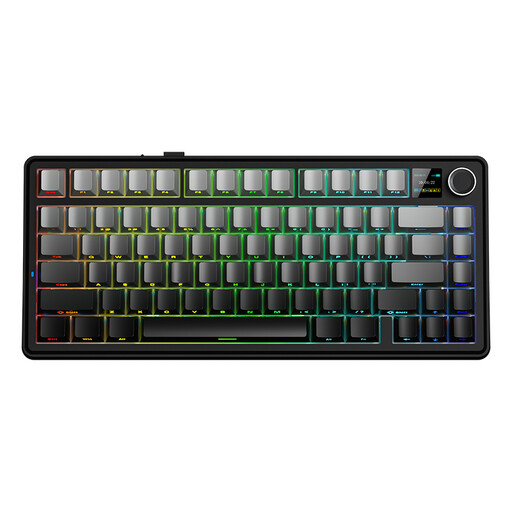 No image available
This 75% mechanical variant is an option for longer drafting if its US QWERTY layout suits you. Its named connection modes are wired, Bluetooth and 2.4 GHz; confirm compatibility and carrying dimensions before ordering.
 No image available
Consider this 96-layout keyboard if you want a near-full key arrangement for drafting rather than the smallest travel setup. Confirm the exact UK-layout variant, device compatibility and carrying weight.
Yes, if you personally move between a laptop, tablet and phone while planning or editing. Logitech specifies switching between up to three devices for Keys-To-Go 2 and Pebble Keys 2 K380s; check the exact model’s operating-system support before buying.
Turn it on, put it in pairing mode, then select it in your device’s Bluetooth settings and complete any pairing prompt. Logitech advises following the keyboard’s pairing instructions; the controls may differ by model.
Check the exact variant’s power requirements and whether the cable or receiver you need is included. Do the same for its layout and device compatibility, particularly if you plan to switch between connection methods.
Take an unwanted keyboard or batteries to an appropriate electrical-waste or battery collection point rather than putting them in household rubbish, as GOV.UK advises. Check the collection point’s instructions for batteries that can be removed.