Choose the accessory that solves your main repeated-setup problem: a portable monitor adds screen space, separate controls change how you can position the laptop, a hub brings connections together, and portable power helps when a suitable socket is uncertain. Before buying, check your laptop’s video and charging capabilities, the connections you need, and any rules that apply to your journey.
Who portable laptop accessories suit
Laptop-screen multitaskers
If you move between desks and need to read, compare or present material alongside your laptop window, check video compatibility and whether you have room to position a second display. Lenovo and ASUS product specifications illustrate different portable-display sizes and connection options.
Long-session laptop users
If you work on a laptop for sustained periods in different locations, consider how the screen and input devices will be arranged together. The Health and Safety Executive’s guidance discusses using a separate keyboard and mouse so the screen can be positioned independently.
Connection-and-power travellers
If you repeatedly reconnect devices or work where suitable sockets may be uncertain, check which functions your laptop’s ports support, the power available to your laptop and the conditions of your journey. National Rail notes that train companies can have different luggage policies.
What to check before buying
Portable monitors
Consider one: when working across windows on the laptop’s built-in screen is the main difficulty.
Trade-off: the panel, stand and cables add items to carry, and the laptop must support the monitor’s video connection.
Compact keyboards and mice
Consider them: when you need separate controls to position the laptop screen independently during longer sessions.
Trade-off: they take up bag and desk space without adding a display or extra laptop ports.
Portable USB-C hubs and adapters
Consider one: when reconnecting the same display or peripherals at different desks is the recurring inconvenience.
Trade-off: a hub cannot add video output that the laptop does not support, and pass-through charging does not guarantee sufficient power for every laptop.
Portable power
Consider it: when access to a suitable socket is your main concern and the power source matches your laptop’s charging needs.
Trade-off: output, capacity, weight and travel rules are separate considerations; a combined output figure does not show what one laptop will receive.
| Concern |
What to check when buying |
Who this matters to |
| Usable screen space |
Check the display size and packed weight, the laptop’s video output, and any required cable or power arrangement. |
When I move between work locations, I need a second screen for documents or side-by-side windows without carrying more than I can position comfortably. Around 31% of consumers put portable screen space first. |
| Separate input for longer sessions |
Check the keyboard layout, packed size, mouse connection and compatibility with your devices. |
If I work on a laptop for longer stretches, separate controls let me position the screen and typing surface independently. Around 25% of consumers prioritise separate controls for prolonged laptop use. |
| Repeated device connections |
List the ports you use and verify that the laptop supports the display and charging functions you need. |
When I change desks, I want to reconnect my existing display and peripherals without repeatedly hunting for the right connections. Around 25% of consumers put easier device reconnection first. |
| Power away from sockets |
Match the laptop’s charging method and required input to the power source’s output; check its watt-hour rating and relevant airline rules if flying. |
If a suitable socket may not be available, I need a power option that matches my laptop and the journey I am taking. Around 19% of consumers prioritise power away from sockets. |
Buying pitfalls to avoid
-
Assuming every USB-C port supports a portable monitor
A USB-C-shaped connector alone does not establish that a laptop can send video to a particular display.
Check the exact laptop port’s video capability and the monitor’s input before ordering. If considering another connection route, confirm that the laptop supports it and that you have the required cable.
-
Treating a hub’s power rating as a laptop charging guarantee
A hub’s stated pass-through capability does not establish how much power the complete laptop, charger and cable combination will deliver.
Check the laptop’s charging requirement and the stated capability of the hub, charger and cable separately.
-
Choosing a power bank by its combined wattage or a flight claim alone
A maximum output to one device and a total output across a power bank describe different things. Carriage rules are also separate from the product’s advertised claims.
Compare the relevant port output with your laptop’s requirements, check the power bank’s watt-hour rating and confirm the current rules for your airline before flying.
Relevant brands to consider
Lenovo
The ThinkVision M14d is one example to consider if you want a 14-inch portable display.
- Lenovo specifies a 2240 × 1400 resolution, a weight of 600 g and USB-C DisplayPort 1.2 Alt Mode connections for this model.
- The laptop still needs a compatible video connection; these specifications apply to this model, not every ThinkVision monitor.
ASUS
The ZenScreen MB16AHV is an example of a larger portable display with USB-C and mini-HDMI inputs.
- ASUS specifies a 15.6-inch Full HD panel, a kickstand and a weight of 0.9 kg for this model.
- ASUS advises checking the laptop’s USB-C display capability before using that connection. The model’s specifications are not independent performance test results.
Logitech
The Pebble Keys 2 K380s keyboard and MX Anywhere 3S mouse illustrate compact input choices for laptop use.
- Logitech specifies switching between three devices for each cited model.
- That function matters only with compatible devices. Check the keyboard layout for the variant you are buying and the mouse’s required connection.
Belkin
The AVC009btSGY illustrates a multiport USB-C hub for carrying common connections together.
- Belkin lists HDMI, USB-A, card readers and up to 100 W power pass-through for this specific hub.
- Those listed capabilities do not establish video compatibility or sufficient charging power for every laptop.
Anker
The Prime A110B illustrates a portable power-bank option for work away from a suitable socket.
- Anker advertises 140 W maximum fast charging and 220 W total output for the A110B.
- These are manufacturer ratings, not measured results with your laptop or evidence that the power bank meets an airline’s requirements.
Joybuy product choices
These choices cover portable displays, separate laptop controls, USB-C connection hubs and a USB-C charger for changing work locations.
 No image available
UPERFECT 14-inch 60Hz Touchscreen Portable Monitor with VESA and Adjustable Stand
Consider it if a separate screen would help when working across windows at different locations; check that your laptop supports the required video connection.
The product name specifies a 14-inch, 60Hz touchscreen and 100% sRGB. The listing describes a one-cable setup that requires a compatible video output and full-featured USB-C cable; a separate power supply is needed if the device does not support that setup. Touch operation requires a touch-enabled connected device.
View on Joybuy
 No image available
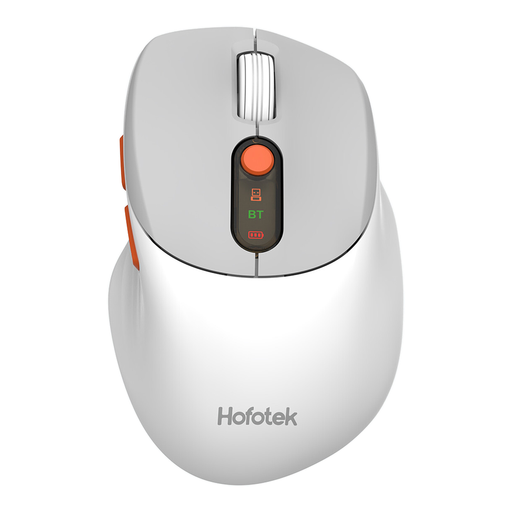
HOFOTEK M311 2.4G+BT Silent Office Mouse
Consider it if you want a separate mouse to carry with a laptop; check that its connection type suits the devices you use.
The product name specifies 2.4G and Bluetooth connections, adjustable multi-level DPI and a 1xAA battery. The listed package includes one pre-installed AA battery and a USB receiver.
View on Joybuy
 No image available
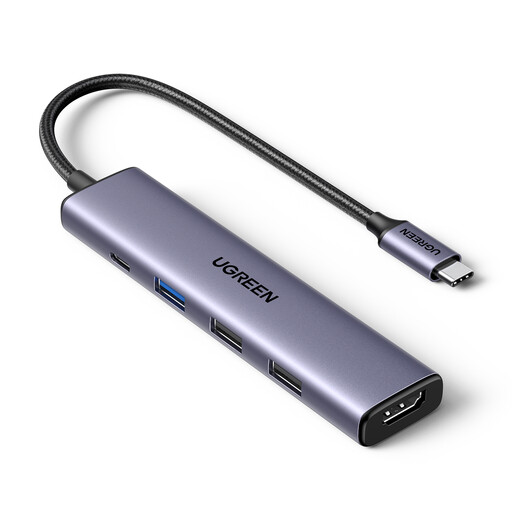
UGREEN Revodok 5-in-1 USB-C Hub
Consider it if you regularly reconnect a display or peripherals, after checking that your laptop supports the functions you intend to use.
The product name specifies 100W PD, 4K HDMI and three USB-A data ports. Display output depends on the host device supporting the required connection.
View on Joybuy
 No image available
V7 V7UC-U3CRJ45HDVG-BLK USB-C Adapter
Consider it if you need to reconnect a display and other peripherals at different desks; check the laptop’s USB-C video support before choosing it.
The product name specifies 4K HDMI, VGA, Gigabit Ethernet, 100W Power Delivery and dual USB 3.0 ports. The listing specifies USB-C Alt Mode and single-display SST operation. Its 100W capability is pass-through charging and does not establish that every laptop will receive its required power.
View on Joybuy
 No image available
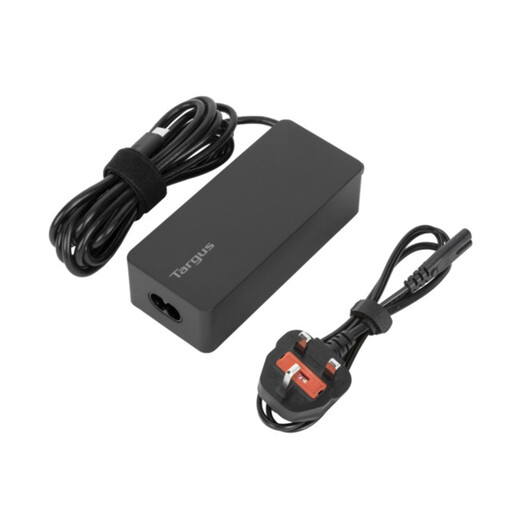
Targus 65W USB Type-C Charger
Consider it if you need a charger for work across locations, after checking your laptop’s charging requirement and whether it is compatible with this charger.
The product name specifies 65W USB Type-C charging. The listing describes support for most USB-C laptops up to 14 inches, rather than every laptop. It also lists UK and EU power cords.
View on Joybuy
Frequently asked questions
Will a USB-C portable monitor work from any laptop USB-C port?
No; check that the exact laptop port supports video output and that the monitor accepts that connection. Lenovo specifies DisplayPort Alt Mode for the ThinkVision M14d, while ASUS advises checking the laptop’s USB-C display capability for the ZenScreen MB16AHV. The ASUS model also has mini-HDMI, which requires a suitable output and cable.
How should I arrange a laptop and separate controls for a longer session?
The Health and Safety Executive’s posture guidance recommends a separate keyboard and mouse so the laptop screen can be elevated, or a separate display. Arrange the screen, input devices and seating as a whole rather than treating one accessory as an ergonomic fix.
Does a hub’s 100W pass-through mean it will charge my laptop at 100W?
Not necessarily; the hub’s rating alone does not establish the power your laptop will receive. Check the laptop’s charging requirement and the capabilities of the hub, charger and cable together.
Can I take a laptop power bank on a flight from the UK?
The UK Civil Aviation Authority says passengers should carry power banks in cabin baggage, may take no more than two and must not recharge them aboard. Check the power bank’s watt-hour rating and your airline’s current conditions before departure.
Is there one power-bank rule for every Great Britain rail journey?
The National Rail luggage guidance says train companies can have different policies, so check the operator for your journey. Do not apply flight limits to rail travel as if they were a universal rail rule.


