Dual-screen business travellers
If you compare documents, work in spreadsheets or present material away from your usual desk, a second display may be useful once you have confirmed a compatible video connection on your laptop.


Choose accessories around the constraint most likely to interrupt your work: confirm laptop video output before adding a portable monitor or display hub, and match charging power to your laptop’s requirements. If you fly with a power bank, check the operating airline’s battery rules for each leg; for work between destinations, plan without assuming a socket or reliable mobile connection will be available.
If you compare documents, work in spreadsheets or present material away from your usual desk, a second display may be useful once you have confirmed a compatible video connection on your laptop.
For work at hotels and client sites, a compact hub and charger can bring the connections you need without carrying a desk-sized dock. Check the exact ports and charging arrangement before packing.
If a usable socket may be hard to find, distinguish a power bank capable of charging your laptop from one intended for smaller devices. For flights, check its capacity and the operating airline’s carriage rules.
Start with your laptop’s display and charging requirements, then decide what will fit the places you expect to work and the journeys between them.
| Concern | What to check when buying | Who this matters to |
|---|---|---|
| Display and hub compatibility | Check the laptop’s documented video-output method and the exact monitor or hub input. ASUS says direct USB-C portable-monitor use requires video capability at both ends; some USB-display methods require a driver. | When I need a second screen for spreadsheets or document comparison, I need to know it will connect to my laptop; around 31% of consumers put display and hub compatibility first. |
| Laptop charging power | Compare the laptop maker’s recommended wattage with the charger’s output when your intended ports are in use, and check how much power a hub delivers to the laptop. | If I rely on one outlet at a hotel or client site, my laptop still needs adequate charging power alongside other devices; dependable laptop power comes first for around 25% of consumers. |
| Flight-ready backup power | Check the power bank’s laptop output and visible watt-hour rating against each operating airline’s current carriage rules. British Airways requires power banks in hand baggage. | For a flight or long transfer without dependable mains access, I need backup power I can carry under my airline’s rules; around 25% of consumers prioritise that need. |
| Compact input and screen privacy | Match a keyboard and mouse to your available work surface and connection method. For a privacy filter, check the screen’s dimensions, aspect ratio and attachment method. | At a temporary desk or in a shared space, I want workable controls or a less visible screen without filling my bag; that is the primary concern for around 19% of consumers. |
A connector that fits may carry charging or data without the video function a portable monitor needs. ASUS says direct USB-C display use requires video capability on both the computer and monitor.
Check your laptop’s exact port specification and the monitor’s input requirements; if it uses a driver-based USB display method, confirm you can install the required software.
A hub can use some incoming power itself. Anker states that its cited 5-in-1 hub takes a 100W input, reserves 10W and passes up to 90W to the laptop; other models need their own figures checked.
Compare the laptop’s recommended wattage with the dock’s stated laptop output and the charger’s allocation when multiple devices are connected.
British Airways requires power banks and spare batteries in hand baggage, and has an approval process for spare lithium batteries between 100Wh and 160Wh. Those conditions should not be assumed to apply unchanged to another carrier.
Keep the battery’s watt-hour rating legible and check the current rules of every operating airline, including connecting and return flights.
A temporary workspace may not have a suitable socket. Ofcom also notes that UK mobile connectivity can fall short, so a connected work session needs a contingency.
Charge your laptop before travelling and keep essential files available offline where your work arrangements permit it. Check socket access with the relevant operator or venue rather than building the setup around it.
Its ZenScreen range includes portable displays for laptop-based work away from a fixed desk.
Its USB-C hubs are relevant when a laptop needs additional display or peripheral connections at a temporary desk.
Its multi-port chargers and travel kits are relevant when one mains charger needs to serve a laptop and smaller devices.
Its keyboard-and-mouse combinations include compact options for a temporary work surface.
These portable monitors, USB-C docks and charger address second-screen, connection and mains-charging needs on work trips. Choose by your laptop’s ports and power requirements rather than treating them as interchangeable parts of one setup.
 No image available
For a second screen while working away from your desk, provided your laptop supports the monitor’s required USB-C video connection.
Check the exact port for DisplayPort Alt Mode before buying. This model does not support HDMI; confirm which cable and other accessories are included.
 No image available
For connecting external displays and peripherals at a temporary desk where a docking station is practical.
The model name specifies dual HDMI 4K connections and 100W Power Delivery pass-through. Display operation requires a compatible USB-C Alt Mode host; check the laptop’s requirements and the power actually delivered to it. The dock also requires an external adapter rated at 100W or higher.
 No image available
For a second screen when access to mains power may be uncertain. Its built-in battery is stated to provide up to four hours of use, not a fixed duration for every session.
Check which of the monitor’s connection methods works with your laptop, particularly the laptop’s video-output capability if you plan to use USB-C.
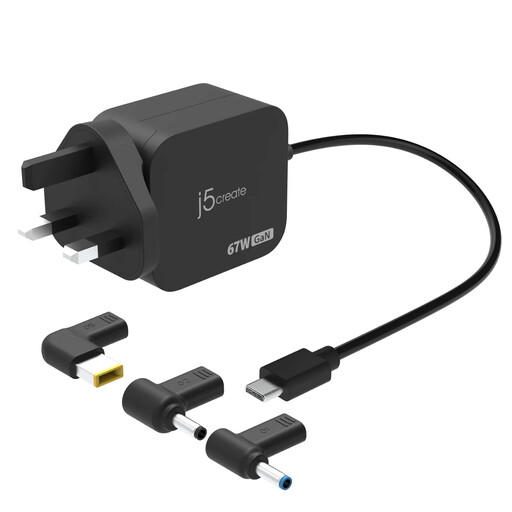 No image available
For mains charging on a work trip if its output meets your laptop’s requirements.
The model is specified at up to 67W and includes three DC connector types. Check your laptop’s required wattage and the exact DC connector fit before using that option; check plug and input-voltage suitability for your destination.
 No image available
For adding display, USB, network and card connections when you settle at a temporary desk.
The named configuration includes two HDMI ports specified at 4K 120Hz and 4K 60Hz, USB-A and USB-C ports, RJ45, SD/TF slots and a USB-C PD input. Confirm that your laptop supports DisplayPort Alt Mode and your intended display arrangement; check the power delivered to the laptop rather than assuming the stated PD input reaches it in full.
You may be able to, but check the rules for your particular power bank and every operating airline. British Airways requires power banks and spare batteries in hand baggage and has an approval process for spare lithium batteries between 100Wh and 160Wh; its policy is not a substitute for checking other carriers or legs of your trip.
No: the port must support the monitor’s required video method, not just have a matching connector. ASUS says direct USB-C plug-and-play use requires video capability on both the laptop port and monitor; a driver-based USB-display route may have different requirements.
Start with the laptop maker’s recommended wattage, then check the power the laptop will receive through your intended charger and hub arrangement. Apple notes that a Mac may show a slow-charger warning when delivered wattage is too low; multi-port sharing and hub power use can also affect the output available to a laptop.