
24/7 Customer Support

Free returns

Same-day & Next-day Delivery

Quality Guaranteed

Unlock Your Welcome Offers: FREE Delivery | Up to 80% OFF | Free 30-day JoyPlus trial
Download the APP
A portable projector can turn a bedroom wall, living room screen or garden sheet into a large display. However, product listings often make similar devices look interchangeable. A low price may hide weak brightness, while “8K supported” may refer only to video decoding rather than the projector’s native resolution.
Before buying, UK shoppers should compare the specifications that affect everyday viewing, streaming compatibility and setup time—not just the largest number in the title.
A projector described as “4K compatible” or “8K supported” may accept and decode higher-resolution video, but its physical display panel can still be 720P or 1080P. Native resolution is the more useful figure when comparing sharpness.
Brightness may be listed in ANSI lumens, ISO lumens or simply “lumens”. These measurement systems are not automatically interchangeable. A projector with a modest brightness rating can work well in a dark bedroom but look washed out in daylight.
For a more reliable comparison, check the stated measurement standard and plan to use the projector after sunset or with curtains closed. Outdoor use also requires a power source, a stable surface and protection from damp conditions.
Android, Android TV and a generic smart interface do not necessarily provide officially licensed Netflix access. Some models rely on screen mirroring, a separate streaming stick or app workarounds. Check whether the listing specifically states Netflix licensing and which other services are supported.
Also remember that Wi-Fi and Bluetooth serve different purposes. Wi-Fi handles streaming or screen casting, while Bluetooth commonly connects headphones, speakers or other audio devices. It does not always mirror a phone’s video.
For a home cinema projector, native 1080P is a practical target for detailed films and gaming. A mini projector with native 720P can be more suitable where low weight and price matter most.
Do not choose a large screen size solely because it is advertised. The projected image becomes dimmer as it grows, and the projector still needs enough throw distance. A short-throw ratio, such as 1.2:1 or 1:1, can help in smaller UK bedrooms and flats.
Consider when and where you will watch:
Curtains, a dedicated screen and correct positioning can improve perceived contrast more effectively than relying on a headline lumen figure.
An autofocus projector can save time when moving between rooms, while auto keystone correction squares the image if the device is not perfectly perpendicular to the wall. Check whether correction is vertical only or supports four-direction adjustment.
For a smart projector, useful features may include dual-band Wi-Fi, Bluetooth audio, HDMI for a laptop or games console, USB playback and screen mirroring. Gamers should prioritise a direct HDMI connection and check the product information for input-lag details, as a projector’s smart functions do not guarantee gaming performance.
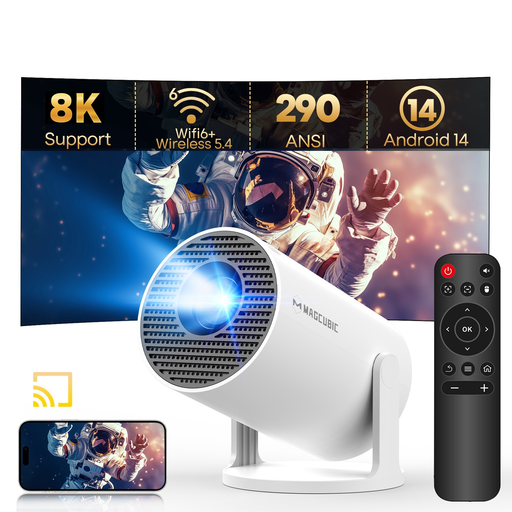
Why This Fits Their Persona: A lightweight option for bedroom films, student rooms and occasional travel, with a 180-degree rotating stand for wall or ceiling projection.
Its listing states native 720P, rather than presenting 8K support as native output. The 290 ANSI lumens rating is more useful when planning dark-room viewing.
Android 14, Wi-Fi 6, Bluetooth 5.4, auto keystone correction and a compact 0.77 lb design.
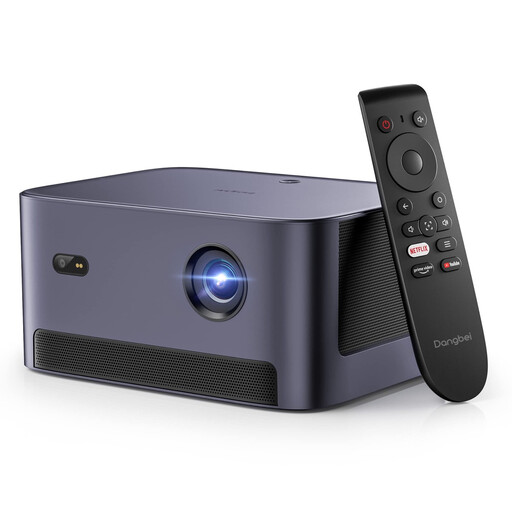
Why This Fits Their Persona: Designed for households wanting a straightforward home cinema projector with native Full HD and built-in licensed streaming access.
The listing identifies 1080P Full HD, 540 ISO lumens and official Netflix access, helping separate resolution, brightness and streaming claims.
Auto focus, four-direction keystone correction, Dolby Audio and HDMI ARC connectivity.
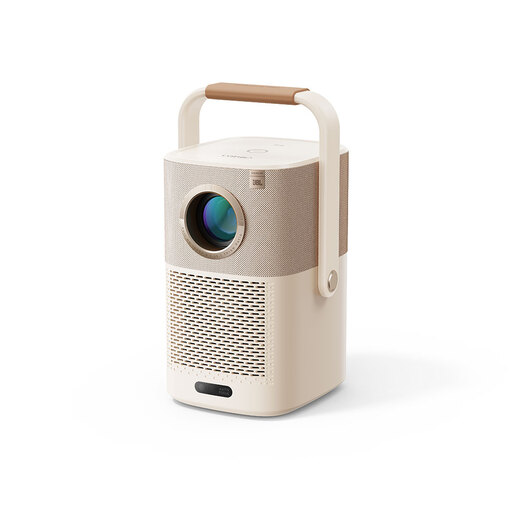
Why This Fits Their Persona: Suitable for garden film nights, camping trips and rooms where a built-in battery reduces dependence on a nearby socket.
The product information states native 1080P and a built-in battery rated for up to 2.5 hours of video playback, rather than implying unlimited cordless use.
AI autofocus, auto keystone correction, Wi-Fi 6, Bluetooth and an integrated handle that works as a stand.

Why This Fits Their Persona: A higher-spec option for frequent film viewing, console use and larger indoor or evening outdoor displays.
Its stated specification separates native 1080P from 8K decoding and lists 900 ANSI lumens, making the intended performance easier to assess.
Android 14, auto focus, auto keystone, obstacle avoidance, Wi-Fi 6, Bluetooth 5.4 and a 15W built-in speaker.
Place the projector on a stable, ventilated surface with the lens clear of obstructions. Keep air vents uncovered and do not use a standard portable projector in rain or damp garden conditions. Allow the unit to cool before packing it away.
LED projectors generally avoid frequent lamp replacement, but electricity use still depends on brightness mode, speaker volume and operating time. An energy-saving mode can reduce consumption where available. Built-in batteries also have a finite playtime and will need recharging, so check whether the advertised runtime covers a full film.
We have compiled a complete, real-time list of products that fully satisfy these strict selection criteria and UK safety regulations.
Usually, image contrast is reduced by daylight. For clearer results, close curtains, reduce room lighting and use a smaller image. Outdoor viewing is generally more practical after sunset.
Service life depends on the LED module, cooling system, usage and maintenance. Keep vents and the lens clean, avoid overheating and follow the supplied power instructions. The stated lamp-life figure is an estimate, not a guarantee of identical performance throughout ownership.
Not always. Models with specifically stated official Netflix licensing can provide built-in access. Other Android projector models may require a compatible streaming device because screen mirroring can be restricted by copyright protection. Check the exact product specification before purchase.