
24/7 Customer Support

Free returns

Same-day & Next-day Delivery

Quality Guaranteed

Unlock Your Welcome Offers: FREE Delivery | Up to 80% OFF | Free 30-day JoyPlus trial
Download the APP
The dream of a big-screen experience at home, in the garden or even on a camping trip is more accessible than ever. A portable projector can transform any wall into a cinema, a gaming arena or a presentation screen, all without the permanence and bulk of a large television. However, the market is filled with technical terms and features that can be confusing.
This guide is designed to help you understand the key features that matter. We will walk you through what to look for in a modern portable projector and share some of our top recommendations to help you find the right model for your needs.
Navigating the specifications is the first step to finding a projector that fits your lifestyle. Here are the three most important areas to focus on.
Image quality hinges on two main factors: resolution and brightness.
The best projectors are easy to connect and use. A smart projector, often running a built-in Android projector operating system, allows you to install streaming apps like Netflix, YouTube and Prime Video directly onto the device, eliminating the need for a separate laptop or TV stick.
For seamless streaming and screen mirroring, look for a projector with WiFi and Bluetooth. The latest WiFi 6 standard provides a faster, more stable connection, reducing buffering when you're mirroring your phone or streaming a film. Bluetooth allows you to easily connect external speakers or headphones for a more immersive audio experience.
Setting up a projector used to involve tedious manual adjustments. Modern models have simplified this process significantly.
Based on the features that offer the most convenience and performance, here are a few standout models to consider.
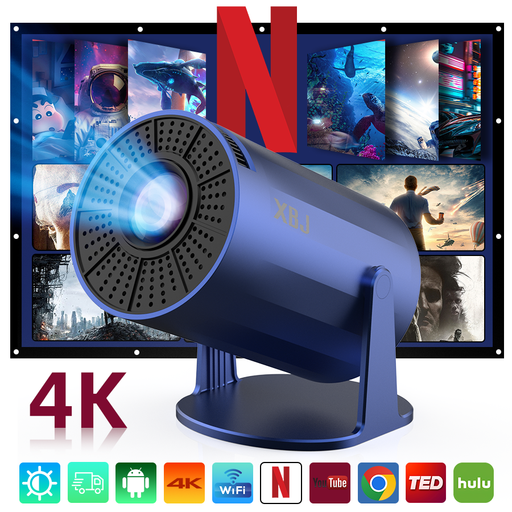
Why It Stands Out This mini projector is built for ultimate flexibility. Its standout feature is the integrated 180° rotatable stand, which allows you to effortlessly project an image onto a wall, screen or even the ceiling without needing extra props or mounts. Combined with its lightweight design, it’s an ideal companion for movie nights in any room.
Pros
Who is it for? This is a great choice for anyone seeking a highly portable and adaptable projector for casual viewing. It's particularly well-suited for use in bedrooms, student accommodation or for creating an impromptu home cinema projector experience anywhere in the house.
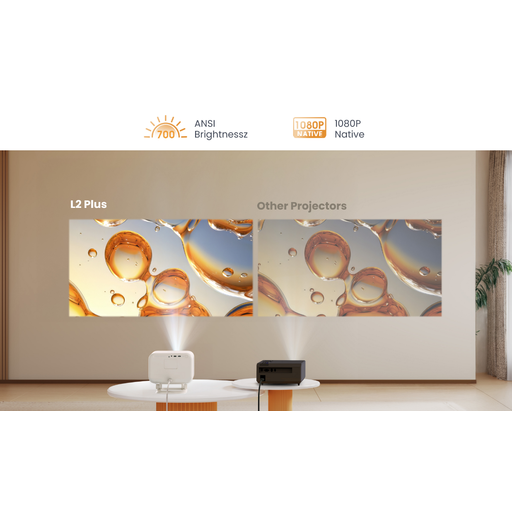
Why It Stands Out The Yaber L2 Plus is all about a seamless, "plug-and-play" experience. It automates almost the entire setup process with auto focus, auto keystone correction, screen alignment and even obstacle avoidance. It also features built-in JBL speakers with Dolby Audio support, delivering impressive sound straight out of the box.
Pros
Who is it for? This model is perfect for users who prioritise convenience and high-quality audio-visual performance. Its automated features and powerful speakers make it an excellent outdoor projector for garden movie nights or a hassle-free projector for iPhone and other devices in the living room.
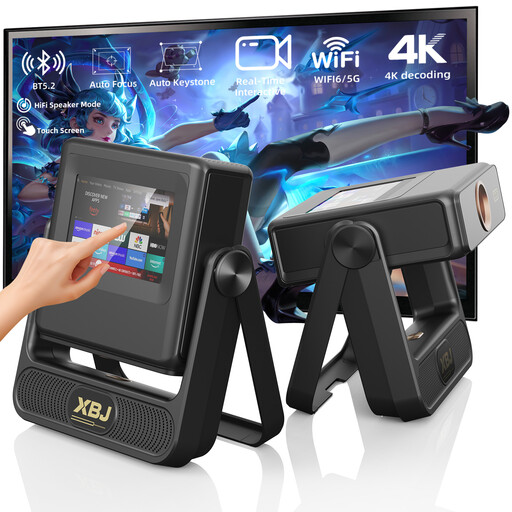
Why It Stands Out This projector introduces a unique and intuitive control method: a built-in touchscreen on the unit itself. This allows you to navigate menus, play content and adjust settings without always reaching for the remote. With a powerful 900 ANSI lumens of brightness and the ability to project a massive screen up to 300 inches, it’s a true powerhouse for immersive entertainment.
Pros
Who is it for? This is aimed at tech enthusiasts and those who want a high-performance projector for a dedicated home cinema setup, large outdoor gatherings or even office presentations. The high brightness and unique touch controls set it apart for users who demand both power and convenience.
A stunning picture deserves equally impressive sound. While many projectors have capable built-in speakers, an external sound system can elevate your viewing experience from great to truly cinematic.
To complete your setup, explore our curated selection of home audio systems.
Yes, many models are designed as outdoor projectors. The key is to choose one with sufficient brightness (ANSI lumens) to be visible in the dark. For the best experience, wait until after sunset. You will also need to ensure you have a power source, as most portable projectors do not have a built-in battery and require mains power.
Not always. A smart projector with a built-in operating system like Android allows you to download and run streaming apps directly. This is often the most convenient solution. However, due to content licensing agreements, some apps may not be available or fully functional on all devices. In such cases, using an external TV stick can provide access to a wider range of content.
Most modern projectors with WiFi support wireless screen mirroring. To create a projector for iPhone, you typically connect both devices to the same WiFi network. Then, open the Control Centre on your iPhone, tap "Screen Mirroring" and select the projector from the list. Some projectors may require you to open a specific app (like AirPlay or a dedicated mirroring app) on the projector first to enable the connection.