
24/7 Customer Support

Free returns

Same-day & Next-day Delivery

Quality Guaranteed

Unlock Your Welcome Offers: FREE Delivery | Up to 80% OFF | Free 30-day JoyPlus trial
Download the APP
A portable projector promises the magic of a massive screen anywhere, from your bedroom ceiling to a garden wall for a summer movie night. However, the market is filled with confusing specifications and overhyped features that can lead to disappointment. Many buyers find their new gadget is either too dim to see, delivers a blurry image or can't even run the streaming apps they use daily.
As the Joybuy Product Recommendation Officer, my role is to help you navigate this landscape. Before you spend your money, let's look at the most common pitfalls and the essential features that truly matter for a great viewing experience in the UK.
Many product listings are designed to sound impressive but often hide crucial flaws. Here are three traps to watch out for:
To ensure you get a device that delivers on its promise, focus on these three non-negotiable areas.
As mentioned, ANSI lumens are the gold standard. This measurement, defined by the American National Standards Institute, involves averaging brightness readings from multiple points on a screen. It gives a realistic indication of how the image will look in a room.
For a cinematic feel, image quality is paramount.
A truly modern projector should be easy to connect and use.
Based on these practical criteria, here are a few models that align with different user needs.
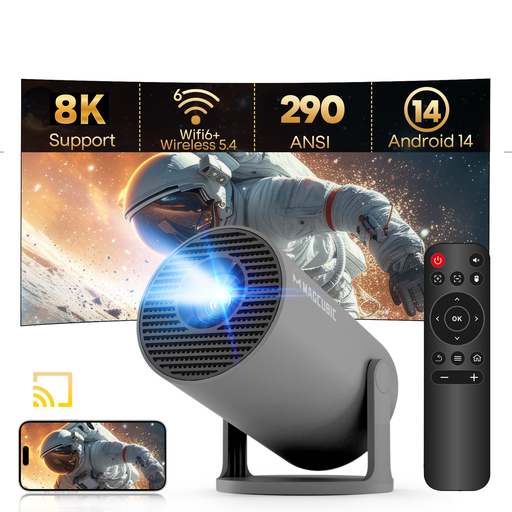
Why This Fits Their Persona: Ideal for someone dipping their toes into projection for casual bedroom viewing or kids' rooms. Its ultra-compact size and built-in stand make it incredibly easy to set up anywhere without fuss, offering great value for its feature set.
While it's native 720p, it's transparent about it, avoiding the "4K supported" confusion. It also runs a modern Android 14 OS, providing a much smoother experience than many affordable projectors with outdated software.
Features a 180° rotating stand for effortless ceiling projection and includes modern WiFi 6 and Bluetooth 5.4 connectivity, which is uncommon at this price point.
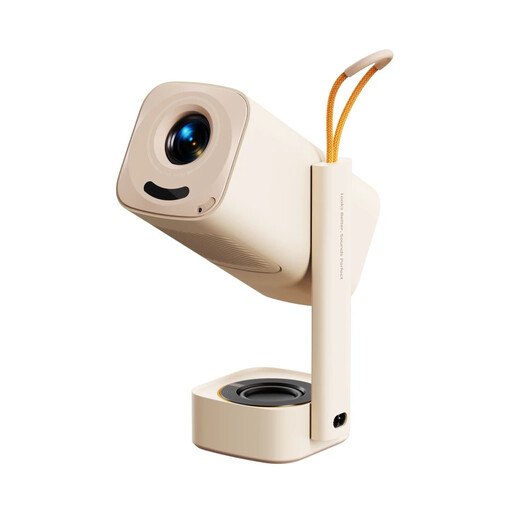
Why This Fits Their Persona: Perfect for families who want a hassle-free cinema experience. With licensed Netflix and Prime Video built-in, there's no need for extra streaming sticks. It's ready for a movie night in the living room or cartoons in the kids' bedroom straight out of the box.
It delivers true native 1080P resolution for a sharp picture and has officially licensed streaming apps, directly solving the two biggest frustrations for users. The full suite of auto-adjustments means no time is wasted on setup.
Its "set and forget" intelligence is a major plus. Auto focus, auto keystone, screen alignment and obstacle avoidance all work together to provide a perfect picture in seconds. The integrated stand is also a highly practical feature.
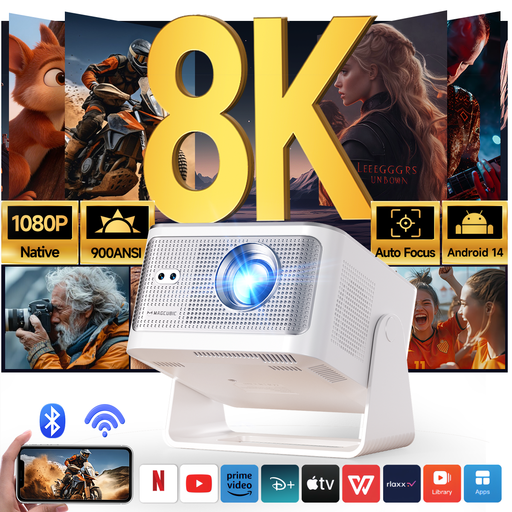
Why This Fits Their Persona: For the user seeking a genuine TV alternative. The high brightness and crisp native 1080p resolution make it suitable for watching sports during the day or enjoying a high-quality home cinema experience at night, without needing a completely blacked-out room.
It tackles the brightness trap head-on by offering a high, verifiable 900 ANSI lumens. This is a significant step up from affordable models and provides genuine viewing flexibility. It also features a modern Android 14 OS and native 1080p clarity.
The combination of high brightness and a full suite of automatic setup features (Auto Focus, Keystone, Screen Fit, Obstacle Avoidance) provides both premium performance and ultimate convenience.
We have compiled a complete, real-time list of products that fully satisfy these strict selection criteria and UK safety regulations.
Most modern portable projectors use an LED light source, not a traditional bulb. These LEDs have a very long lifespan, typically rated for 20,000 to 30,000 hours. If you were to watch a two-hour film every single day, a 30,000-hour lamp would last for over 40 years. For most users, the lamp will likely outlast the projector itself.
You don't necessarily need one. A smooth, plain, light-coloured wall (preferably white or light grey) can work well, especially for casual viewing. However, for the best image quality, a dedicated projector screen is a worthwhile investment. It will have a specialised surface that reflects light more uniformly, improving contrast, colour accuracy and brightness, which is particularly noticeable when using an outdoor projector.
Yes, absolutely. All projectors on the market include at least one HDMI port, which is the standard connection for consoles like the PlayStation 5, Xbox Series X/S and Nintendo Switch. Simply connect the console to the projector's HDMI input and switch to the correct source. For fast-paced gaming, some projectors offer a "Game Mode" to reduce input lag, so this is a feature to look out for if gaming is a priority.