
24/7 Customer Support

Free returns

Same-day & Next-day Delivery

Quality Guaranteed

Unlock Your Welcome Offers: FREE Delivery | Up to 80% OFF | Free 30-day JoyPlus trial
Download the APP
A portable projector with stand can turn a living room, bedroom, garden or camping pitch into a flexible viewing space. However, choosing one based only on screen size or phrases such as “4K support” can lead to disappointing results.
The most useful setup depends on more than the projector itself. You need to consider native resolution, brightness, streaming access, power requirements, sound, mounting stability and whether a screen is included. This guide explains the main buying traps and compares suitable options for different UK households.
A projector may advertise 4K or 1080p support while using a lower native display resolution. Native resolution describes the actual number of pixels produced by the projector.
For sharper subtitles, football scores and game graphics, check the native specification rather than relying on “supports 4K” or “4K decoding”. A native 1080p projector can be more suitable for a home cinema setup than a compact model that only accepts higher-resolution files.
Brightness can be listed in different ways, including ANSI lumens, ISO lumens and less clearly defined “lumens”. These measurements should not be compared as though they are identical.
For evening garden use or a dim indoor room, a compact projector may be adequate. Rooms with daylight or ambient lighting require a higher brightness specification. Remember that a larger projected image spreads the available light over a wider area, so a 200-inch image will not appear as bright as a smaller image from the same projector.
A smart projector may include an operating system, built-in apps or screen mirroring, but streaming-service availability varies. Some services may require a compatible app, external streaming stick or HDMI connection.
If you specifically want a Netflix projector, verify that Netflix is licensed or supported directly on the model. For other services, check the current app compatibility before buying. A built-in Wi-Fi projector can reduce cable clutter, while Bluetooth is useful for connecting headphones or external speakers, but neither feature guarantees access to every streaming platform.
For films, football and console gaming, 1080p native resolution offers a practical balance between image detail and portability. Smaller 720p projectors can suit casual viewing, children’s rooms or travel, particularly when the viewing distance is short.
Check the manufacturer’s recommended throw distance and screen range. A projector advertising a 200-inch image may need considerable room to achieve that size. In a typical lounge, a 72-inch, 100-inch or 120-inch screen may be easier to position and more comfortable to watch.
Use the room as the starting point:
A white, wrinkle-free projection screen can improve consistency compared with a coloured or uneven wall. A projector screen with tripod also gives you a defined viewing area and can be folded away after use.
A suitable projector stand should support the device’s weight and allow secure angle adjustment. Look for:
Built-in stands are convenient for quick positioning, while a separate tripod gives more height and placement flexibility. Never move a loaded stand, and use ground stakes or fixing ropes when setting up a screen outdoors in suitable conditions.

Why This Fits Their Persona: Its compact format and 180-degree rotating stand suit students, renters and families wanting occasional indoor or outdoor viewing without a large installation.
The listing states its native resolution is 720p, making the specification clearer than treating 1080p or 8K support as native output. Its 290 ANSI lumens are more appropriate for darker viewing conditions.
Wi-Fi 6, Bluetooth 5.4, Android 14, auto vertical keystone correction and a stated 35–140-inch screen range.
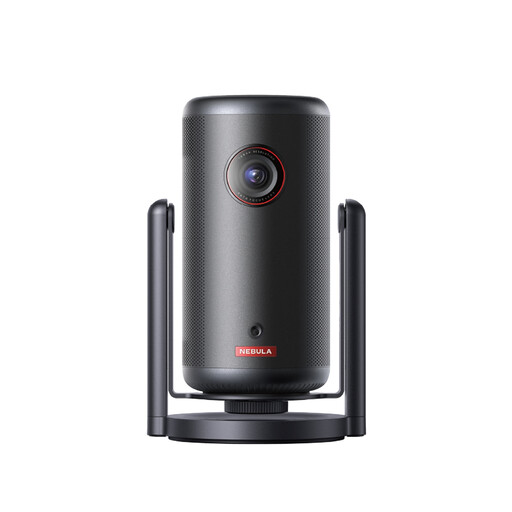
Why This Fits Their Persona: This compact home cinema projector is designed for buyers who value portability, integrated streaming and quick positioning between rooms or trips.
The specification identifies 1080p display resolution and 200 ANSI lumens, helping set realistic expectations for dark-room viewing rather than bright daytime use.
Google TV, licensed Netflix, up to 120-inch projection, a stated 2.5-hour film battery life and 360-degree gimbal adjustment.

Why This Fits Their Persona: A practical match for sports fans, family film nights and buyers seeking a ready-to-use portable home theatre projector with an adjustable stand.
The listing specifies native 1080p rather than only high-resolution decoding. It also states 1500 ANSI brightness, while noting that ceiling projection requires manual focus and keystone adjustment.
Built-in adjustable stand, licensed Netflix, Dolby Audio, two 5W speakers, Wi-Fi 6, Bluetooth 5.2 and HDMI, USB and 3.5mm connections.
A projector with a built-in stand does not always include a screen. For garden films, football viewing or presentations, a portable projector screen can provide a more predictable image than a wall.
The 72-inch XBJ screen includes a tripod, four fixing ropes, six ground stakes and a carry bag. This makes it suited to temporary outdoor setups, provided the screen is secured properly and conditions are calm. For larger viewing areas, 100-inch and 120-inch tripod screen options are also available.
If you need a separate mounting solution, the 1.7 m projector mount with phone clip offers a 60–160 cm height range, 360-degree rotation, a foldable design and a standard 1/4-inch screw interface. Check the projector’s weight and mounting connection before purchase. You can browse the wider projector stand range for additional formats and bundles.
We have compiled a complete, real-time list of products that fully satisfy these strict selection criteria and UK safety regulations.
Yes, many models can be used outdoors after sunset, provided they remain dry, ventilated and securely positioned. You will also need a suitable power source and may benefit from a tripod screen. Outdoor brightness, wind and uneven ground can affect the viewing experience.
Not always. A native 720p model can suit casual viewing and smaller screens, while native 1080p generally gives more detail for films, gaming, subtitles and football broadcasts. Always compare native resolution with the actual screen size and viewing distance.
No. A smart projector provides the display and, depending on the model, access to built-in apps or casting. Subscription fees, account requirements and service availability still apply. Check whether the specific projector supports the streaming platforms you use before ordering.