
24/7 Customer Support

Free returns

Same-day & Next-day Delivery

Quality Guaranteed

Unlock Your Welcome Offers: FREE Delivery | Up to 80% OFF | Free 30-day JoyPlus trial
Download the APP
A portable smart projector can turn a bedroom wall, living-room screen or garden sheet into a large viewing area. However, compact designs often come with compromises that are easy to miss in product listings. Before buying, UK shoppers should look beyond phrases such as “4K supported”, “cinema experience” and “smart entertainment”.
The right choice depends on the room, viewing habits and the amount of set-up you are willing to handle. Here are the main buying pitfalls and the specifications worth checking.
A projector described as “4K supported” may accept and decode a 4K video signal without displaying it at 4K resolution. Its actual panel may be native 1080P or native 720P.
For sharper subtitles, game menus and detailed films, prioritise native resolution:
Brightness may be listed in ANSI lumens, ISO lumens or simply “lumens”. These measurement systems are not automatically comparable. A higher-looking number in a listing does not guarantee a brighter image in your room.
Projectors work most effectively with reduced ambient light. Even a model with a relatively strong brightness specification can look washed out opposite a sunny window. For daytime use, choose a darker room, close curtains and use a suitable screen or light-coloured wall.
An Android projector may provide access to apps, screen mirroring or downloadable software, but streaming services can have device compatibility and digital-rights restrictions. Some models require an external TV stick or HDMI source for particular platforms.
If direct Netflix access matters, look specifically for a listing that states official Netflix licensing, rather than relying on general Android compatibility. A laptop, games console or streaming device connected through HDMI can also provide a more predictable viewing experience.
A 1080p projector provides 1,920 × 1,080 pixels and is a practical choice for a home cinema projector used for films, gaming and presentations. Check the recommended throw distance and screen size, not only the maximum advertised image. Enlarging a picture too far can reduce perceived brightness and clarity.
A short or moderate throw ratio can help in smaller UK bedrooms and flats. For example, the MAGCUBIC L018 lists a 1.2:1 throw ratio, while the HY300Pro lists 0.8:1. These figures indicate how far the projector needs to sit from the screen for a particular image width.
An auto-focus projector can reduce the time spent turning a focus ring whenever the unit is moved. Auto-keystone correction adjusts a skewed image when the projector is not positioned squarely to the wall.
These functions are convenient, but they have limits. Excessive correction can reduce the usable image area, and some affordable models only support vertical correction. If you plan to project onto ceilings, sloped walls or irregular surfaces, check whether the model offers four-direction correction, screen alignment or obstacle avoidance.
A projector with Wi-Fi and Bluetooth can connect to wireless speakers, headphones or compatible mobile devices. Dual-band Wi-Fi may help with network congestion, but streaming quality also depends on your router and broadband connection.
Check for:
Many portable projectors still require a power socket. The Yaber T2 Plus, by contrast, is listed with a built-in battery offering up to 2.5 hours of video playback, which may be useful for garden or camping use where a socket is inconvenient.
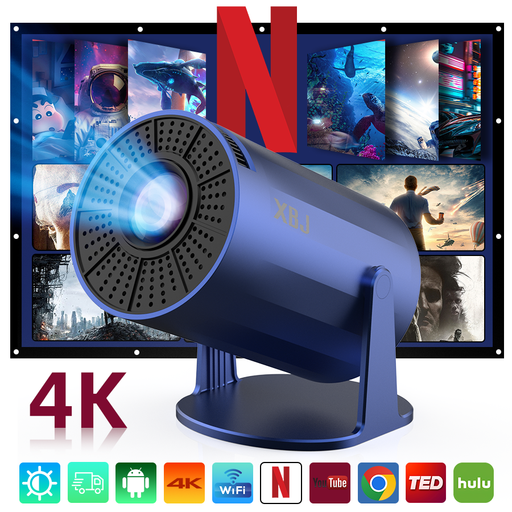
Why This Fits Their Persona: Its compact format and rotatable design suit students, renters and first-time buyers wanting occasional bedroom or indoor viewing without a large installation.
The listing states native 720P, making the resolution clear rather than presenting 4K decoding as native 4K. It also identifies manual focus, so buyers know set-up is not fully automatic.
Native 720P, auto vertical keystone, Wi-Fi 6, HDMI, USB and a 220° rotating design. It requires mains power and does not include a built-in battery.
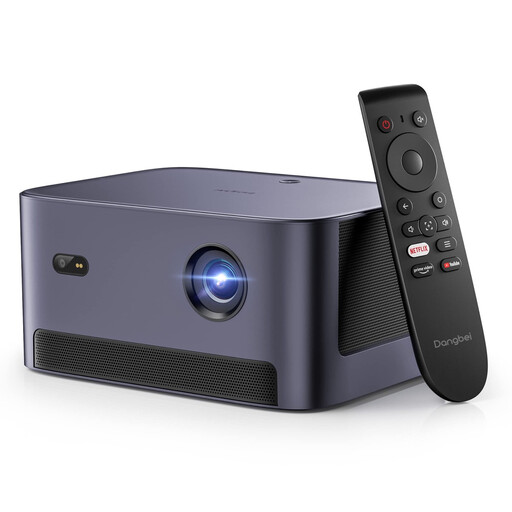
Why This Fits Their Persona: This mini projector is suited to film-focused households wanting native Full HD, integrated streaming and stronger audio for living-room or bedroom use.
The listing specifies native 1080P, 540 ISO lumens and official Netflix licensing. This gives shoppers clearer information about resolution, brightness measurement and streaming support.
Auto-focus, four-direction keystone correction, dual 6W speakers with Dolby Audio, Wi-Fi and Bluetooth. Its stated projection range is 37.5 to 120 inches.
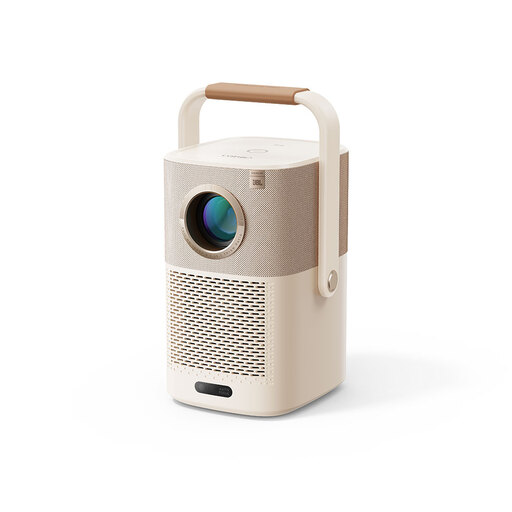
Why This Fits Their Persona: Families and outdoor entertainers may value the built-in battery, handle-stand and integrated audio for flexible garden, camping or indoor use.
It addresses the common outdoor-use limitation of mains-only operation by listing a built-in battery with up to 2.5 hours of video playback. It also states native 1080P rather than only supported resolution.
Native 1080P, AI auto-focus, auto-keystone correction, obstacle avoidance, Wi-Fi 6 and JBL audio with Dolby Audio support.
We have compiled a complete, real-time list of products that fully satisfy these strict selection criteria and UK safety regulations.
For gaming, check input compatibility and connection delay rather than relying only on resolution. For business presentations, confirm that your laptop, presentation software and any required adapters will connect through HDMI or wireless casting.
Some models include licensed Netflix access, while others use Android, screen casting or an external streaming stick. Check the individual product listing for explicit licensing. A “Netflix projector” description should not be assumed to mean every Android-based projector supports the app directly.
Yes, provided it is used in a dry, sheltered setting with access to power or a suitable battery. Outdoor darkness improves the image, while a flat white screen or clean wall gives more consistent results than a sheet with creases. Never leave the projector exposed to rain or condensation.
Lifespan depends on the light source, operating temperature, usage pattern and ventilation. Some listings provide an LED-life estimate, but this is not a guarantee of total device life. Keeping vents clear, avoiding overheating and allowing the unit to cool before storage can support more reliable operation.