
24/7 Customer Support

Free returns

Same-day & Next-day Delivery

Quality Guaranteed

Unlock Your Welcome Offers: FREE Delivery | Up to 80% OFF | Free 30-day JoyPlus trial
Download the APP
A portable smart projector can turn a bedroom wall, garden screen or rented flat into a flexible entertainment space. However, compact projectors often use impressive-sounding specifications that do not always describe the viewing experience clearly.
Before buying, look beyond phrases such as “8K supported”, “cinema screen” and “lag-free streaming”. The important questions are whether the projector has the right native resolution, enough brightness for your room, compatible streaming services and a practical setup for your intended use.
A projector may decode or accept a 4K or 8K video signal while displaying it at a lower native resolution. For example, a projector listed as “8K supported” may have a native 720P resolution. It can process higher-resolution content, but the projected image is still formed using its native display hardware.
For sharper subtitles, game interfaces and detailed films, check for native 1080P rather than relying only on 4K or 8K compatibility.
Brightness may be stated in ANSI lumens or ISO lumens, and these measurement systems should not be treated as identical. A 290 ANSI-lumen mini projector is primarily suited to a dim bedroom or evening viewing, while brighter models are more practical in a living room with some ambient light.
Even a high brightness rating will not make a projector perform like a television in direct sunlight. Outdoor use normally works best after dusk, with the lens protected from rain, dew and dust.
An Android projector may include an app store or screen-casting software without offering officially supported Netflix playback. Copyright protection can also prevent wireless mirroring of streaming services from a phone.
If built-in Netflix matters, choose a model that specifically states Netflix licensing or certification, or connect a compatible TV stick through HDMI. Always check which services are included, as availability can vary between operating systems and firmware versions.
For general films, cartoons and casual viewing, native 720P can be adequate at moderate screen sizes, particularly in a dark room. Native 1080P is more suitable for a home cinema projector, presentations and gaming, where text and fine details benefit from extra pixels.
Also check the recommended throw distance. A short-throw ratio can create a large image in a small bedroom, while a projector designed for a larger distance may be awkward in a compact UK flat. A claimed screen size is not a guarantee of equal clarity across the entire range.
Brightness is only one part of image quality. Contrast affects how distinct dark and bright areas appear, but manufacturers may use different measurement methods, so it is safer to compare models using clearly stated ANSI or ISO figures.
For a projector for bedroom use, blackout curtains and a pale, flat wall can make a modestly bright model more usable. For garden film nights, remember that a portable projector normally needs mains power unless a built-in battery is specified. A USB power bank may not provide enough power for every model.
An auto focus projector can save time when the unit is moved between rooms. Auto keystone correction helps square the image when the projector is positioned above, below or at an angle to the screen. Some models only correct vertical distortion, so check whether horizontal or four-direction correction is required.
Useful connections include:
For gaming, wired HDMI is generally the simpler connection. A projector can display a PS5 image, but response time, refresh-rate support and game-mode information should be confirmed before purchase if competitive gaming is a priority.
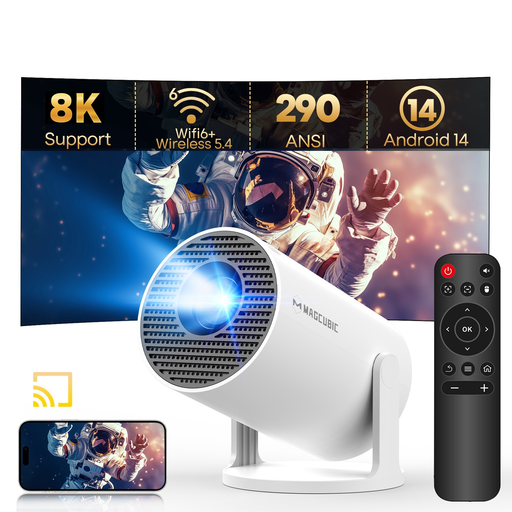
Why This Fits Their Persona: A compact option for students, renters and occasional film nights who want Android 14, Wi-Fi 6 and a rotating design without carrying a larger home cinema projector.
Its listing states the native resolution as 720P, making the 8K and 1080P support easier to interpret. Built-in HDMI and USB also provide alternatives if an app is unavailable.
290 ANSI lumens, 180-degree rotation, auto vertical keystone, Wi-Fi 6 and Bluetooth 5.4 in a stated 0.77-pound design.
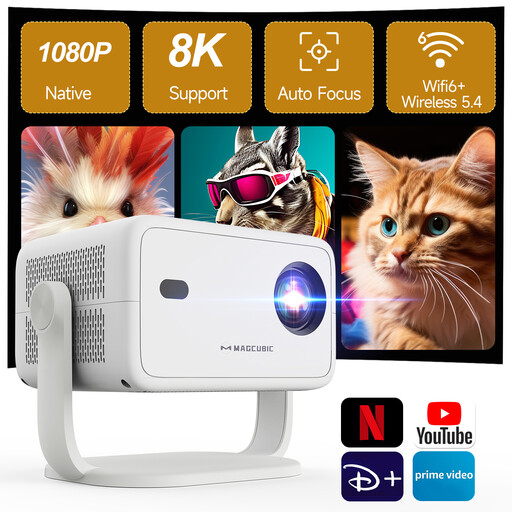
Why This Fits Their Persona: Suited to households prioritising native Full HD detail, simpler streaming access and automatic setup for regular living-room or bedroom viewing.
The product information specifies native 1080P and licensed Netflix, Prime Video and YouTube rather than relying solely on generic Android access.
Native 1080P, HDR10 support, Wi-Fi 6, Bluetooth 5.4, autofocus, auto keystone and a 180-degree integrated stand.
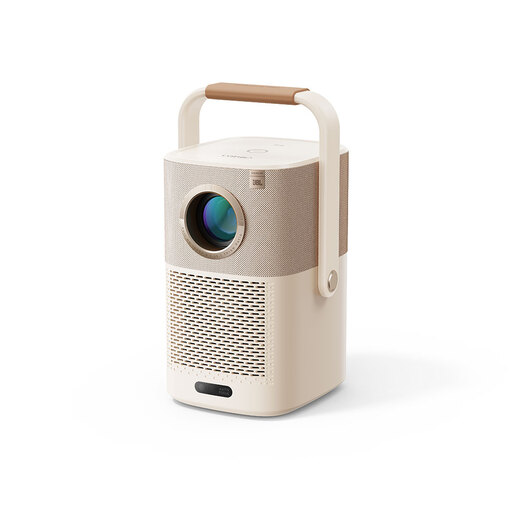
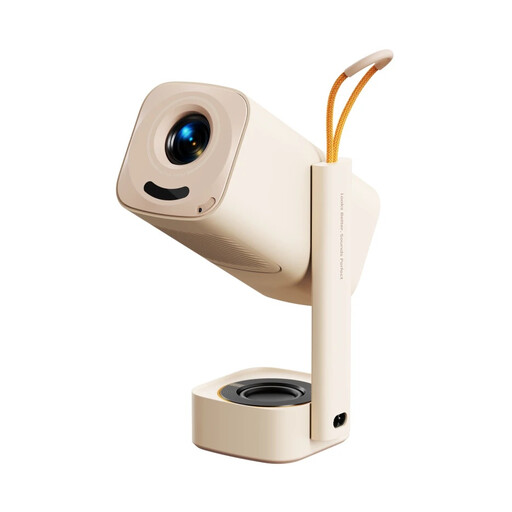
Why This Fits Their Persona: A practical match for garden gatherings, camping trips and flexible rooms where mains power may not always be close by.
Unlike many compact models, the listing clearly states a built-in battery and gives an estimated video playback time, while also identifying the included Google TV dongle.
Native 1080P, up to 2.5 hours of stated video playback, Wi-Fi 6, AI autofocus and auto keystone with JBL audio.
Why This Fits Their Persona: Designed for users who want a higher-resolution image for films, console gaming and flexible placement in smaller UK rooms.
The specification separates native 1080P from 4K/8K support and states the adjustment method, including autofocus, auto keystone and 50–100% zoom.
650 ANSI lumens, native 1080P, Wi-Fi 6, Bluetooth 5.4, autofocus and a 1.2:1 throw ratio for smaller footprints.
We have compiled a complete, real-time list of products that fully satisfy these strict selection criteria and UK safety regulations.
Most portable projectors listed above require a power connection, so verify this before planning an outdoor film night. Place the unit on a stable, ventilated surface and leave space around the air vents. Do not use a non-waterproof projector in rain, mist or damp conditions.
For a cleaner image, use a flat white or light-grey wall, or a compatible projector screen. Keep the lens free from fingerprints and clean it only with a soft lens-safe cloth. Never look directly into the lens, particularly when children are nearby, and allow the unit to cool before storing it.
Yes, provided the room can be darkened and the projector is positioned at the correct distance. A compact model with a rotating stand can project towards a wall or ceiling, but built-in speakers may be more suitable for quiet personal viewing than larger rooms.
Most compatible models accept a PS5 through HDMI. Check the projector’s native resolution, supported refresh rate and input lag before buying. For casual gaming, native 1080P and a direct HDMI connection can provide a clearer and more dependable setup than wireless mirroring.
Running costs depend on the model’s wattage and your electricity tariff. For example, a projector rated at 38W uses approximately 0.038kWh for one hour, before standby consumption is considered. Turn it off fully after use, unplug it during long periods of non-use and keep the cooling vents clear to support reliable operation.