
24/7 Customer Support

Free returns

Same-day & Next-day Delivery

Quality Guaranteed

Unlock Your Welcome Offers: FREE Delivery | Up to 80% OFF | Free 30-day JoyPlus trial
Download the APP
A portable smart projector can turn a bedroom wall, living room or garden screen into a flexible entertainment space. However, product listings often use terms such as “4K supported”, “cinema quality” and “ultra-bright” without explaining what they mean in everyday UK conditions.
Before buying, focus on the specifications that affect actual use: native resolution, measured brightness, streaming compatibility, setup features and power requirements. This guide explains the main pitfalls and highlights suitable options for different lifestyles.
A projector advertised as a 4K-supported projector may be able to decode or accept a 4K video signal, but that does not mean it displays a native 4K image. The physical display panel may still be 720p or 1080p.
For sharper subtitles, presentations and console games, check the native resolution:
Brightness figures are not always measured using the same standard. ANSI lumens and ISO lumens should not be treated as directly interchangeable, and some listings may use vague lumen terminology.
A compact mini projector with 200–300 ANSI lumens generally performs more comfortably in a darkened room. For daytime use, look for a higher brightness specification, reduce surrounding light and use a suitable screen. Even a brighter model may struggle against direct sunlight.
If daytime viewing is important, consider the wider daytime projector range.
Android projector interfaces can provide access to apps, but availability may vary by operating system, firmware and regional licensing. Screen mirroring from a phone may also be restricted for protected streaming content because of HDCP rules.
If Netflix is a priority, look for wording that specifically identifies official Netflix licensing, or use a compatible streaming stick through HDMI. Also check whether the projector needs a separate subscription; no projector removes the need for a subscription to paid streaming services.
A larger projected image makes lower resolution more noticeable. For a 40–80-inch screen in a bedroom, 720p can be acceptable for relaxed viewing. If you want a home cinema projector for films, football or PS5 gaming, native 1080p is a more suitable target.
Check the manufacturer’s recommended throw distance. Shorter throw ratios help in smaller UK bedrooms and rented flats, while zoom functions can reduce the need to move the projector every time you change the screen size.
Brightness affects visibility, while contrast influences how distinct dark and bright areas appear. A high contrast ratio listed by a manufacturer should not be considered a guarantee of cinema-level performance, as room lighting, wall colour and image settings also matter.
For an outdoor projector, plan to use it after sunset. Keep the unit dry, protect it from dew and use a stable power source. Most compact models listed here do not include an internal battery, so portable does not necessarily mean cordless.
Auto-focus, auto-keystone and screen-alignment features reduce setup time, particularly when projecting from a bedside table or an angled surface. However, check the exact correction range. Some low-cost models offer only vertical keystone correction, rather than four-direction or horizontal adjustment.
Useful connections include:
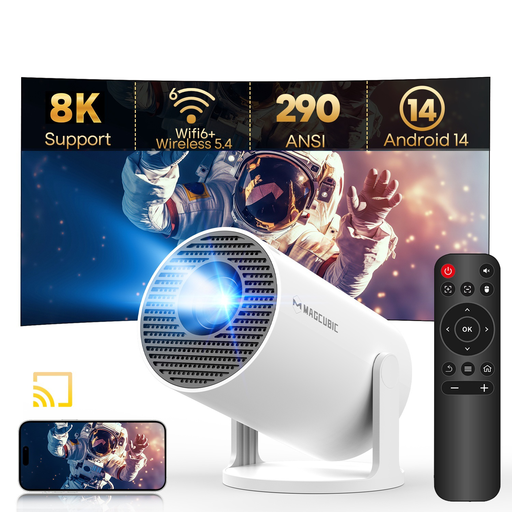
Why This Fits Their Persona: A compact option for renters, students and occasional bedroom or garden-night viewing where low weight and simple positioning matter.
Its specification clearly states native 720p rather than presenting supported 8K and 1080p formats as native resolution. It also has auto-keystone, but focus remains manual.
290 ANSI lumens, Android 14, Wi-Fi 6, Bluetooth 5.4 and a 180-degree rotating stand in a 0.77-pound design.
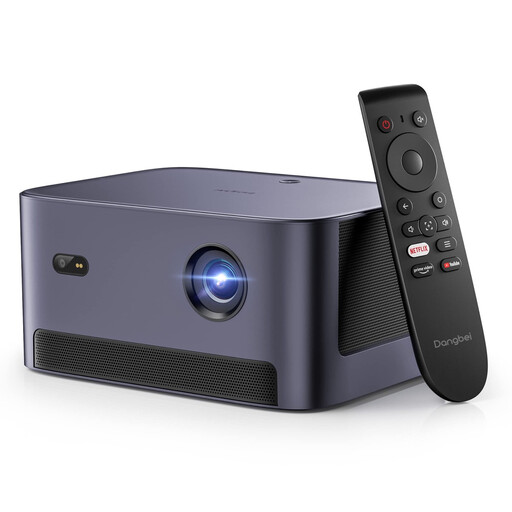
Why This Fits Their Persona: Suited to households wanting native Full HD, licensed Netflix access and easier setup for regular film nights or office use.
The listing identifies native 1080p resolution and official Netflix licensing, helping distinguish display resolution and streaming access from generic Android compatibility.
540 ISO lumens, auto-focus, four-direction keystone correction, Dolby Audio and Bluetooth connectivity.
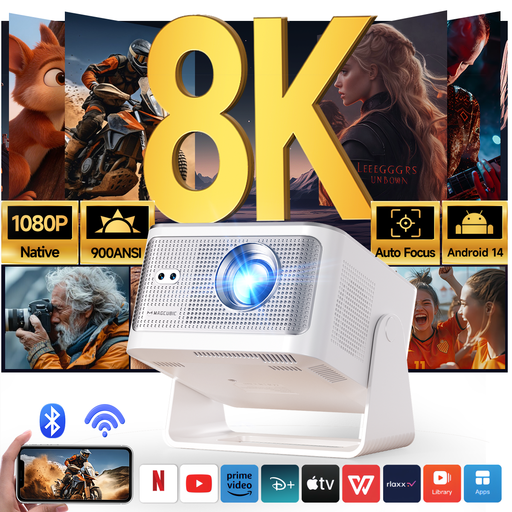
Why This Fits Their Persona: A practical match for frequent home cinema viewing, gaming and larger indoor or outdoor-night setups where native Full HD and automatic adjustments are useful.
It specifies native 1080p separately from 8K support and includes auto-focus, auto-keystone, screen fit and obstacle avoidance features.
The listed specification includes 900 ANSI lumens, Wi-Fi 6, Bluetooth 5.4, Android 14 and a 15W built-in speaker.
We have compiled a complete, real-time list of products that fully satisfy these strict selection criteria and UK safety regulations.
Yes, provided the room can be darkened and the projector has a suitable throw distance. A rotating stand is useful for ceiling viewing, while auto-keystone and auto-focus simplify setup beside a bed. Check fan noise and built-in speaker specifications if you plan to use it late at night.
Several compact models list LED lamp life of around 30,000 hours, but actual operating life depends on ventilation, ambient temperature, usage and power handling. Keep vents unobstructed and follow the supplied shutdown procedure to support reliable operation.
Power consumption varies by model and brightness mode. Many compact LED projectors use modest electrical power, but they still require mains power unless a built-in battery is specified. Check the wattage, standby consumption and whether an external streaming stick or speaker will also draw power.