
24/7 全天候客户支持

免费退货

当日/次日达

品质保障

开启新人专享福利: 全场免邮 | 低至 2 折 | 免费试用 30 天 JoyPlus 会员
下载 Joybuy
Running out of storage on your laptop or smartphone is a common frustration. Whether you're a professional videographer managing large 4K files, a gamer needing more space for your library or simply someone looking to back up precious family photos, slow transfer speeds and limited capacity can bring your workflow to a halt. The market is filled with options, from compact flash drives to powerful external drives, making it difficult to know which device is right for you.
As a Joybuy Product Recommendation Officer, my role is to help you navigate these choices. This guide will break down the key features to look for in a portable SSD and present a few of our top recommendations for 2026 to help you find a reliable and high-performing storage solution.
Before diving into specific products, it's useful to understand the core features that will impact performance and usability. Considering these points will help you select a device that fits your specific requirements.
The primary advantage of an external solid state drive is its speed. Transfer speeds are measured in megabytes per second (MB/s). A standard hard drive might offer 100-150MB/s, while a modern portable SSD can range from 500MB/s to over 2000MB/s. For everyday file transfers, 500MB/s is more than sufficient. However, for demanding tasks like editing 4K video or running applications directly from the drive, look for speeds of 1000MB/s or higher.
Pay close attention to the connection type. A USB 3.2 external drive offers significantly faster potential than older USB 2.0 standards. To achieve the highest speeds, such as those offered by USB 3.2 Gen 2x2, both your device and the SSD must support that specific protocol. The USB-C connector has become the universal standard, offering versatility across laptops, tablets and the latest iPhones.
How much storage do you really need? A 256GB flash drive is a great portable option for transferring documents, presentations and a moderate number of photos. For users who need to back up their entire system, store extensive photo libraries or carry a few large games, a 1TB external SSD provides a much more comfortable buffer.
Content creators working with high-resolution video, particularly those using formats like Apple ProRes, will benefit most from higher capacities. Direct SSD for ProRes recording from a compatible camera or iPhone requires not only speed but also substantial space, making 1TB or larger drives a practical necessity.
If you handle sensitive work documents or personal information, security is paramount. An encrypted flash drive provides peace of mind by protecting your data with a password or, in more advanced models, biometric authentication. A secure thumb drive with fingerprint access ensures that even if the device is lost, its contents remain inaccessible to others.
For those who are frequently on the move, durability is also a key factor. Look for drives with solid metal casings and stated shock or vibration resistance. This ensures your data remains safe whether you're commuting to the office or working on location.
Based on a combination of performance, features and user applications, here are our recommendations for high-quality portable storage solutions.
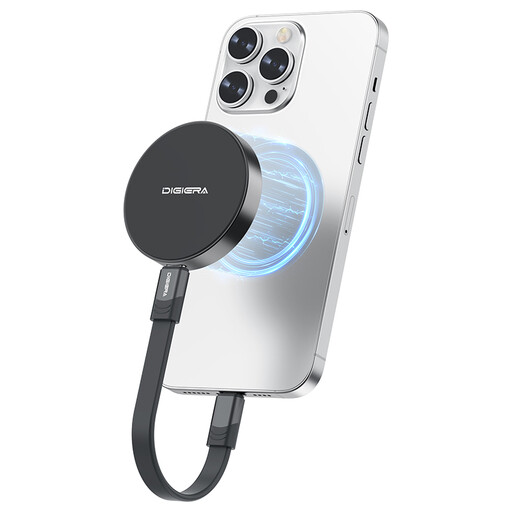
Why It Stands Out: The DigiEra LPS2000M-1 is engineered for the modern content creator. Its standout feature is the built-in magnetic system, which allows it to attach securely to the back of an iPhone 15 or 16 Pro. This makes it an exceptional tool for mobile filmmakers who want to shoot 4K ProRes video directly to an external drive without cumbersome rigs. Combined with its blistering 2000MB/s read speed via USB 3.2 Gen 2x2, it’s a true performance powerhouse in a tiny package.
Pros:
Who is it for? This is an ideal choice for professional and aspiring videographers, photographers and content creators who rely on their iPhone for high-quality video capture and need a fast, seamless mobile workflow.
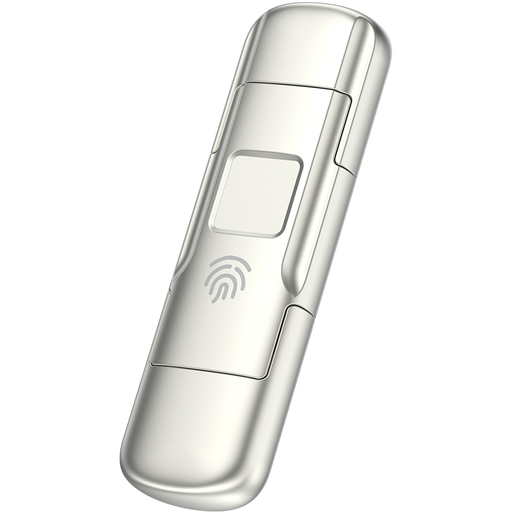
Why It Stands Out: This MOVESPEED drive prioritises security without compromising on speed. It combines AES-256 hardware encryption with a reliable fingerprint sensor, making it a pocket-sized vault for your data. Unlike software-based encryption, this is built directly into the drive. Its dual USB-A and USB-C thumb drive connectors also provide excellent compatibility across a wide range of devices, from new laptops to older desktops.
Pros:
Who is it for? This encrypted flash drive is perfect for business professionals, students and anyone who handles sensitive or confidential information and requires a secure, portable way to transport it.
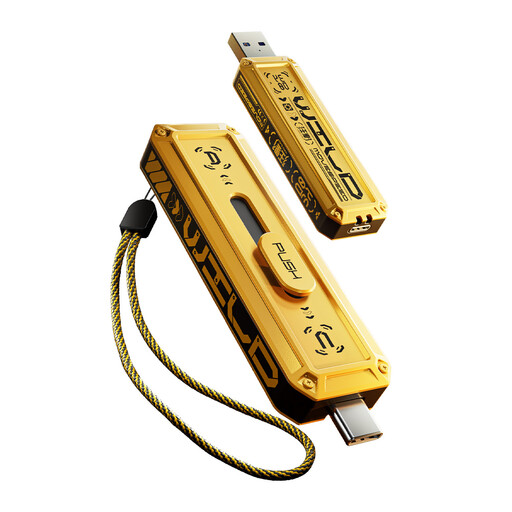
Why It Stands Out: For those who crave speed in the most compact form factor, this MOVESPEED drive is a remarkable option. It blurs the line between a flash drive and a portable SSD, offering incredible read speeds of up to 1090MB/s. The push-slide mechanism protects the dual USB-A and USB-C connectors and its striking yellow mecha-inspired design adds a touch of personality. It’s a high speed flash drive that performs as well as it looks.
Pros:
Who is it for? This drive is well-suited for gamers, tech enthusiasts and everyday users who need to move large files quickly between different devices and appreciate a blend of high performance and distinctive style.
While these three recommendations cover a range of common needs, your ideal storage solution might require a different capacity, form factor or feature set. From ultra-compact drives to multi-terabyte powerhouses, there is a device for every workflow.
Explore our full collection of USB-C storage solutions to find the perfect match for your devices and budget.
Traditionally, portable SSDs offered much higher capacities and sustained speeds, making them suitable for intensive tasks like video editing. High-speed flash drives were more compact but slower. Today, the lines are blurring. Advanced models like the MOVESPEED Mecha drive offer SSD-level speeds in a flash drive body. The main distinction often comes down to form factor and top-end performance, where a dedicated portable SSD like the DigiEra still leads for professional use.
Yes. Thanks to the USB-C port on the iPhone 15 and newer models, you can connect an external solid state drive directly. This is particularly useful for content creators, as it allows for recording high-quality ProRes video straight to the drive, bypassing the phone's internal storage limits. Some models, like a magnetic SSD for iPhone, are designed specifically for this purpose.
To achieve the maximum advertised speeds, your computer, tablet or smartphone must have a port that supports the same or a newer USB standard. For example, to get 2000MB/s from a USB 3.2 Gen 2x2 drive, your device needs a port with the same specification. These drives are backwards compatible, meaning they will work with older ports (like USB 3.0 or 2.0), but the transfer speed will be limited to the maximum capability of that older port.