Travelling video editors
If you move or edit substantial media projects between workstations, check your workflow requirements as well as the drive and host connections. Adobe Premiere Help discusses fast SSD or NVMe storage for video production.


A portable SSD suits frequent transfers of large projects or editing media from external storage; a portable HDD is worth considering for less time-sensitive copies where capacity is the priority. Before choosing, check the ports, file format and software workflow on every device, and plan a separate backup that you can restore.
If you move or edit substantial media projects between workstations, check your workflow requirements as well as the drive and host connections. Adobe Premiere Help discusses fast SSD or NVMe storage for video production.
If you need room for originals and a separate copy, decide which files need fast working storage and how you will keep and restore the backup. The National Cyber Security Centre and Northern Ireland Cyber Security Centre offer guidance on keeping backup copies.
If you take coursework or work files between computers, check that the drive can be read and written on each device and fits your backup routine. Apple Support UK and Microsoft Support explain relevant format and backup considerations.
The main decision is whether the drive is for active work, recoverable backups, cross-device access, archive capacity or protecting files while travelling.
| Concern | What to check when buying | Who this matters to |
|---|---|---|
| Moving or editing large files | Match the drive interface, host port and cable; check the needs of your editing workload. Adobe Premiere Help discusses fast SSD or NVMe storage for video production. | If I edit from an external drive, repeated transfers need to fit my workflow and host connection. Around 25% of consumers put transfer speed first. |
| Restorable backups | Check which folders are included, how often they are copied, where the separate copy is kept and whether you can restore a file. The National Cyber Security Centre and Northern Ireland Cyber Security Centre provide backup guidance. | When I depend on a copy to recover work or photos, it needs to be separate, current and restorable. Around 25% of consumers make recoverable backups their primary concern. |
| Access across devices | Check each device’s ports, operating-system support and file format; decide whether the drive is for exchanging files or a dedicated backup. Apple Support UK explains that format can affect writing files on a Mac and using a disk with Time Machine. | If I move a project between computers, I need the drive to stay accessible and writable on each one. Around 20% of consumers prioritise cross-device compatibility. |
| Capacity for an archive | Compare the exact variant’s capacity with your current library, expected growth and backup needs; allow for formatted space being below the marketed capacity. | When I carry a growing photo library or backup set, I want enough room without paying for speed I will not use. Around 20% of consumers put capacity first. |
| Files carried while travelling | Check the exact model’s stated protection conditions and, if confidentiality matters, how its unlocking method and credentials work. | If a drive is lost or exposed to rough conditions, I need to consider physical protection separately from access to its files. Around 10% of consumers prioritise protection while travelling. |
Advertised sequential speeds can depend on the host, cable and interface, so a compatible drive may not reach its stated maximum on every computer.
Check the exact model’s interface against your host port and cable before comparing speed figures.
You may pay for an interface your computer or cable cannot use.
Apple Support explains that Time Machine cannot back up to a Windows-formatted disk. Reformatting erases data from the drive.
Decide whether the drive is for file exchange or dedicated backup before copying files, and protect another copy before reformatting.
If the drive and computer are lost or damaged together, both copies may be unavailable; an untested backup may also be incomplete.
Keep a separate copy, schedule backups where suitable and practise restoring a file. The National Cyber Security Centre and Northern Ireland Cyber Security Centre provide guidance on backup routines.
Keeping a backup current takes time to configure and test.
The T9 portable SSD line is relevant to frequent large-file transfers when the host supports its interface.
The X9 Pro illustrates a compact SSD for exchanging projects across supported devices.
The One Touch portable HDD line is an example to consider for less time-sensitive copies and larger libraries.
The diskAshur² line has PIN-authenticated encrypted portable HDD and SSD variants for files that need confidentiality while travelling.
The DS223j is a home NAS example for scheduled backups from devices, rather than a pocket-sized project drive.
These Joybuy listings focus on portable external SSDs for carrying project files, mobile media work and personal backups. Check each drive’s connections and any device-specific limits before relying on it.
 No image available
Consider it for carrying project files between locations, after checking that its connection suits each host.
2 TB; USB Type-C 3.2 Gen 2 (3.1 Gen 2).
The listing says it is not waterproof or dustproof; keep it away from liquids and excessive moisture.
 No image available
Consider it for carrying active files, but check the device connection and the specific protection conditions that matter to your use.
1 TB; USB 3.2 Gen.2.
The listing says not to immerse the drive.
 No image available
Consider it for carrying a substantial project or photo library; check its connection against each host before relying on it.
2 TB.
Plan a separate backup if the files need to be recoverable; one travelling drive alone is not a complete backup plan.
 No image available
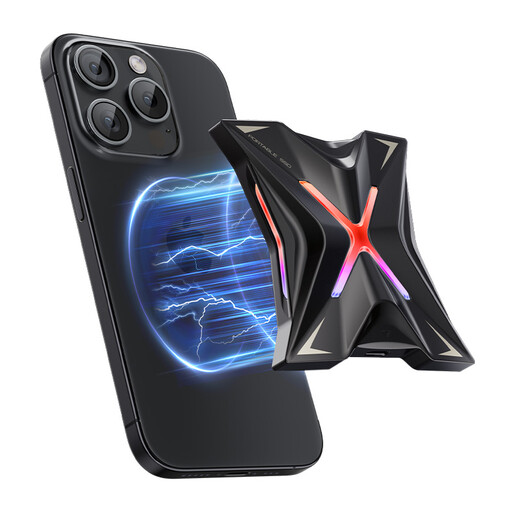
Consider it for a mobile video workflow only if the drive’s connection and magnetic attachment suit your devices.
1 TB; USB 3.2 Gen 2x2; stated transfer speeds up to 2,000 MB/s.
The listing limits the magnetic attachment to iPhone 15 and 16 Pro and Pro Max models, and says it is not compatible with iPhone 14 or earlier.
 No image available
Consider it for carrying active project files between compatible USB-C devices; check the host before relying on the listed transfer speed.
1 TB; USB 3.2 Gen 2x2; stated transfer speed up to 2,060 MB/s.
The listing describes magnetic iPhone compatibility for the 12–15 series; check your exact phone model before relying on the attachment.
It can depend on the format and setup: check that both systems can read and write the chosen format, and plan a suitable Time Machine destination separately. Apple Support says Time Machine cannot back up to a Windows-formatted disk, and setting up or reformatting a disk can erase its data, so protect existing files first.
Check that the intended folders are included, keep a separate copy and practise restoring a file. Microsoft Support explains that Windows File History can use an external drive or network location; check its folder coverage against where your project files are stored.
Do not assume that it does: check the exact manufacturer warranty and any recovery-service terms, and keep another copy of important files. GOV.UK explains that statutory consumer rights for faulty goods are distinct from a manufacturer’s voluntary warranty.
The Information Commissioner’s Office says UK GDPR does not specifically require encryption of all personal information, so this does not establish a blanket rule for every personal drive. If you handle work or other information with specific requirements, check the rules that apply to that context.