Choose the portable addition that addresses your main difficulty away from a fixed desk: laptop power, connections, call audio, protected carrying or extra screen space. Check your laptop’s charging requirements and port capabilities before buying; a USB-C connector alone does not establish that charging or video output will work. A power bank also adds something to carry and requires a baggage check if you fly.
Who needs a portable setup?
Workers away from a socket
If your laptop has to last through journeys, client visits or changes of desk, start with its charging requirements. Check whether it accepts USB-C Power Delivery before choosing a charger or power bank; if you fly, battery carriage matters too. USB Implementers Forum guidance distinguishes USB power capabilities, while the UK Civil Aviation Authority says power banks belong in cabin baggage.
Hot-desk and meeting-room users
If you repeatedly connect to displays or wired accessories, the laptop port must support the functions you need from a hub. The USB Implementers Forum notes that cables differ in capability, so check both the port and cable rather than choosing by connector shape or port count.
Mobile callers and multi-window workers
Frequent calls can make microphone design and laptop connection more important than listening features. If your recurring difficulty is working across documents away from a desk, a portable screen may be useful instead—but confirm its video and power connection first. Jabra’s headset information and Lenovo’s ThinkVision M14 specifications illustrate those different checks, not a performance guarantee for every setup.
What should you check first?
Start with the task that most often interrupts your laptop work, then check the compatibility and carrying demands of the addition intended to solve it.
| Concern |
What to check |
Who this matters to |
| Laptop power |
Confirm USB-C Power Delivery support, the laptop maker’s minimum charging wattage and the power available from the charger’s or power bank’s intended port. |
If I work for long periods without a socket, keeping the laptop charged takes priority over extra connections. About 28% of consumers put laptop power first. |
| Desk connections |
Check the laptop port’s video and power capabilities against the hub’s outputs and charging pass-through. |
Moving between hot desks or meeting rooms makes a dependable display and accessory connection my main concern; about 22% of consumers prioritise connectivity. |
| Carrying and protection |
Compare the laptop’s actual dimensions with the compartment, then consider space for the accessories you carry. |
If my laptop and accessories travel together each day, I need a manageable way to protect and organise them. Carrying is the primary need for about 22% of consumers. |
| Call audio |
Check microphone design, connection compatibility and comfort for your usual call length. |
When I take calls in changing surroundings, being heard is more pressing than adding another screen; about 17% of consumers put call audio first. |
| Extra screen space |
Confirm the laptop supports the monitor’s video input and establish how the screen receives power. |
If I regularly work across two documents away from my desk, more visible workspace is my priority. About 11% of consumers put a second screen first. |
Common buying mistakes
-
Assuming every USB-C port carries video and power
A hub or portable monitor may have the connector you expect while the laptop port lacks the function you need. A USB-C shape alone does not establish display output or charging support.
Check the laptop manual for the required video mode and USB Power Delivery support, then compare those capabilities with the device and cable.
-
Using total output as the laptop charging figure
A multi-port charger can share its available output, while a hub may use some of its power input itself. Neither a total-output figure nor a hub’s PD input rating establishes what reaches the laptop.
Compare the laptop maker’s minimum recommended wattage with the output available from the intended port when your other devices are connected.
-
Choosing a flight power bank without checking its battery marking
The UK Civil Aviation Authority says power banks must travel with passengers in the cabin, not in checked luggage. Battery capacity and the operating airline’s conditions can affect what you may carry.
Read the watt-hour marking on the exact model and check the airline’s current rules before travelling.
-
Continuing to use a damaged charger or battery
London Fire Brigade identifies damaged and overheated batteries as fire risks. A charger’s connector fitting the device is not, by itself, a reason to keep using damaged equipment.
Use the supplied charger or a genuine replacement from a trusted supplier, and stop using a swollen or damaged battery.
Brands to consider
These brands illustrate different parts of a mobile laptop setup. Check the particular product and laptop combination rather than treating a brand’s wider range as one specification.
Anker
Anker UK lists USB-C Power Delivery chargers and laptop-oriented power banks.
- The range includes products intended for laptop charging.
- Check the exact model’s single-port output, output sharing and battery watt-hours; a range description does not establish those values for an individual power bank.
UGREEN
UGREEN UK offers compact hubs and other USB-C accessories for laptop connections.
- Its cited 5-in-1 hub lists HDMI, USB-A and a 100W PD input.
- That hub specifies 4K output at 30Hz, and its features still depend on the host laptop’s port capabilities.
Targus
Targus UK has laptop bags and travel backpacks with space for carried accessories.
- Its cited travel backpack has a dedicated compartment described for 15–16-inch laptops.
- A 40L travel bag may be more than a light daily commute calls for. Compare compartment measurements with the laptop’s dimensions.
Jabra
Jabra offers business-oriented headsets for calls across work locations.
- Jabra describes the Evolve2 55 as having active noise cancellation and noise-cancelling microphones.
- Those manufacturer-described features do not guarantee call performance in every environment; consider fit and the connection method you will use.
Lenovo
Lenovo’s ThinkVision range includes portable screens for laptop use.
- Lenovo specifies the ThinkVision M14 as a 14-inch, 598g USB-C monitor.
- Its stated one-cable arrangement requires a notebook port supporting DP1.2 Alt Mode and PD2.0; confirm those capabilities before relying on it.
Joybuy products for a mobile setup
These Joybuy products address desk connections, a portable second screen, daily carrying and personal audio. Choose according to the part of your laptop setup that needs attention, and check device compatibility before ordering.
 Image unavailable
Targus USB-C Universal Dual HDMI 4K Docking Station, 100W PD Pass-Thru
Consider this dock if a hot desk calls for two HDMI displays alongside wired accessories. The listing describes dual HDMI, Gigabit Ethernet, USB-A and SD/Micro SD connections, with USB-C Alt Mode required at the host. It specifies an external 100W+ adapter; check whether that adapter is included and how much charging power reaches your laptop.
View on Joybuy
 Image unavailable
ASUS ZENSCREEN MB166CR FHD Portable Monitor
This is a second-screen option for recurring side-by-side laptop work away from a fixed desk. The listing specifies a 15.6-inch Full HD IPS display, a 60Hz refresh rate and a 780g weight. Its single-cable arrangement requires a compatible USB-C DisplayPort Alt Mode connection; check your laptop port and the package contents before planning how to carry it.
View on Joybuy
 Image unavailable
Baseus Metal Gleam Series II 10-in-1 USB-C Hub, Cosmic Black
This hub suits a laptop setup that needs display, wired-network, USB and card connections at different desks. Its listing specifies two HDMI outputs, Gigabit Ethernet, SD/TF slots and a USB-C PD input rated up to 100W. Video requires a host supporting USB-C DisplayPort Alt Mode; the PD input rating is not the power confirmed as delivered to the laptop.
View on Joybuy
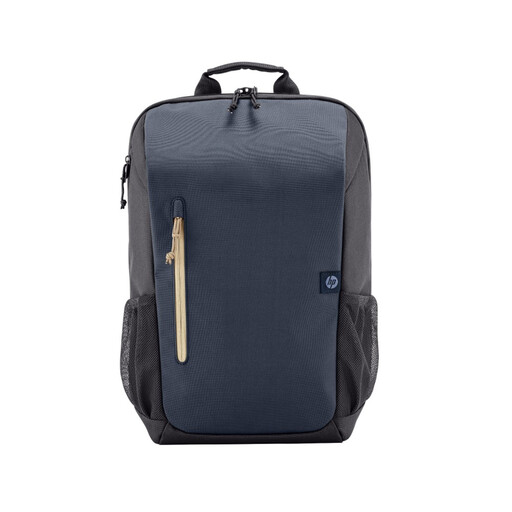 Image unavailable
HP Travel 18L 15.6 Laptop Backpack
For carrying a laptop and work accessories between locations, this backpack lists an 18L capacity, organised pockets and a padded laptop compartment for devices up to 15.6 inches. It weighs 580g and has a stated maximum recommended load of 5kg. Compare your laptop’s dimensions with the compartment; the exterior is described as resistant to light splashes, not waterproof.
View on Joybuy
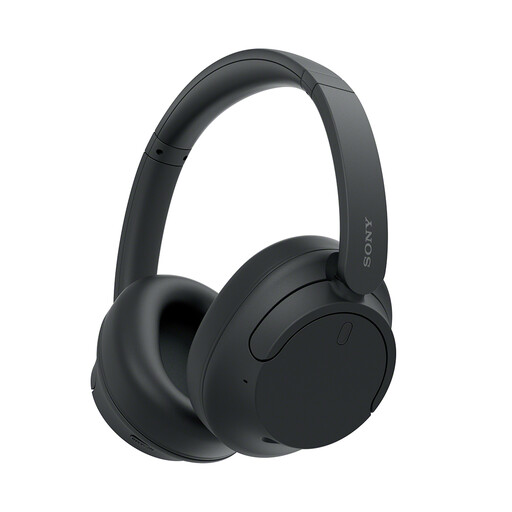 Image unavailable
Sony WH-CH720N Noise-Cancelling Over-Ear Headphones, Black
These are an audio option for listening and calls while moving between work locations. The listing describes a built-in microphone, Bluetooth multipoint, a 3.5mm wired option, fold-flat earcups and a 192g weight. Check that your laptop supports your intended connection and that the microphone arrangement meets your call needs; noise cancellation for listening does not establish what other callers will hear.
View on Joybuy
Frequently asked questions
How do I choose a portable charger or power bank for my laptop?
Confirm that your laptop accepts USB-C Power Delivery and find the maker’s minimum recommended charging wattage. Compare it with the intended charger or power-bank port’s output and the cable’s capability, including what happens when other ports are in use. The USB Implementers Forum’s specification allows for different power capabilities; it does not mean every device supports the same level.
Will any USB-C hub connect my laptop to a monitor and charge it?
No. A USB-C connector does not establish video output or Power Delivery support. Check the laptop manual for its port capabilities, then compare them with the hub’s video mode and charging pass-through specifications.
Where should I pack a power bank when flying?
Keep it with you in the cabin, not in checked luggage, as the UK Civil Aviation Authority advises. Read the battery’s watt-hour marking and check the operating airline’s current conditions for your particular power bank before travel.
What should I do if a portable battery is damaged?
Stop using a swollen or damaged battery. London Fire Brigade warns about risks from damaged and overheated batteries and advises using the supplied charger or a genuine replacement from a trusted supplier.


