Start with the smallest portable kit that solves your recurring problem: carrying the laptop, keeping it charged, taking calls or working at a temporary desk. Check physical fit and the exact device requirements before buying; for anything that connects to a work device or network, confirm your employer permits it.
Who needs a portable work kit?
The useful accessory depends on what makes the journey between work locations difficult—not on how many devices will fit in a bag.
Security-constrained hybrid worker
You use an employer-issued laptop or access work systems. Confirm the rules for USB peripherals, Bluetooth, personal hotspots and your own devices before choosing accessories that connect to work equipment. The National Cyber Security Centre advises organisations to manage peripheral access and define permitted personal-device activities.
Call-heavy commuter
You join meetings from changing locations and need an audio setup that works with your employer’s meeting platform and permitted connection methods. Check the exact headset variant rather than assuming that a platform label applies to every version.
Minimal-kit laptop carrier
You regularly take a laptop between home and your usual workplace. A case that fits the device, suitable charging and a peripheral that solves a repeated problem may be more useful than duplicating a fixed desk setup.
What should you check before buying?
Confirm workplace permission and device compatibility before choosing connected accessories. Then prioritise the problem you encounter most often—calls, power or carrying a usable setup.
| Concern |
What to check |
Who this matters to |
| Work-device approval |
Ask IT which USB, Bluetooth and hotspot connections are permitted, and whether a particular model or meeting-platform variant needs approval. |
If my work laptop restricts personal peripherals, an accessory is useful only when I am allowed to connect it. Around 36% of consumers put employer approval and compatibility first. |
| Calls in changing locations |
Check the headset’s connection method, microphone arrangement, carried size and exact platform variant. |
When I take calls from shared spaces, I want an audio setup that suits those surroundings and my work platform. Call continuity comes first for around 29% of consumers. |
| Compatible power |
Match the exact laptop’s charging port and stated power requirement to the charger, cable or power bank; check charger output when ports are shared. |
If I move between desks and sockets, I need dependable charging without assuming every USB-C accessory can power my laptop. Around 21% of consumers make compatible power their primary concern. |
| Carrying and temporary-desk use |
Compare laptop dimensions with the case’s stated capacity, and check whether a keyboard or mouse works with your device and permitted connection method. |
I carry my setup repeatedly, so I want protection and only the peripherals I will use away from my usual desk. Keeping that load practical is the main concern for around 14% of consumers. |
Common buying mistakes
-
Choosing a charger by its USB-C plug alone
The plug shape does not establish that the laptop accepts USB-C charging or that the charger and cable meet its power requirement. The USB Implementers Forum describes different USB Power Delivery capabilities, while Microsoft publishes model-specific charging requirements for Surface laptops.
Start with the exact laptop model’s charging documentation, then check charger output, shared-port behaviour and cable rating.
-
Assuming a personal accessory is allowed at work
A USB hub, wireless receiver or personal hotspot can work technically while still conflicting with employer controls. The National Cyber Security Centre advises organisations to manage peripheral access and define permitted uses of personal devices.
Confirm permitted connections and any approved models with your employer before buying accessories for work systems.
-
Using screen size as the only sleeve measurement
Two laptops with the same screen size can have different chassis dimensions. A sleeve also needs to suit any protective shell and the way you plan to carry other items.
Compare the laptop’s physical measurements with the case’s stated capacity, then decide where the charger and peripherals will go.
-
Treating headset certification as universal compatibility
A platform-specific headset variant does not establish approval for every employer-issued device or connection method. Jabra describes a Microsoft Teams-certified variant of its Evolve2 65, but the exact variant and workplace rules still matter.
Check the full model name, connection method and employer-supported meeting platform before choosing a work headset.
Brands to consider by accessory type
Anker
A reference point for comparing portable power banks, USB-C chargers, cables and hubs.
- Anker’s range includes several charging and connection accessory types, so stated output and port arrangements can be compared by model.
- A product’s output rating does not establish compatibility with your work laptop or permission under your employer’s policy.
Logitech
Relevant when a compact keyboard or mouse would make a temporary desk easier to use.
- Logitech states that the Pebble Keys 2 K380s can switch between three devices and lists support for Windows, macOS, iPadOS, iOS and Android.
- Check the keyboard layout and connection method, particularly if your employer restricts Bluetooth or USB receivers.
Kensington
Relevant when laptop fit, protection and space for small peripherals drive the choice of sleeve.
- Kensington specifies its EQ 14-inch sleeve for devices up to 14 inches and describes a peripheral pocket.
- The screen-size limit alone cannot confirm fit: compare your laptop’s chassis dimensions and what you intend to carry.
Jabra
Relevant to call-focused headsets where the meeting-platform variant matters.
- Jabra offers an Evolve2 65 variant identified for Microsoft Teams use.
- The manufacturer’s platform description does not replace checking the exact variant, connection method and employer approval.
Bags and sleeves on Joybuy
These two carrying options address the laptop-protection part of a portable work kit. Choose by your laptop’s physical fit and how much else you need to carry; they do not resolve charging, call or network requirements.
 No image available
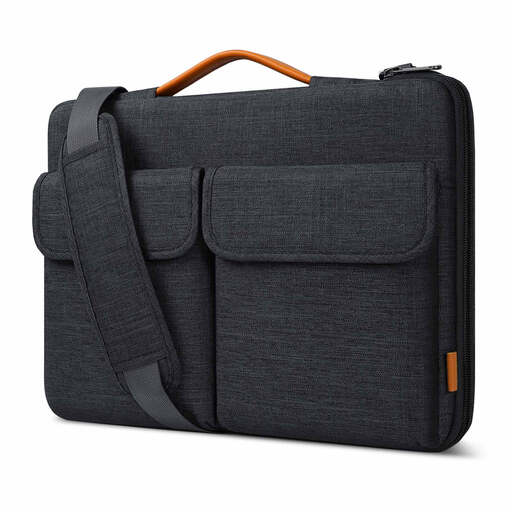
Inateck LB03008-15BG 15.6-inch laptop bag
Consider this bag if you carry a laptop and small accessories between locations; check your laptop’s physical dimensions against the bag’s fit before buying.
The product name specifies a 15.6-inch size, splashproof design and two carrying methods. Confirm the carried weight if that will affect your commute.
View on Joybuy
 No image available
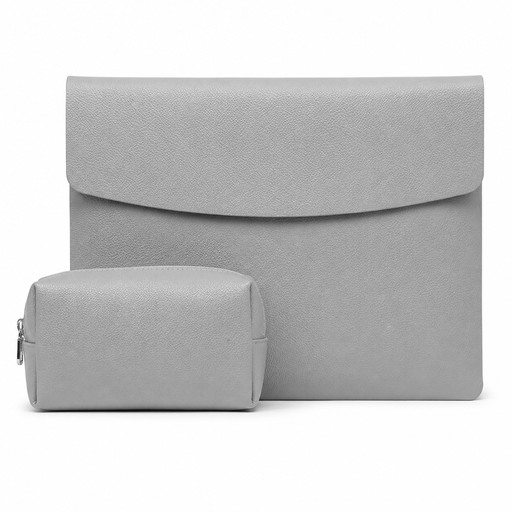
VoxorAI grey 14-inch laptop sleeve
Consider this sleeve if you want a separate layer for carrying a 14-inch laptop; confirm the device’s physical fit rather than relying on screen size alone.
The product name specifies a grey sleeve for 14-inch laptops. If you expect a power adapter with it, confirm the bundle contents before buying.
View on Joybuy
Frequently asked questions
Can one USB-C charger power my work laptop, phone and headset?
Yes, if the laptop supports USB-C charging and the charger can meet its stated power requirement while the other devices are connected. Check the exact laptop model, each port’s output when used together and the cable rating; a USB-C connector alone does not establish sufficient power.
Will any USB-C cable work for laptop charging?
No. USB-C cables have different power capabilities, so match the cable’s stated rating to the charger and your laptop’s requirements. The USB Implementers Forum notes specific cable requirements for higher-power USB-C operation.
Can I connect my own keyboard, headset receiver or USB hub to a work laptop?
Only if your employer permits that connection to the work laptop. The National Cyber Security Centre advises organisations to assess and, where appropriate, restrict peripheral access; check your employer’s rules before choosing a receiver-based accessory or hub.
What should I check for a mains charger or mobile hotspot?
Check that a mains charger suits your device and the market where it will be used, and confirm employer permission before using a personal hotspot for work. The Office for Product Safety and Standards publishes separate Great Britain guidance for electrical and radio equipment; do not assume those arrangements apply unchanged in Northern Ireland.


