
24/7 Customer Support

Free returns

Same-day & Next-day Delivery

Quality Guaranteed

Unlock Your Welcome Offers: FREE Delivery | Up to 80% OFF | Free 30-day JoyPlus trial
Download the APP
A portable printer can be useful for boarding passes, invoices, study notes, product labels and instant photos. However, choosing the right model is not simply a matter of selecting the smallest device. A printer that works well for occasional travel may be unsuitable for A4 documents, while an inkless model designed for labels may not produce traditional office paperwork.
The main challenge is matching the printing method, paper format and connectivity to your routine. Before buying, consider these common purchasing traps.
Many mini printers use narrow thermal paper, sticker rolls or small photo sheets. They are convenient, but they cannot replace an A4 all-in-one printer for contracts, school assignments or full-size invoices.
Check the supported media before purchase. A model described as a mobile printer may be designed only for labels, notes or 2×3-inch photos.
An inkless printer does not use conventional ink cartridges or toner, but it still requires compatible thermal paper, label rolls or ZINK photo paper. These consumables can vary in price and availability.
Thermal prints may also be more sensitive to heat, sunlight or friction than ordinary inkjet documents. For records that need to remain readable for a long period, review the manufacturer’s paper guidance and consider whether standard inkjet output is more suitable.
A Bluetooth printer can be convenient, but printing may depend on a specific mobile app and operating system. Confirm that the app supports your Android or iOS device and check whether printing is possible from a laptop.
Battery capacity also matters. A lightweight printer with a small battery may be suitable for a few travel documents, but less practical for a market stall or a busy packing session. Look for an advertised page or photo capacity and consider how often you can recharge it.
For home-office work, confirm support for A4 paper, automatic duplex printing and the required paper tray capacity. For labels, check the supported roll width, maximum print width and whether the device includes an auto cutter.
Online sellers and retailers may also need barcode or QR-code support. A general wireless printer is not always suitable for repeated label production.
Bluetooth is practical for phones and tablets, especially away from a desk. Wi-Fi is generally more suitable for shared home use, laptops and multiple devices. Also compare:
A small footprint is useful in a student room or home office, but a very compact unit may sacrifice paper size, print speed or multifunction features.
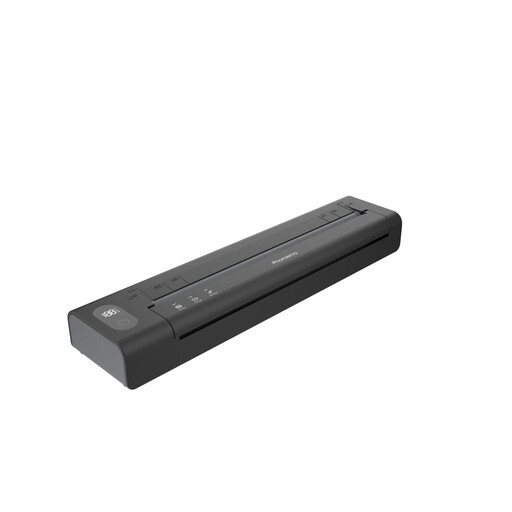
Why This Fits Their Persona: At 600g, this model is designed for users who need documents while travelling, studying or working away from a fixed desk.
Its inkless design avoids ink or toner replacement, while Bluetooth app support makes phone-based printing straightforward. Confirm the paper format meets your document needs before ordering.
Rechargeable battery rated for up to 150 sheets per charge; compatible with iOS and Android through the Phomemo app.

Why This Fits Their Persona: This is suited to households and home-office users who want one device for documents, photos, copying and scanning rather than a travel-sized unit.
Its A4 format prevents the common mistake of buying a mini printer for full-size paperwork. Individual cartridges also mean the colour that runs out can be replaced separately.
Print, copy and scan functions; Wi-Fi, automatic duplex printing and a 100-sheet rear tray.

Why This Fits Their Persona: Online sellers, retailers and small businesses can use this dedicated thermal label printer for shipping, address, filing and product labels.
It is clearly designed for labels rather than general documents, reducing the risk of choosing a compact printer with the wrong output format. It uses USB rather than Bluetooth, so check desk and laptop arrangements first.
Direct thermal printing at up to 71mm per second; supports DK labels, barcode formats and an integrated auto cutter.

Why This Fits Their Persona: Travellers, families and crafters can print small adhesive-backed photos directly from a phone during events, trips or creative projects.
The intended 2×3-inch output is clearly defined, so buyers are less likely to mistake a photo printer for an A4 or label device. Remember to budget for compatible ZINK photo paper.
Approximately 180g; Bluetooth 5.2 connectivity; ZINK printing with a stated capacity of approximately 20 photos per charge.
We have compiled a complete, real-time list of products that fully satisfy these strict selection criteria and UK safety regulations.
Some models can, but many pocket-sized devices are limited to thermal notes, stickers or small photos. Check the product specification for A4 support, paper tray details and whether the printer is inkjet or thermal before purchasing.
Not necessarily. Wireless connectivity affects how the printer connects, not the cost of its consumables. Running costs depend on ink cartridges, toner, thermal labels or photo paper. Compare the price and availability of compatible supplies in the UK.
Battery life varies by model and printing type. For example, the Phomemo A282U specification states up to 150 sheets per charge, while the Xiaomi Portable Photo Printer 1S states approximately 20 photos. Actual results can vary with print content, paper and battery condition. Recharge the device according to the manufacturer’s instructions and avoid storing it in damp or extremely hot conditions.