Window-side web designers
If daylight falls across your desk, reflections can make it harder to judge type, spacing and subtle interface colours while you build a portfolio homepage.


For portfolio design beside a bright window, start with an explicitly anti-glare or matte screen and a practical way to angle it away from reflections; neither a coating nor a brightness figure guarantees visibility in direct sun. For web-first work, check sRGB colour support and the workspace you need before prioritising wider colour gamuts. If you want one cable for a laptop, check its video output and charging requirements against the monitor.
If daylight falls across your desk, reflections can make it harder to judge type, spacing and subtle interface colours while you build a portfolio homepage.
If the same portfolio imagery also serves photography, branding or print-related work, the colour spaces and calibration documentation you need may extend beyond a web-only workflow.
If you want a simpler desk connection, check whether your laptop and monitor can carry video and sufficient charging power through the intended USB-C or Thunderbolt connection.
Deal with the window and screen position first, then match colour support and resolution to your actual work. Treat laptop connectivity as a separate compatibility check.
| Concern | What to check | Who this matters to |
|---|---|---|
| Reflections and legibility | Check the exact panel finish, the stated brightness and whether the stand lets you angle the screen away from the window. | If the window reflects across my layouts, I need to change the viewing angle before I can judge fine details. Around 36% of consumers put reflection control first. |
| Colour for the intended output | Check sRGB support for web work; consider the relevant wider gamut and calibration documentation if your work also uses it. | When my portfolio images also go into photography, branding or print-related work, I need colour settings suited to those outputs. Colour confidence comes first for around 29% of consumers. |
| Layout detail and workspace | Compare screen size and native resolution, then check graphics-output support and how your operating system scales the display. | Small type and closely spaced elements make it important for me to inspect a homepage at a comfortable size. Around 21% of consumers prioritise layout detail and workspace. |
| One-cable laptop setup | Check laptop video-output support, the monitor’s power-delivery rating and whether the intended cable supports both functions. | If I connect a laptop each day, I want display output and charging to work through the same connection. That is the primary concern for around 14% of consumers. |
Adobe RGB or Display P3 coverage does not tell you whether the window will reflect across the panel. Screen finish and placement are separate decisions.
Check for an explicitly anti-glare or matte finish and consider where the stand lets you position the display relative to the window.
Controlling reflected light may also mean rearranging the desk or using a blind or curtain.
A USB-C connector alone does not establish video output or enough charging power for your laptop.
Check the laptop’s DisplayPort over USB-C or Thunderbolt support and compare its charging requirement with the exact monitor’s power-delivery rating.
Depending on those connections, you may still need a compatible cable, separate charger or dock.
A stated calibration result is a starting point, not a guarantee that colours will match across browsers, devices and output media.
Use a colour space appropriate to the work, such as sRGB for a web-first portfolio, and check calibration documentation if colour decisions also affect print or other managed outputs.
The energy label gives you another way to compare an electronic display alongside its finish, colour features and connections.
GOV.UK says products within UK energy-labelling scope must display an energy label at the point of sale, including on a website. Check the label for the exact monitor variant you are considering.
The U2725QE is a reference point for a 27-inch 4K desk setup where panel finish and positioning matter.
The PD2732U illustrates a colour-workflow choice for designers who also use wider-gamut output.
The PA279CRV is a reference point for combining a 27-inch 4K workspace with wider-gamut features and a laptop-oriented connection.
These monitors offer different starting points for window-side portfolio work, from WQHD and ultrawide layouts to 4K and OLED. Check the finish and desk positioning of the exact model before relying on it beside a bright window.
 No image available
Consider this WQHD option if its layout detail suits your working distance and you can manage the screen’s position beside the window.
Check the finish and stand adjustments for your desk, and confirm USB-C video and charging compatibility if you plan to connect a laptop with one cable.
 No image available
The 27-inch 4K UHD format is worth considering when inspecting detailed homepage layouts is a priority.
For a window-side position, confirm the exact screen coating. Check the port functions and charging rating separately before planning a one-cable laptop setup.
 No image available
Consider this OLED 4K UHD model if cross-media colour work is central to your portfolio workflow, while checking its settings for web output.
Confirm its typical brightness for your room rather than relying on a peak figure. Prolonged static images can pose an OLED image-retention risk, which matters for design layouts left on screen for long periods.
 No image available
This 4K UHD option may suit detailed homepage layouts if its stand and finish work at your window-side desk.
Check the exact coating and available adjustments before depending on repositioning to manage reflections. For colour-critical client work, check the model’s calibration information.
 No image available
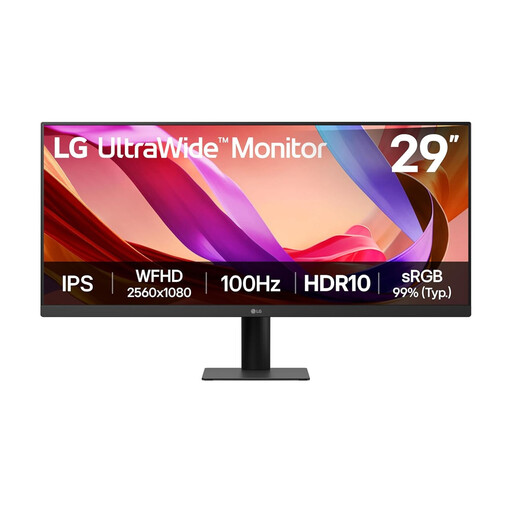
Consider the ultrawide format if horizontal workspace matters more to you than a 4K layout view.
Check whether its vertical workspace suits your homepage designs, and assess the screen position in your room. If you need to move the display away from reflections, check the stand adjustments you require.
Not on its own. An anti-glare finish is relevant, but the window’s position and the screen angle still matter; strong reflections or direct sun may call for a blind, curtain or desk move. Dell specifies anti-glare and anti-reflective treatment for the U2725QE, without making it a guarantee for every room.
Not necessarily for web-only work: check sRGB support and use the colour settings appropriate to your output. Adobe RGB or Display P3 coverage becomes more relevant when your work also uses those spaces for photography, branding, print-related projects or other managed output. BenQ UK lists both standard and wider-gamut coverage for the PD2732U.
It can if the laptop supports the required video output and the monitor’s power delivery meets its charging needs. ASUS specifies USB-C DisplayPort support and 96 W power delivery for the PA279CRV; BenQ UK specifies Thunderbolt connectivity and 90 W power delivery for the PD2732U. Check your laptop and intended cable before ordering.
Yes, check the label for the exact model you are considering. GOV.UK says products within UK energy-labelling scope must display an energy label at the point of sale, including on a website; compare that information alongside the screen features you need.