For poster design beside a bright window, control reflections before choosing an anti-glare monitor with the colour-management features your work requires. If the room remains bright, compare typical brightness rather than relying on a peak HDR figure; for posters destined for print, plan to calibrate and profile the display and soft-proof against the intended output.
Who this suits
Daylight-exposed poster designers
If reflections or a bright window behind the screen make layouts difficult to judge, start with desk placement and light control. The Health and Safety Executive advises arranging the desk and screen to avoid glare and bright reflections.
Print-bound colour reviewers
If you approve poster colours for a printer or print supplier, consider the whole colour-managed workflow, not gamut coverage alone. The International Color Consortium explains that display calibration and profiling work together to support consistent colour.
Laptop-led creative desk users
If the monitor will also connect a laptop and desk accessories, check the computer’s video output, charging requirement and the exact monitor’s ports. A USB-C or Thunderbolt connection is useful only when its functions match your setup.
What to check when buying
Deal with direct window reflections before comparing screens. Then match the display’s colour workflow and desk connections to the way you produce posters.
| Concern |
What to check |
Who this matters to |
| Daylight and reflections |
Position the screen away from direct reflections; compare its surface finish and typical brightness in cd/m² for the light that remains. |
If the window makes artwork hard to judge, I need a screen I can use without fighting reflections. Around 39% of consumers put daylight and reflection control first. |
| Colour for print |
Check the relevant working colour space and calibration options; use the intended output profile for soft-proofing where available. |
When a poster is going to print, I need dependable colour decisions rather than a wide-gamut figure on its own. Print-colour confidence is the primary need for around 38% of consumers. |
| Workspace and connections |
Measure the desk and stand footprint; check the laptop’s video output and required charging wattage against the monitor’s connections. |
If my laptop shares a limited desk with poster work, I need the screen size and connections to fit together. Around 23% of consumers prioritise desk fit and connectivity. |
Buying pitfalls
-
Choosing brightness while the window still reflects in the screen
Reflections can obscure poster details even on a bright display. The Health and Safety Executive advises arranging the desk and screen to avoid glare and bright reflections.
Try blinds, curtains or a different screen angle first. Then compare anti-glare finishes and typical brightness for the remaining room light.
-
Treating wide gamut as a print preview
Gamut coverage does not, by itself, establish how a poster will reproduce in print. The International Color Consortium describes calibration and profiling as complementary steps, while Adobe describes soft-proofing with colour profiles.
Confirm the working colour space, profile the display and soft-proof with the relevant printer or print-supplier profile where available.
Repeated colour corrections can add time to a print-bound project.
-
Assuming USB-C replaces every laptop cable
Video input, charging power and hub functions vary between monitors and computers. A USB-C connector alone does not establish that one cable will handle your whole setup.
Compare your laptop’s video and charging requirements with the exact monitor’s USB-C or Thunderbolt specification before buying.
Relevant brands to consider
ASUS ProArt
The PA32UCXR is a reference point for a professional, high-brightness colour workflow in a difficult bright-room setup.
- ASUS UK specifies a 32-inch 4K anti-glare mini-LED panel, 1,000 cd/m² typical brightness, 99% Adobe RGB coverage and an embedded colorimeter for the PA32UCXR.
- Those specifications apply to the PA32UCXR, not every ProArt display. Direct window reflections still call for light control.
BenQ DesignVue / Creative Pro
The PD3225U illustrates a larger designer-monitor route when window light can be controlled.
- BenQ UK specifies a matte 31.5-inch 4K panel, 400-nit typical brightness, a calibration report and Thunderbolt power delivery of up to 85 W for the PD3225U.
- Beside a persistently bright window, assess whether its stated typical brightness is suitable after controlling reflections.
Dell UltraSharp
The U2723QE is a compact 4K USB-C hub-monitor reference for a laptop-led design desk.
- Dell UK specifies a 27-inch 4K anti-glare display, 400 cd/m² brightness and USB-C power delivery of up to 90 W for the U2723QE.
- Dell’s cited UK page marks that exact model unavailable. Check current availability before planning around it.
Joybuy monitor choices
These monitors offer different starting points for a poster-design desk, from larger creator displays to compact 4K and gaming-oriented options. For any choice beside a bright window, assess reflections, colour workflow and the exact model’s stated brightness before deciding.
 No image available
ASUS ProArt Display PA32UCG-K 32-inch 4K Mini LED
Consider this larger display if you need room for poster layouts and a colour-managed workflow. The product name specifies a 4K IPS Mini LED panel, 120 Hz and Thunderbolt 3. Check the exact model’s typical brightness and peak-brightness specification before relying on it for persistent daylight, and confirm laptop charging compatibility.
View on Joybuy
 No image available
ASUS ProArt PA27DCE-K 4K OLED
If you are considering an OLED display for poster layouts, assess how much daylight reaches the desk before choosing this model. Its product name specifies a 4K OLED panel; check typical brightness, screen finish and any required laptop charging functions against the exact specification.
View on Joybuy
 No image available
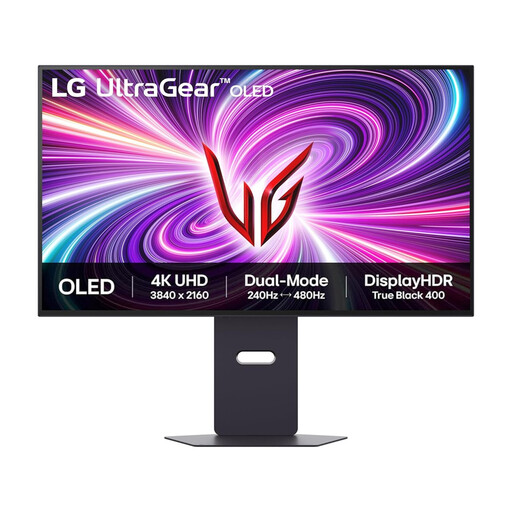
LG UltraGear 32GS95UV-B 32-inch 4K OLED
This gaming-oriented monitor may interest you if the desk also serves other uses, but consider how long static poster layouts remain on screen. The product name specifies a 32-inch 4K OLED display with DisplayPort and HDMI 2.1. Check typical brightness for the room and the model’s image-retention care guidance before buying.
View on Joybuy
 No image available
iiyama ProLite XUB2792UHSU-B6 27-inch 4K UHD
This is a 27-inch 4K option to assess if desk space is limited. Before using it for bright-window or print-bound work, check the screen’s anti-glare treatment, typical brightness and calibration options. Match any USB-C video and charging functions to your laptop.
View on Joybuy
 No image available
Dahua 32-inch 4K 165 Hz curved OLED gaming monitor
If you want a larger screen, consider whether a curved gaming display suits your poster-layout work. The product name states 4K OLED, 99% DCI-P3 coverage and Type-C 65 W. Check typical brightness, anti-glare treatment and calibration options; gamut coverage alone does not establish a print-proofing workflow.
View on Joybuy
Common questions
Will a brighter monitor solve a bright-window workstation?
Not if direct reflections still obscure the screen. The Health and Safety Executive advises arranging the desk and display to avoid glare and bright reflections; control the window light first, then compare monitors’ typical brightness for the remaining conditions.
Is wide gamut enough to make poster colours match print?
No: gamut coverage is only one part of a print-colour workflow. The International Color Consortium explains the role of calibration and profiling, and Adobe describes soft-proofing with colour profiles. Use the relevant output profile where available before approving print-bound colours.
Should I choose a 27-inch or a larger 4K display for posters?
A 27-inch 4K display suits a desk where footprint matters; a 31.5–32-inch 4K display gives artwork and interface elements more physical space. Measure the available desk area and stand depth, then check the selected model’s brightness, surface finish and connections separately.


