What matters when choosing?
Decide whether consistent colour, frame-filling detail or whole-pot photographs are your main output before comparing camera bodies. For colour-sensitive work, Datacolor describes taking a RAW reference shot under the shoot lighting; that workflow still needs to be planned around whichever camera you choose.
| Concern |
What to check |
Who this matters to |
| Repeatable glaze colour |
Check RAW capture and white-balance controls. Plan to photograph a grey or colour reference under the same lighting as the pots. |
If I sell pieces from one firing batch, I need their glaze colours to remain consistent across listings. Around 36% of consumers put colour consistency first. |
| Fine surface detail |
Compare lens magnification, including 1:1 versus 1:2, and check the working distance available for lights and diffusers. |
When tiny marks or glaze texture need their own photographs, I want them to fill the frame without relying entirely on cropping. For around 29% of consumers, close-up detail is the primary need. |
| Consistent whole-pot framing |
Check that the lens frames complete vessels from your available space and that the tripod and head support the camera-and-lens combination. |
If I photograph a range of pots for one catalogue, I need a viewpoint I can reproduce from piece to piece. Stable composition comes first for around 21% of consumers. |
| Capture-to-listing workflow |
Check how files reach your editing device and whether the screen works at your intended camera position. |
When I am starting with whole-pot listings, I want a setup I can position and use routinely while leaving open the option of another lens later. Around 14% of consumers make a straightforward workflow their first priority. |
Camera brands to consider
These brands offer camera and lens routes relevant to the tasks above. Check the exact body, lens mount and bundle rather than treating a brand name as a complete studio setup.
Canon
An EOS R APS-C route for whole-pot framing with an RF lens option for closer details.
- Canon specifies a 24.2MP APS-C sensor and vari-angle touchscreen for the EOS R50.
- Canon specifies 0.5×, or 1:2, magnification for the RF 35mm F1.8 Macro IS STM; it is not a 1:1 lens.
Nikon
A Z-system option for photographers considering a Z50II body and a dedicated macro lens.
- Nikon describes a vari-angle screen on the Z50II and specifies 1:1 magnification for the NIKKOR Z MC 50mm f/2.8.
- Check the space needed to frame complete pots with a macro lens before using it as your only lens.
Sony
An E-mount route worth considering if you already use a compatible α6400-class camera or want a separate macro-lens option.
- Sony specifies an APS-C sensor for the α6400 and 1:1 magnification for the E 30mm F3.5 Macro.
- Sony states a 2.4 cm minimum working distance for that macro lens, so plan where diffusers and lights will sit.
Fujifilm
A higher-resolution APS-C option when cropping or producing larger files is part of the brief.
- Fujifilm specifies an approximately 40.2MP sensor and 14-bit RAW recording for the X-T50.
- Resolution and in-camera colour choices do not establish faithful glaze colour; keep the lighting and reference workflow consistent.
Joybuy camera choices
These camera-and-zoom bundles are choices to examine chiefly for whole-pot photography. If frame-filling glaze detail is essential, assess a suitable macro lens separately; also check each bundle against your colour-reference workflow.
 No image available
Sony Alpha ZV-E10 II K, 16–50 mm power-zoom kit
Consider this APS-C kit if you chiefly need to frame complete pots and want an interchangeable-lens camera.
The product title specifies 26 megapixels and a 16–50 mm f/3.5–5.6 power zoom. Check its close-focus capability for small details and confirm the white-balance controls you need for repeatable colour work.
View on Joybuy
 No image available
Sony Alpha 7 III, 28–70 mm zoom kit
Consider this full-frame camera-and-zoom bundle if its lens frames your complete pots from the space available in your studio.
The named kit includes a 28–70 mm zoom. If small glaze features are a regular subject, check what close-up magnification you require and whether a separate lens is needed.
View on Joybuy
 No image available
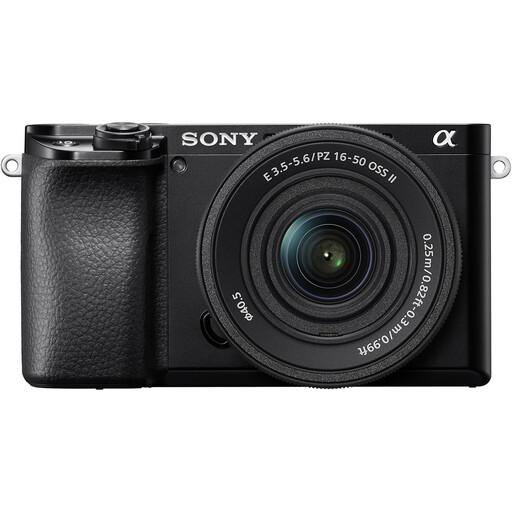
Sony A6400, 16–50 mm power-zoom kit
This APS-C zoom kit is a route to whole-pot photographs if you also want the option to assess a dedicated E-mount macro lens later.
The named bundle includes a 16–50 mm power zoom. Sony specifies a separate 1:1 E 30mm F3.5 Macro lens; check lens compatibility and your planned lighting distance before choosing it for detail work.
View on Joybuy
 No image available
Sony A6100, 16–55 mm zoom kit
Consider this APS-C kit for complete-pot images if its supplied zoom covers the framing you need.
The product title names a 16–55 mm zoom. Confirm the exact included lens and its close-focus capability, as well as RAW and white-balance controls if you plan to correct colour using a reference shot.
View on Joybuy
 No image available
Sony A6700, 16–50 mm lens kit
Consider this APS-C bundle for whole-pot framing where a supplied zoom suits your shooting space.
The named kit includes a 16–50 mm lens. Check its close-focus specifications and confirm RAW and white-balance controls if fine surface detail and repeatable glaze colour are priorities.
View on Joybuy
Frequently asked questions
Will more megapixels make my glaze colours more accurate?
No: resolution affects the number of pixels available for an image or crop, not whether its colours match the pot. For colour-sensitive photographs, keep the lighting consistent and photograph a grey or colour reference in the actual setup for use during processing.
Should I prioritise a macro lens or a higher-resolution body?
Prioritise a suitable macro lens when tiny glaze features or maker's marks must fill the frame. Nikon and Sony specify 1:1 lenses for life-size reproduction; extra resolution is not a substitute for checking the lens magnification, focus and lighting your detail photographs require.
Why does macro working distance matter with shiny pottery?
A short working distance leaves less room to position diffusers and control what appears in a reflective glaze. Sony specifies a 2.4 cm minimum working distance for its E 30mm F3.5 Macro, so compare the lens position with your planned lighting layout before buying.
What if a camera bought online in the UK arrives faulty or not as described?
Treat a faulty or misdescribed camera as a separate issue from changing your mind about a purchase, and contact the seller about the appropriate remedy. For an online change-of-mind cancellation, GOV.UK says to tell the seller within 14 days of receiving the item; check the applicable return instructions rather than assuming they settle a fault complaint.


