What should you check before choosing?
Start with the energy your devices need during the shift, then check charging compatibility, simultaneous output and how the bank will be refilled.
| Priority | What to check | Your needs |
|---|
| Usable energy |
Find the bank’s stated Wh, or calculate mAh × nominal cell voltage ÷ 1,000. Compare it with the energy you expect to put back into each device, allowing for conversion and charging losses. Anker UK gives about 74Wh of stored energy for 20,000mAh at 3.7V; the voltage of the model you choose matters. |
I need enough reserve for navigation, photos and calls across the shift, not a number of phone charges inferred from the mAh label alone. |
| Device output |
Check USB-C PD support, the output of one port and a suitable cable against the exact device’s requirements. Apple specifies USB-C PD and a USB-C cable for faster wired charging on iPhone 15 and later; Apple’s iPad Pro (M5) fast-charging guidance calls for a compliant 60W-or-higher adapter. |
If I carry a tablet or laptop as well as a phone, I want to know whether the bank can deliver the charging power that device requires. |
| Shared charging |
Check the model’s output table with the ports you intend to use together. A total wattage or port count does not establish the power available from each port during simultaneous charging. |
My phone needs to stay available while another work device or accessory is plugged in. |
| Cables |
For a built-in cable, confirm its connector and charging capability against your device. Check whether another device needs a separate cable. |
I would rather have a cable ready when I leave, but I still need the right connection for everything I carry. |
| Refilling the bank |
Compare the bank’s maximum USB-C input with your wall charger and cable. Treat a stated recharge time as applying to the specified model and suitable input equipment. |
I use the bank on consecutive workdays and need time to recharge it before the next shift. |
Relevant brand ranges
These brand examples illustrate features to compare; check the specifications of the exact model you intend to carry.
Anker
Anker UK describes 100W-class power banks aimed at charging phones and compatible laptops.
- Its range includes higher-output USB-C options and models with multiple ports, according to Anker UK.
- Check the chosen model’s single-port output, Wh rating, input and cable requirements rather than applying range-wide claims to every bank.
UGREEN
UGREEN UK lists distinct 20,000mAh USB-C models, including a 100W model and a 130W-total-output model with a built-in cable.
- UGREEN specifies two USB-C ports and one USB-A port for its cited 100W model.
- The cited 130W figure is total output on a different model; check its port-allocation table before planning simultaneous charging.
Belkin
Belkin UK lists separate 20,000mAh options for built-in-cable convenience and laptop-oriented USB-C PD charging.
- Belkin states up to 45W output for its integrated-cable UltraCharge model and up to 65W from one USB-C port for its BoostCharge Pro laptop model.
- Those figures belong to different products. Match the exact bank’s single-port output to your tablet or laptop before choosing.
Joybuy power bank options
These options cover compact banks with built-in cables and a higher-capacity, higher-output USB-C model. Compare each with your device’s energy and charging requirements; the compact options are not substitutes for a 20,000mAh bank simply because they have multiple outputs.
 No image available
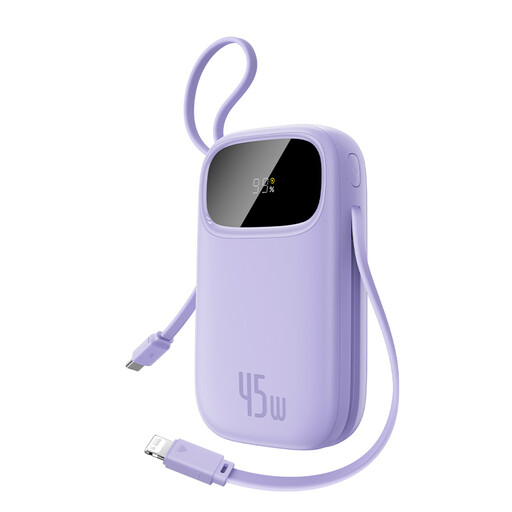
Baseus EnerFill FC31 Qpow 3 10,000mAh 45W, Nebula Purple
The built-in USB-C and iP cables suit a worker who wants charging connections ready to carry. The stated 45W output applies to one device; the listed combined output is 15W, so check your devices’ requirements before relying on simultaneous charging. The 10,000mAh capacity should be assessed against the energy your shift needs.
View on Joybuy
 No image available
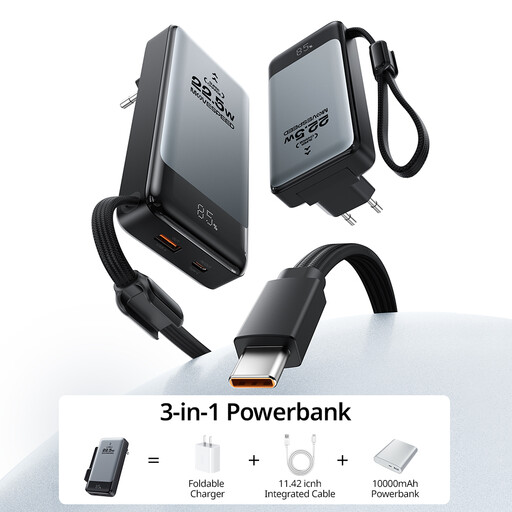
MOVESPEED 3-in-1 10,000mAh 15W power bank
The integrated USB-C cable and three stated outputs may reduce the cables needed for a phone-centred shift. Its stated total output in power-bank mode is 15W; check device-specific charging needs rather than treating the three outputs as three independent 15W supplies.
View on Joybuy
 No image available
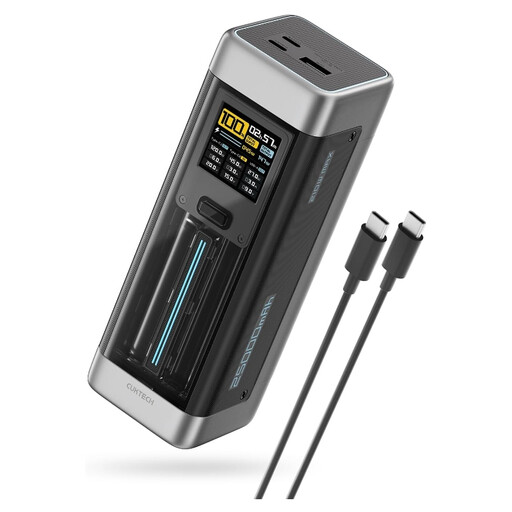
CUKTECH NO.20 P23 25,000mAh 140W, grey
The stated 25,000mAh capacity and up-to-140W USB-C output make this a candidate when a phone is accompanied by a compatible higher-power device. Its title specifies PD 3.1 and three ports; check the exact single-port and shared-output profiles, cable requirement and your device’s USB-C PD specification. Use the bank’s Wh rating, rather than mAh alone, to plan the energy reserve.
View on Joybuy
Common questions
How can I estimate the capacity needed for a workday?
Compare energy in Wh, not the bank’s mAh directly with your phone’s mAh. Multiply the bank’s mAh by its nominal cell voltage and divide by 1,000: 20,000mAh at 3.6V is 72Wh stored, while at 3.7V it is 74Wh. Allow for losses, then estimate how much energy you need to return to each device during the shift. Anker UK explains why energy delivered at USB output is lower than the bank’s nominal stored energy.
What should I check to charge my phone faster?
Match the bank’s charging protocol and cable to your phone. Apple specifies a USB-C Power Delivery charger and USB-C cable for faster wired charging on iPhone 15 and later; a USB-C connector on a bank does not, by itself, establish the charging method your phone needs.
How much output does a tablet need?
Use the requirement for your exact tablet and compare it with one port’s output, rather than choosing by the bank’s total wattage. For example, Apple says fast charging an iPad Pro (M5) requires a USB-C cable and a compliant 60W-or-higher adapter; that figure should not be applied to every tablet.
Can a power bank charge my USB-C laptop?
It is a suitable candidate only if the laptop accepts USB-C PD input and the bank’s single-port output meets that model’s charging requirement. Microsoft publishes model-specific Surface Laptop requirements and warns that a lower-wattage USB-C supply may charge slowly or not at all. Also check the cable and the bank’s output when your phone is connected.
Why might charging slow down with several devices connected?
A bank’s total output is shared according to its model-specific port arrangement, so one port may not retain its single-device maximum when others are in use. Check the output table for the exact combination of ports you plan to use, especially if one device is a tablet or laptop.


