Households charging phones and tablets
A compact USB power bank may cover essential communication devices. Check that its connections and output suit each device, particularly if several will charge together.


For portable charging of phones, tablets and a compatible USB-C Power Delivery laptop, consider a power bank with enough output for the devices you will connect. A UPS is principally a short bridge for equipment that must stay on or shut down safely; for repeated charging across a longer outage, consider a portable power station. In each case, check the device’s charging method, the backup unit’s output and its runtime at your planned load.
A compact USB power bank may cover essential communication devices. Check that its connections and output suit each device, particularly if several will charge together.
For a laptop, establish whether it accepts USB-C Power Delivery and how much input power it requires. For a desktop or router that must ride through a brief interruption, check a UPS runtime chart at the actual load instead.
If several devices will need repeated charging, compare portable power stations by capacity in Wh, suitable AC and USB outputs, recharge method and the weight you can accommodate.
Choose the charging route first, then size it for the devices and the length of interruption you are preparing for.
Consider it when: You need portable USB charging for phones or tablets, or for a laptop confirmed to accept the bank’s USB-C Power Delivery output.
Trade-off: A USB-only bank cannot run a laptop’s mains adapter, and its output may be shared between ports.
Consider it when: A desktop, router or similar device needs continuity through a short cut or time for an orderly shutdown.
Trade-off: Runtime depends on the connected load; a VA rating alone does not tell you how many minutes you will get.
Consider it when: Several devices need repeated charging, or a laptop needs its approved mains adapter.
Trade-off: It takes more space and weight than a power bank, while its rated Wh capacity does not guarantee delivered runtime.
| Priority | What to check | Your needs |
|---|---|---|
| Charging compatibility | Confirm each device’s accepted charging method and input in W. For a USB-C laptop, check Power Delivery support, the bank’s per-port and shared output, and a suitable cable; otherwise check the approved adapter and AC output. | My laptop must charge from the backup source, not merely have a connector that fits. I may also need to charge a phone at the same time. |
| Useful runtime | Compare capacity in Wh with the expected load in W, allowing for charging and conversion losses. For a UPS, use its runtime chart at the combined load rather than its VA rating alone. | I need to know whether I am covering a brief interruption, a work session or repeated charging during a longer cut. |
| Outputs and recharge | Check the station’s continuous AC output, 230V/50Hz configuration, USB outputs and recharge options. For a UPS, check its sockets and the cables your equipment needs. | Several devices may need power together, and I need a practical way to recharge the backup between uses. |
| UK-use safety | Identify the exact model, supplier, charger and suitable UK mains accessories. Check the Office for Product Safety and Standards safety alerts and recalls; avoid overloaded or damaged extension equipment. | I want the equipment and its mains connections to be suitable for the setup I will rely on at home. |
These figures describe different things. The historic APC BX700UI UPS is listed for up to one minute at full load and nine minutes at half load, illustrating why its 700VA label cannot stand in for a runtime estimate.
Write down each device’s charging method and load. Check USB-C compatibility for a power bank, the load-specific runtime chart for a UPS, or capacity in Wh and continuous output for a station.
Power can be shared. Anker says the maximum total output of its 737 Power Bank is divided between its two USB-C ports when both are used.
Check the exact model’s port-allocation information for the combination you plan to charge, such as a laptop and phone together.
Electrical Safety First warns that overloaded extension equipment can overheat and cause fire. A damaged accessory also has no place in a planned backup setup.
Use sound, appropriately rated UK-compatible accessories, avoid daisy-chaining extension leads and check the exact equipment model against Office for Product Safety and Standards safety alerts and recalls.
The UK Civil Aviation Authority says power banks must go in carry-on baggage; batteries over 160Wh are prohibited in passenger baggage.
If you also intend to fly with the backup, check its Wh marking and the airline’s requirements before choosing it.
These examples illustrate specifications worth checking on an exact model; they do not indicate which brands or products are available in the selection below.
Its 737 Power Bank 24K is an example of a USB-C laptop-charging power bank.
UPS models are relevant when a computer or network device needs short-term continuity.
Its UK DELTA 3 Classic specifications provide an example of a portable station with AC and USB-C outputs.
Its UK Explorer 1000 v2 is another portable-station example for comparing capacity and output.
These are USB power banks for portable device charging during a power cut. They do not serve the same short-bridge role as a UPS or provide a portable power station’s AC-output route; check laptop compatibility and expected runtime for your own devices.
 No image available
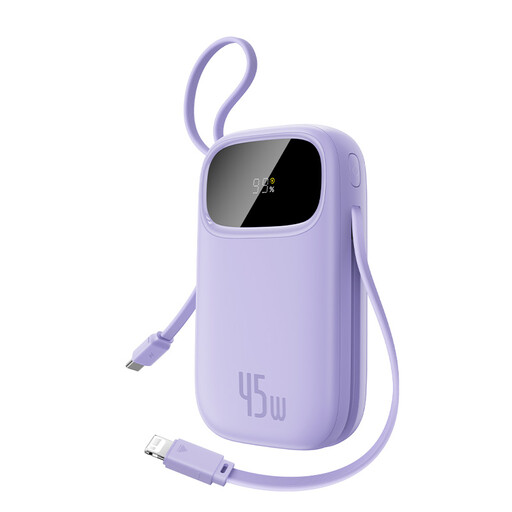
Consider this for portable phone or tablet charging, or a laptop confirmed to accept its USB-C charging output. The product description states 45W for one device but a 15W total when charging devices simultaneously; it also gives 36.5Wh alongside the title’s 10,000mAh rating. Check how those capacity figures relate and whether the available output meets your laptop’s requirements.
 No image available
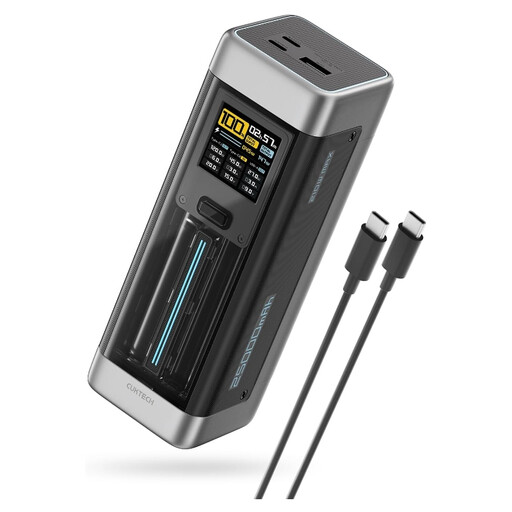
This is a USB-C laptop power-bank option if the laptop accepts a compatible Power Delivery profile. The product description states up to 140W USB-C output and three ports: two USB-C and one USB-A. Check the per-port and simultaneous outputs, the energy rating in Wh and the laptop’s charging requirements before planning outage runtime.
 No image available
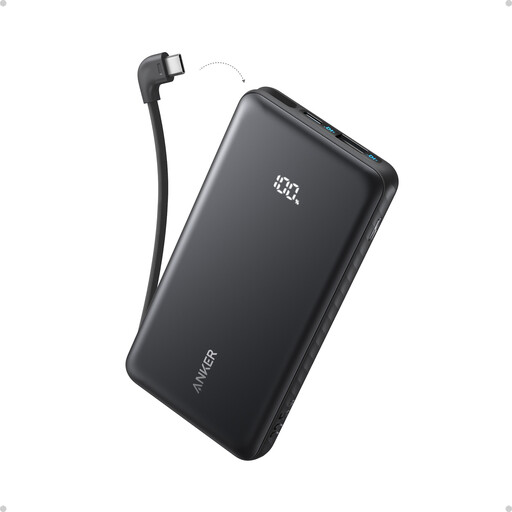
Consider this for portable charging of compatible phones and other USB devices. The listing states 22.5W output, a built-in USB-C cable and a USB-A output. Check its energy rating and port outputs for your planned devices; do not assume the USB-C cable establishes laptop charging compatibility.
Use the backup unit’s capacity in Wh and your expected device load in W for a rough planning estimate, leaving room for charging and conversion losses. For a UPS, consult its runtime chart at the combined load: the historic 390W APC BX700UI is listed for up to one minute at full load and nine minutes at half load.
No. The laptop must accept charging through USB-C Power Delivery, while the bank and cable must support a compatible power profile. Check the laptop’s stated input and the bank’s per-port output, especially when other devices will charge at the same time.
Choose a UPS when a desktop, router or similar device needs to stay on through a short interruption or shut down in an orderly way, provided its runtime chart covers your load. Consider a portable power station for repeated device charging over a longer outage; check its capacity, outputs and recharge method against the devices you will use.
Identify the exact equipment and charger models, check that their plugs, outlets and accessories suit your UK setup, and look for relevant Office for Product Safety and Standards safety alerts or recalls. Electrical Safety First warns against overloading extension equipment; do not use damaged leads or adaptors.
Check its Wh rating and the airline’s requirements before travelling. The UK Civil Aviation Authority says power banks must be carried in cabin baggage, batteries from 100Wh to 160Wh require airline approval, and batteries over 160Wh are prohibited in passenger baggage.