Choose a power bank to recharge phones and USB-powered tablets, a UPS to keep compatible plugged-in equipment running through the moment mains power fails, or a portable power station when several devices need charging over a longer interruption. List the devices you depend on and the time they need power, then check output in watts, stored energy in watt-hours, ports and runtime at your intended load. None of these choices guarantees that a mobile signal or internet service will remain available.
Who needs which backup?
Households prioritising phones and tablets
If calls, messages and updates are the priority, assess a USB power bank against your devices' charging ports and the number of times you may need to recharge them. A charged phone alone cannot ensure that the network stays available.
Households needing uninterrupted connectivity
If a router, modem or desktop must stay on when mains power fails, assess a UPS against the combined load and its runtime at that load. Check that every essential component is plugged into a battery-backed outlet.
Households planning for several devices
If you need to recharge multiple devices over a longer interruption, compare a portable power station's stored energy, output types and rated simultaneous output. Plan how you would recharge the station if mains power remained unavailable.
What matters when choosing?
Start with whether equipment must stay on without interruption or can be recharged later. That distinction points towards a UPS for continuity, or towards a power bank or power station for charging; the device list and required duration then determine what to check.
USB power bank
Choose when: Phones, tablets or other compatible USB devices are your priority and you need a portable source of charge.
Trade-off: A conventional power bank is not a mains UPS for equipment that must remain on without a break.
UPS
Choose when: A compatible router, desktop or other mains-powered device must stay on as power fails.
Trade-off: Runtime depends on the connected load, so check it at the wattage you expect to use rather than treating the UPS as a multi-day battery.
Portable power station
Choose when: Several devices need charging over a longer interruption, particularly if you need both USB and AC outputs.
Trade-off: It takes more space than a small power bank, and an AC socket does not mean every appliance fits its rated output.
Device-specific backup
Choose when: The essential device has a backup battery specified by its manufacturer or provider.
Trade-off: Check compatibility with that exact device; this route does not provide general-purpose charging for the rest of the household.
| Concern | What to check | Who this matters to |
|---|
| Immediate continuity |
Add the wattages of equipment that must stay on; check the UPS output, battery-backed outlets and runtime at a comparable load. CyberPower recommends output capacity 20–30% above the total connected wattage. |
If my router and desktop must not switch off as mains power fails, keeping them running is my primary need; around 33% of consumers put immediate continuity first. |
| Portable phone and tablet charging |
Check the devices' charging ports, the power bank's capacity and the output of the ports you will use. |
When I need to carry power for calls and updates, I want to recharge my phone or tablet away from a socket; portable charging comes first for around 25% of consumers. |
| Longer, multi-device use |
Compare stored energy in watt-hours, rated output in watts and the available ports; check recharge options for the exact model. |
If several devices will need power before mains service returns, I care most about how long the supply can support them; around 25% of consumers prioritise longer, multi-device use. |
| Laptop compatibility |
Check the laptop's charging method and required wattage against the source's per-port output and a suitable cable. |
For a laptop I rely on, a large capacity label is little help unless its charging connection and power requirement match; compatibility is the first concern for around 17% of consumers. |
Mistakes to avoid
-
Comparing only mAh labels
A capacity label alone does not establish whether a source can charge a particular laptop or how long a UPS will run connected equipment.
Compare watt-hours when assessing stored energy, match per-port output to device requirements and use UPS runtime figures at a comparable load.
-
Treating a UPS as a multi-day household battery
A UPS can bridge an interruption for connected equipment, but its runtime changes with the load; CyberPower's BR1200ELCD-UK, for example, specifies nine minutes at half load.
Decide whether uninterrupted operation or extended charging is the priority before selecting a UPS or investigating a power station.
-
Charging a power bank under bedding or unattended
Covering a charging unit restricts ventilation. Electrical Safety First advises keeping power banks uncovered in a well-ventilated place and not charging them overnight or while you are out.
Make a safe charging place part of your preparations and follow the instructions for the exact battery product.
-
Assuming a charged phone guarantees communication
The UK Government Prepare campaign notes that internet access and mobile signal can be affected during a power cut. Battery charge cannot keep those services available by itself.
Keep essential contact information accessible without relying solely on an internet connection.
Relevant brands for reference
Anker
Anker has USB power banks to consider for phones, tablets and, with the right charging requirements, some USB-C laptops.
- Anker specifies 90Wh capacity and up to 100W output per USB-C cable or port for its Power Bank (25K, 165W, Built-In and Retractable Cables).
- Those specifications apply to that model, not every Anker bank; check your laptop's charging requirements and the output available from the port you will use.
EcoFlow
EcoFlow's portable power stations are relevant when stored energy and a mixture of outputs matter more than pocket-sized portability.
- EcoFlow lists 245Wh capacity and 300W rated output for its RIVER 3.
- Check the combined wattage of connected devices against the exact station's rated output; these RIVER 3 figures do not describe every EcoFlow model.
CyberPower
CyberPower's UK-format UPS range is relevant to short-term backup for connected networking and desktop equipment.
- CyberPower specifies 720W output, six UK outlets and three battery-backed outlets for the BR1200ELCD-UK.
- CyberPower lists nine minutes at half load for that model. Check runtime at your load and whether its output waveform suits the connected equipment.
Joybuy products for these needs
These products cover portable power stations for mixed-output charging and power banks for portable USB charging. If uninterrupted power to plugged-in equipment is the priority, assess a suitably sized UPS separately.
 No image available
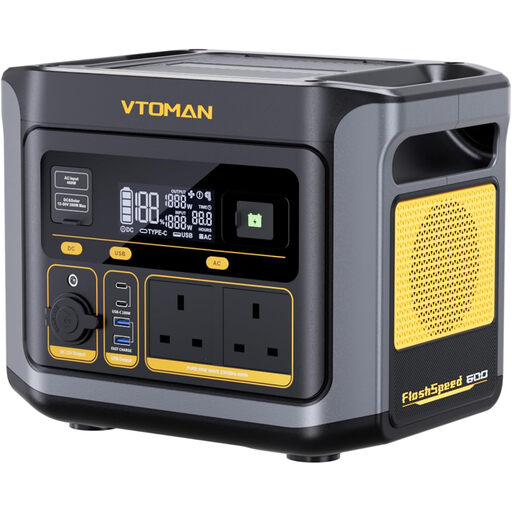
VTOMAN FlashSpeed 600 portable power station, 499Wh
Consider this station if several devices need USB-C or AC power during an interruption; check runtime against their actual load.
The title specifies 499Wh capacity, 600W output, 1200W peak output, a 100W USB-C output and 230V AC. Do not use its peak figure as the continuous output rating.
Joybuy
 No image available
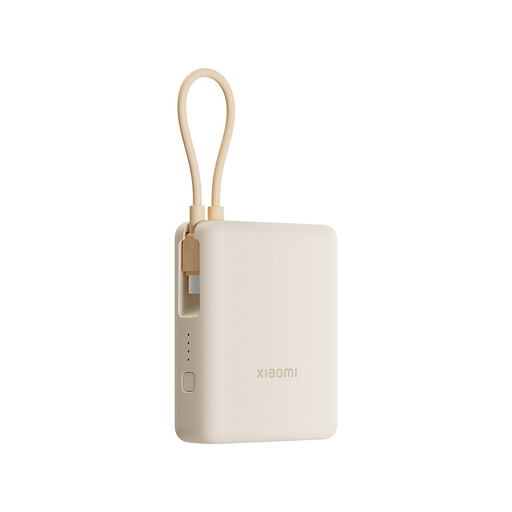
Xiaomi 33W Power Bank 10000mAh with integrated cable, Tan
Consider this power bank for portable charging of compatible phones or tablets, rather than uninterrupted power to mains equipment.
Its title specifies 10,000mAh capacity and 33W output. Check the output available to your particular device before relying on it for laptop charging.
Joybuy
 No image available
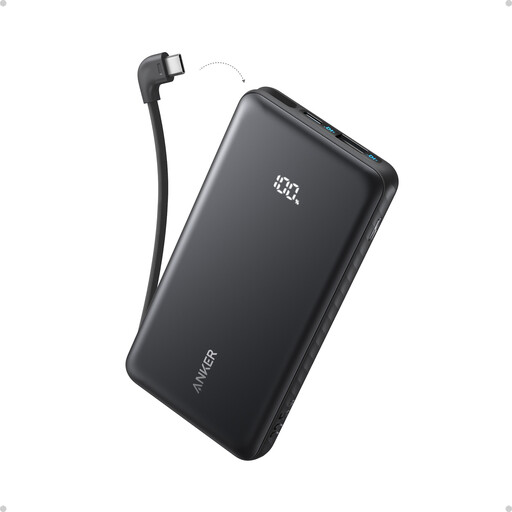
Anker Zolo Power Bank 10,000mAh 22.5W with built-in USB-C cable
Consider this model for portable charging when a built-in USB-C cable suits your device.
The title specifies 10,000mAh capacity and 22.5W output. Confirm the relevant port's charging protocol and power before choosing it for a laptop.
Joybuy
 No image available
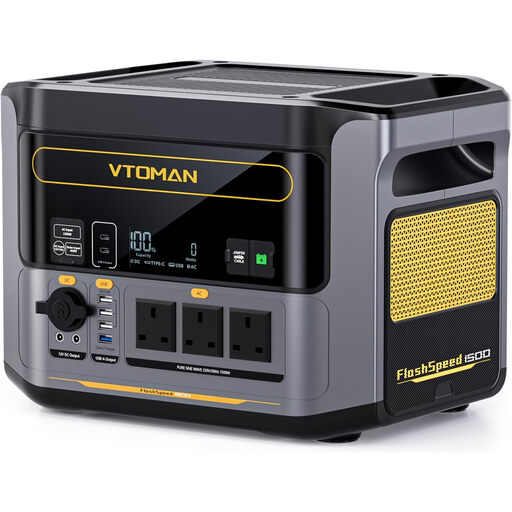
VTOMAN FlashSpeed 1500 portable power station, 1548Wh
Consider this station when you need to plan charging for several devices over a longer interruption; check its runtime at your intended load.
Its title specifies a 1548Wh LiFePO4 battery, 1500W AC output and a 100W USB-C port. Confirm that each device matches the output it will use.
Joybuy
 No image available
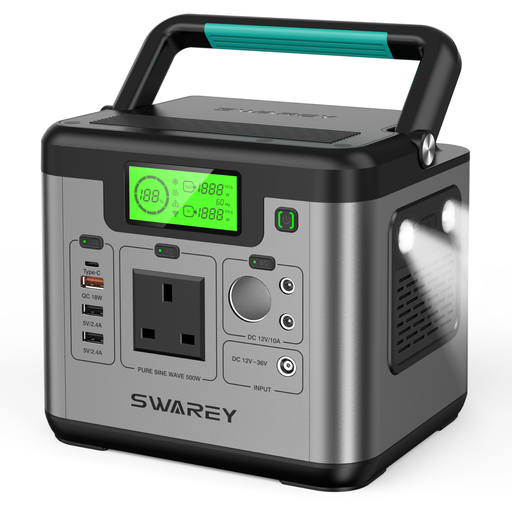
S500 portable power station, 518Wh, 500W AC
Consider this station if your device list calls for AC as well as USB-C output; compare the expected load with its continuous rating.
The title specifies 518Wh capacity, 500W AC output, 1000W peak output and 65W USB-C charging. The peak figure is not its continuous output rating.
Joybuy
Frequently asked questions
How do I work out what size of backup I need?
Add the wattages of devices that may run at the same time, then consider how long they need power. Output in watts determines whether the backup can support that simultaneous load; capacity in watt-hours helps you assess stored energy. For a UPS, use runtime information at a comparable load: CyberPower recommends output watt capacity 20–30% above the total connected wattage.
Can a power bank keep my home internet working?
A conventional USB power bank will not necessarily keep home internet working. Identify the router and every other component that needs power, then check whether a compatible UPS or device-specific backup can supply them. The UK Government Prepare campaign also warns that connectivity can be affected during a power cut, even when equipment has power.
How should I charge a power bank safely?
Charge it uncovered in a well-ventilated place and follow its manufacturer's instructions. Electrical Safety First advises against charging power banks overnight or while you are out of the house.
Can I take a power bank on a flight?
Keep a power bank with you in the cabin, not in checked baggage, as the UK Civil Aviation Authority advises. Check your airline's rules and the capacity of your particular unit before travelling.
What should I do with an old power bank?
Take it to an appropriate battery or electrical-waste collection point rather than putting it in household rubbish. The Office for Product Safety and Standards advises that lithium battery terminals should ideally be taped before recycling to reduce fire risk; seek local collection advice for a damaged unit.


