Basement workstation users
If router Wi-Fi struggles to reach a basement project computer, an Ethernet endpoint may meet your needs. For its G.hn kits, TP-Link says the powerline adapters must be connected to the same electrical circuit.


A wired G.hn starter kit is a sensible choice for a basement project computer if the router-side and basement sockets meet the kit’s electrical-circuit requirements. Choose enough Ethernet ports for the devices in the room, or a Wi-Fi powerline endpoint if the basement also needs wireless coverage. Check compatibility with existing adapters, and do not treat an advertised powerline rate as a guaranteed file-transfer speed.
If router Wi-Fi struggles to reach a basement project computer, an Ethernet endpoint may meet your needs. For its G.hn kits, TP-Link says the powerline adapters must be connected to the same electrical circuit.
A desktop and NAS in the same basement room need separate wired connections. Check the endpoint’s port count: devolo lists three Gigabit LAN ports on its Magic 2 LAN triple adapter.
If the main project device needs Ethernet but laptops or phones also need Wi-Fi downstairs, consider a powerline endpoint with both connections. TP-Link lists those functions for its PGW2440 KIT.
Start with the intended wall sockets and any adapters you already own. Then decide how many wired devices the basement endpoint must serve and whether it also needs Wi-Fi.
| Concern | What to check | Who this matters to |
|---|---|---|
| Electrical connection | Check the intended sockets against the kit’s circuit requirements; test the adapters in those locations. | If the router and basement outlets cannot form a usable link, port count will not help me share files; around 36% of consumers put connection viability first. |
| Wired file transfers | Check for an Ethernet connection to the project device and assess file transfers in the basement, not just the stated powerline rate. | Large project files make an unreliable transfer frustrating, so I need to judge the connection in my own room; roughly 29% of consumers prioritise wired-transfer expectations. |
| Ethernet ports | Count the wired devices at the basement endpoint and check its port count or whether you will need a switch. | My desktop and NAS both need a connection, and a single available port would change the setup; around 21% of consumers put multi-device capacity first. |
| Basement Wi-Fi | Check whether the endpoint provides Wi-Fi; if you want mesh integration, check compatibility with your router. | I also use wireless devices downstairs, so Ethernet alone would leave that need unmet; about 14% of consumers primarily want Wi-Fi alongside a wired endpoint. |
TP-Link specifies same-circuit use for its researched G.hn kits, while electrical layout and interference can affect actual throughput and range. A basement socket should not be assumed to work just because it is nearby.
Check the circuit arrangement where possible, then try the kit at the intended router and basement outlets before relying on it for project files.
If those locations cannot provide the required link, you may need a different networking approach, such as Ethernet cabling.
TP-Link says its G.hn adapters are not compatible with HomePlug AV or AV2 adapters. An existing powerline network therefore does not automatically provide an expansion route for a G.hn kit.
Identify the standard of every adapter you intend to keep and check compatibility before buying another unit.
Moving to an incompatible adapter family may mean replacing older units you had planned to reuse.
A maximum physical link rate is not the throughput a project computer will necessarily achieve. TP-Link notes that powerline throughput and range vary with conditions including interference, traffic and circuit layout.
Assess large-file transfers in the intended basement setup before depending on powerline as the sole connection.
A Wi-Fi endpoint addresses a different need from a wired-only connection: it can serve wireless devices in the basement but does not remove the powerline link’s dependence on the electrical installation.
Count the wired devices and decide whether phones or laptops also need basement Wi-Fi before choosing the endpoint type.
Its UK powerline range includes wired G.hn kits, G.hn Wi-Fi kits and HomePlug models.
The Magic range includes G.hn wired and Wi-Fi endpoints.
The PLA6456 is a G.hn powerline adapter described in Zyxel’s product guidance.
These powerline kits address two basement setups: a room that needs wired connections and Wi-Fi, and a room centred on one wired project computer. Check each kit’s contents and installation requirements for your intended outlets before choosing.
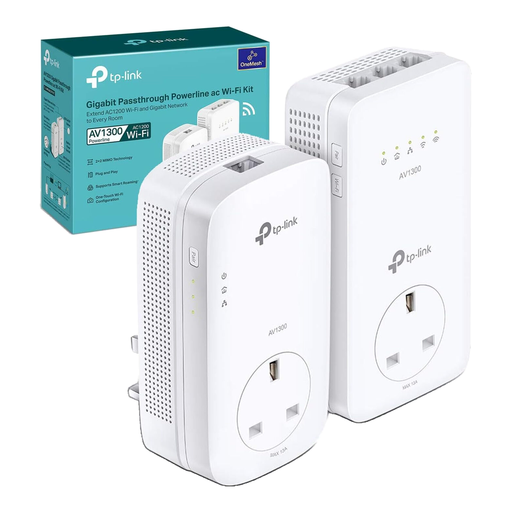 Image unavailable
Consider this kit if the basement needs both a wired project device and Wi-Fi. Its name identifies an AV1300 Gigabit powerline Wi-Fi kit; check the number of Ethernet ports, the included adapters and the requirements for your intended outlets before purchase. AV1300 does not establish the file-transfer speed you will get.
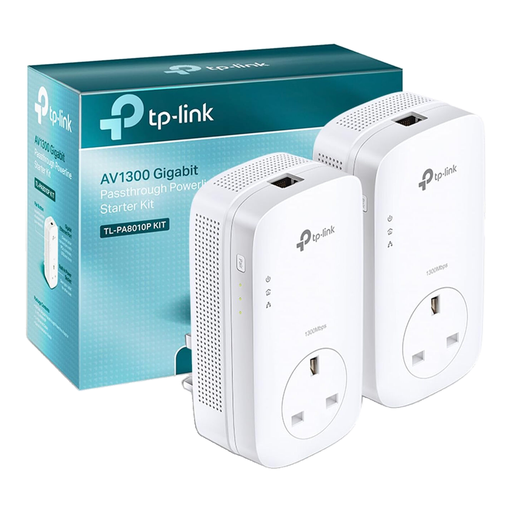 Image unavailable
Consider this wired powerline kit for a basement project computer when new Wi-Fi coverage is not the aim. The product name specifies AV1300, Gigabit and a passthrough socket; check its Ethernet port count, compatibility with existing adapters and installation requirements. The AV1300 designation does not guarantee a particular file-copy speed.
For the researched TP-Link G.hn kits, yes: TP-Link specifies that the adapters must be connected to the same electrical circuit. Check the intended sockets and try the connection in its final locations.
Not with the researched TP-Link G.hn models: TP-Link says they are incompatible with HomePlug AV and AV2 adapters. Check the standard of each existing unit before choosing an expansion adapter.
No. Figures such as a maximum PHY rate describe the rated physical link, not a guaranteed file-copy result. TP-Link says actual powerline throughput and range vary with electrical and network conditions, so assess transfers at the intended outlets.
Take the suspected interference seriously. Ofcom explains that electromagnetic disturbance can affect radio communications equipment; isolate the suspected device where safe to do so and consult Ofcom’s consumer interference guidance if the problem persists.