Viewers with a fixed screen in a weak-Wi-Fi room
If the TV, streaming box or computer has Ethernet, a powerline kit can provide a wired endpoint near the screen. The result still depends on the home’s electrical wiring.


Choose a wired powerline kit if the theatre recording plays mainly on one TV or streaming device with Ethernet; choose a powerline Wi-Fi kit if phones, tablets or laptops also need coverage in that room. Either choice depends on a workable electrical connection between the adapters, while the broadband connection must still support the streams being watched.
If the TV, streaming box or computer has Ethernet, a powerline kit can provide a wired endpoint near the screen. The result still depends on the home’s electrical wiring.
When other viewers use phones, tablets or laptops in the same room, a powerline Wi-Fi kit can provide local wireless coverage as well as a connection for a wired screen.
If suitable wall sockets or the electrical path between rooms are uncertain, establish where both adapters would plug in before choosing a kit. Ofcom notes that powerline results depend on how the home is wired.
Choose it when: One fixed playback device has Ethernet and weak room-to-router Wi-Fi is the main problem.
Trade-off: A wired-only kit does not provide Wi-Fi for nearby phones or tablets.
Choose it when: Several devices need Wi-Fi near the viewing screen, possibly alongside a wired connection for the screen itself.
Trade-off: Wireless performance also depends on device connections and placement; adding Wi-Fi does not remove the wiring requirements of the powerline link.
| Concern | What to check | Who this matters to |
|---|---|---|
| Ethernet for the main screen | Check that the playback device has Ethernet and that the receiving adapter has enough Ethernet ports. Confirm that the kit supplies the adapters needed at both ends. | If my TV is fixed in a weak-Wi-Fi room, I want a direct network connection without relying on its wireless reception; around 46% of consumers put that wired-screen need first. |
| Wi-Fi for nearby devices | Check that the receiving unit provides Wi-Fi as well as any Ethernet ports needed for the screen. Check compatibility before adding it to an existing powerline system. | When several of us use phones or laptops near the viewing room, I need coverage for those devices too. Roughly 36% of consumers prioritise that shared-room Wi-Fi need. |
| Wiring and socket suitability | Identify direct wall sockets near the router and viewing room, and check the same-circuit requirement. Ofcom advises checking for a UKCA or CE safety mark. | Before choosing features, I need to know whether the intended sockets can provide a workable link; for about 18% of consumers, that installation question comes first. |
TP-Link describes advertised powerline rates as theoretical maximum link rates; actual speeds vary with the electrical and physical environment. A kit also cannot increase the speed of the broadband connection entering the home.
Compare the hardware specifications, then test playback in the intended room while the other devices you expect to use are connected.
A TV or streaming device with Ethernet can connect directly to a suitable receiving adapter. Wi-Fi capability matters separately if portable devices also need coverage in the room.
Check the playback device’s ports, then decide whether you need a wired-only kit or a receiving unit that also provides Wi-Fi.
Powerline performance depends on the wiring between the adapters. D-Link warns that extension leads, surge protectors and power strips can interfere with correct operation or network performance.
Plan for direct wall sockets near the router and viewing area, check the circuit requirement, and test the intended locations after installation.
devolo says its Magic G.hn adapters cannot connect to devolo dLAN or other HomePlug AV products. TP-Link likewise distinguishes G.hn from HomePlug AV and AV2.
If you already own adapters, check their standard before buying an expansion unit rather than choosing by brand or advertised Mbps alone.
Changing to an incompatible standard can mean replacing existing adapters instead of adding one.
Its documented UK range includes HomePlug AV2 wired starter kits, passthrough-socket models and powerline Wi-Fi kits. The distinction is useful when deciding whether the remote room needs Ethernet alone or Ethernet and Wi-Fi.
The Magic range uses G.hn and includes LAN models for wired devices and Wi-Fi models for rooms that also need wireless coverage.
The documented DHP-W611AV starter kit combines a powerline Wi-Fi adapter with a Gigabit passthrough adapter.
These two TP-Link kits cover different viewing-room needs: one combines local Wi-Fi with Ethernet ports, while the other is a wired powerline option for a screen with Ethernet. Check the intended wall sockets and the product’s UKCA or CE safety mark before buying.
 No image available
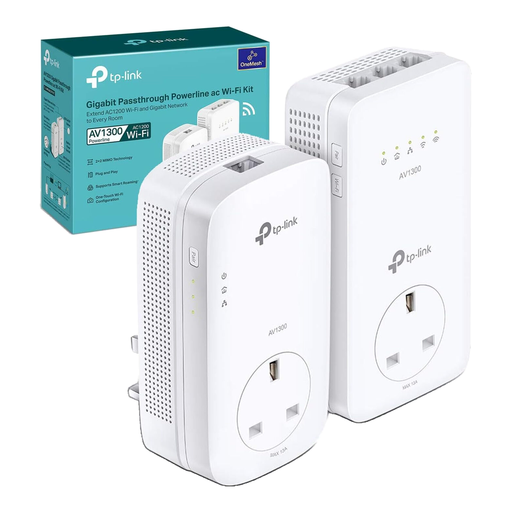
Consider this kit when the main screen needs Ethernet and nearby viewers also need Wi-Fi.
TP-Link documents three Gigabit Ethernet ports and dual-band Wi-Fi for the TL-WPA8631P. AV1300 describes a theoretical powerline link rate, not the speed each viewer will receive.
Use suitable direct wall sockets on the same electrical circuit. If you plan to use OneMesh roaming, check that the router is compatible.
 No image available
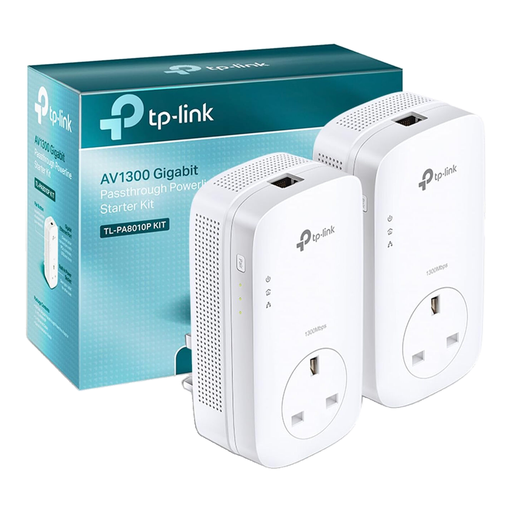
Consider this kit when a fixed TV or streaming device has Ethernet and a wired connection in the remote room is the priority.
TP-Link documents HomePlug AV2, Gigabit Ethernet and a passthrough socket for this model. The AV1300 rating is a theoretical powerline rate; actual performance depends on the wiring.
If other viewers need Wi-Fi in the room, check how you will provide it separately. The adapters need suitable direct wall sockets on the same electrical circuit.
It can help if weak Wi-Fi between the router and viewing room is the problem, but it cannot increase the household’s broadband capacity. Netflix says slow or unstable connections may reduce video quality; consider everything being streamed at the same time and test the connection in the intended room.
Use a powerline adapter’s Ethernet connection when the TV or streaming device has the required port and a fixed wired endpoint is your priority. Choose a powerline Wi-Fi kit if phones, tablets or laptops also need coverage nearby, and check that it has enough Ethernet ports for any wired devices.
Plan to plug the adapters directly into wall sockets. D-Link’s installation guidance warns that extension leads, surge protectors and power strips may prevent correct operation or reduce network performance.
No. devolo says its Magic G.hn adapters cannot connect to devolo dLAN or other HomePlug AV products, so check the standard of any adapters you already own before expanding the network.
Check the powerline adapter for a UKCA or CE safety mark, as Ofcom advises in its consumer guidance. Confirm the marking on the product you intend to buy rather than assuming it applies to every variant in a range.