Fixed-desk file sharers
If you work mainly at a desktop, dock or NAS and cannot conveniently run an Ethernet cable to the router, a kit with a wired office endpoint is a starting point. The result still depends on the electrical installation.


For project-file sharing at one fixed desk, start with a wired powerline kit; choose a kit with Wi-Fi at the office end if nearby wireless devices also need a connection. If you are extending a devolo Magic network, stay within its compatible G.hn ecosystem rather than mixing it with HomePlug equipment. For the TP-Link setup, the intended sockets must be on the same electrical circuit, and wiring conditions can affect whether the link works well enough for routine transfers.
If you work mainly at a desktop, dock or NAS and cannot conveniently run an Ethernet cable to the router, a kit with a wired office endpoint is a starting point. The result still depends on the electrical installation.
If your main computer needs Ethernet while a laptop or phone also needs a wireless connection nearby, consider a kit with Wi-Fi at the office endpoint. TP-Link lists both connection types for its TL-WPA7817 KIT.
If you are adding an office endpoint, identify your current powerline standard before choosing an adapter. devolo states that its Magic G.hn equipment does not support dLAN or other HomePlug AV products.
For home-office file sharing, decide whether the office endpoint needs Ethernet alone or Ethernet plus Wi-Fi, then check the planned sockets and any adapters you already own.
Choose when: One fixed computer, dock or NAS needs Ethernet, without Wi-Fi from the office adapter.
Bear in mind: TP-Link and MERCUSYS advertise up to 1,000 Mbps for the cited kits, but that powerline rating is not a guaranteed file-copy speed.
Choose when: A fixed desk device needs Ethernet and nearby portable devices also need Wi-Fi.
Bear in mind: Wi-Fi at the remote endpoint does not remove the powerline link’s dependence on the electrical wiring.
Choose when: You are building or extending a devolo Magic network and want a wired office endpoint.
Bear in mind: devolo says Magic equipment cannot be mixed with dLAN or other HomePlug AV adapters.
| Concern | What to check | Who this matters to |
|---|---|---|
| Wired file transfers | Check the Ethernet ports needed at the desk and test a file transfer between the intended sockets. | If I regularly move project folders from a desktop or NAS, I need a usable wired connection rather than relying on weak office Wi-Fi. Around 42% of consumers put that wired-file-sharing need first. |
| Ethernet plus Wi-Fi | Check that the remote unit provides both connections and that any Wi-Fi synchronisation feature suits your existing setup. | When my main computer uses Ethernet but nearby portable devices need Wi-Fi, I want both connections at the office end; around 25% of consumers prioritise that combination. |
| Setup and compatibility | Identify any existing adapter standard, check the circuit layout and plan to use wall sockets directly. | I do not want an added adapter that cannot join my network, or a link disrupted by socket placement. Avoiding those setup and compatibility problems is the primary concern for around 33% of consumers. |
Powerline rate labels describe a maximum physical-layer specification, not the speed of a project-file transfer. TP-Link says wiring, electrical noise, distance and outlet choice can affect performance.
Test a real transfer using the intended router and office sockets before relying on the link for routine work. Check the seller’s returns terms before buying.
TP-Link says the adapters in its reviewed setup must be on the same electrical circuit. It also warns that power strips and surge protectors can filter or block the signal.
Identify suitable wall sockets at both ends, pair the adapters as instructed, then test them in their final positions.
Similar-looking adapters need not work together: devolo says Magic G.hn adapters do not support dLAN or other HomePlug AV products.
Check the standard and product family of an installed network before selecting an expansion adapter.
Electrical Safety First warns that overloaded or daisy-chained extension leads can overheat and create a fire risk.
Do not daisy-chain extension leads or exceed their marked current rating. If sockets are regularly insufficient, consider a properly installed additional socket rather than stacking adaptors.
Its cited UK range includes wired HomePlug AV2 kits and a kit with Wi-Fi at the remote endpoint.
Its Magic range is relevant when starting or extending a compatible G.hn powerline network.
Its MP500 KIT is a HomePlug AV2 wired-kit option for an office endpoint that does not need Wi-Fi from the adapter.
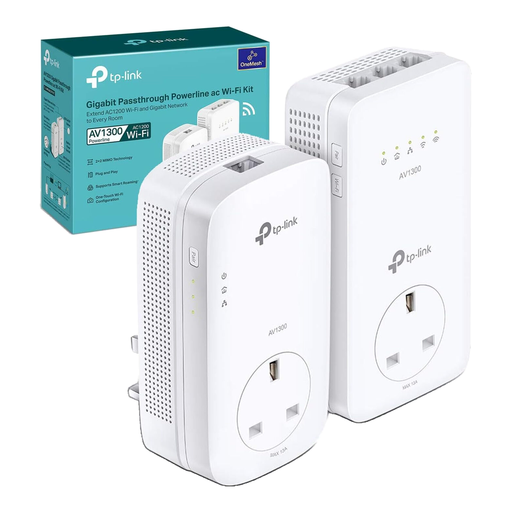
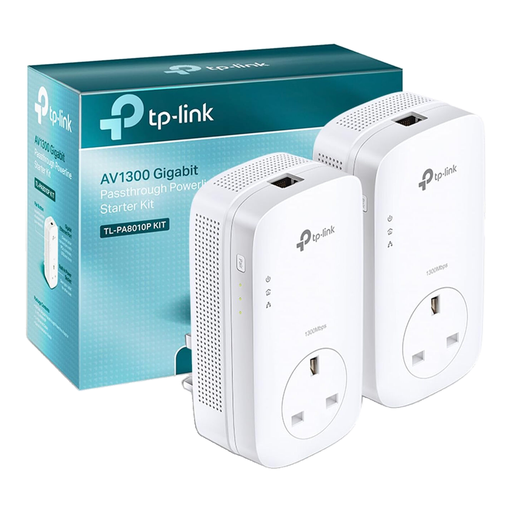
These TP-Link kits offer two ways to connect a home-office desk: one includes a Wi-Fi extender, while the other is a wired powerline kit with a passthrough socket. Check the intended sockets and test transfer performance before settling on either setup.
 No image available
Consider this kit when a fixed desk needs Ethernet and nearby devices also need Wi-Fi. The product title identifies an AV1300-rated powerline Wi-Fi extender kit with Gigabit Ethernet; that rating is not a guaranteed project-file transfer speed.
For the TP-Link setup, use sockets on the same electrical circuit and test the link in the office before depending on it for regular transfers.
 No image available
Consider this kit for a fixed desk that needs a wired connection and where retaining access to the wall socket matters. Its title specifies an AV1300 rating, Gigabit Ethernet and a passthrough socket; the rating does not promise an equivalent file-copy speed.
Check the product’s powerline standard before adding it to an existing adapter network, and test the intended sockets on the same electrical circuit.
Yes, if the adapters establish a usable link over the property’s wiring, they can provide an Ethernet endpoint in the office. Test a real file transfer: the advertised powerline rate is a maximum physical-layer figure, while interference, wiring and distance can affect throughput.
For the TP-Link setup, connect one adapter to a router LAN port and plug it into a wall socket, then pair the second adapter as instructed before testing it in the office socket. TP-Link says both adapters must be on the same electrical circuit to communicate.
Use a direct wall socket where possible: TP-Link says power strips and surge protectors can filter or block the powerline signal. If socket space is limited, consider whether a suitable passthrough model meets your needs; do not overload or daisy-chain extension leads.
No. devolo says its Magic G.hn adapters do not support dLAN or other HomePlug AV products. Check the standard of your installed adapters and choose an expansion product within a compatible ecosystem.