Top-floor wired lesson users
If the lesson computer stays at one desk and can connect by Ethernet, a wired powerline endpoint offers an alternative to relying on router Wi-Fi through several floors. Plan for a direct wall socket in the lesson room.


Choose a wired powerline kit for a lesson computer that stays at one upper-floor desk; choose a powerline Wi-Fi kit if the lesson device moves around the floor. Either choice depends on usable wall sockets and a stable connection through the home’s wiring, so test at the intended lesson time before relying on it.
If the lesson computer stays at one desk and can connect by Ethernet, a wired powerline endpoint offers an alternative to relying on router Wi-Fi through several floors. Plan for a direct wall socket in the lesson room.
If lessons take place on a laptop, tablet or phone in different upper-floor rooms, a powerline kit with a Wi-Fi endpoint lets the device connect wirelessly near that endpoint.
If the router and lesson room are far apart, test the installed adapters before depending on them for a live lesson. Socket placement and the home’s electrical conditions can affect the connection.
Decide whether the lesson device needs Ethernet or local Wi-Fi, then check where both adapters can plug in. If the connection is already poor at the router, investigate that separately: a powerline kit cannot improve the broadband service reaching it.
Choose it when: The lesson computer can stay connected by Ethernet at a fixed desk.
Trade-off: A wired-only endpoint does not provide local Wi-Fi for a device used away from the desk.
Choose it when: A laptop, tablet or phone needs a wireless connection around the upper floor.
Trade-off: The lesson also depends on Wi-Fi quality between the device and the upstairs adapter.
| Concern | What to check | Who this matters to |
|---|---|---|
| Connection across floors | Check for direct wall sockets at the router and lesson room. Test the installed pair during normal lesson hours. | I need audio and video to remain usable throughout a live lesson, not just when the connection is briefly tested. Around 36% of consumers put connection stability first. |
| Wired or wireless lesson device | Check for an Ethernet connection at a fixed desk, or choose a kit explicitly specified with Wi-Fi for portable devices. | If I move between upper-floor rooms with a tablet or laptop, I need a connection away from a cable. Around 29% of consumers prioritise that device flexibility. |
| Sockets and connections | Count the available wall sockets and wired devices. Check whether a pass-through socket or additional Ethernet ports are needed. | At a crowded lesson desk, I need the adapter to fit the available socket and connect the devices I use there. For around 14% of consumers, that practicality is the primary concern. |
| Broadband and later expansion | Where possible, check the connection at the router by Ethernet. Before adding adapters, confirm compatibility with the existing product family. | I want to avoid changing the room connection if the broadband line is the problem, and I may need another room connected later. Around 21% of consumers put that decision first. |
An advertised powerline rate does not tell you what the connection will deliver through this house’s wiring. It also cannot improve a slow connection at the router.
Where possible, establish an Ethernet baseline at the router, then test the installed adapters at the usual lesson time. Ofcom advises testing broadband performance over several days and at different times.
Adapter placement can affect powerline transmission. devolo advises plugging powerline adapters directly into wall sockets rather than extension leads or power strips.
Plan a direct socket for each adapter. If another device must use the same outlet, check whether the kit has an integrated pass-through socket.
Matching a brand name is not enough to establish compatibility. devolo says its Magic adapters are not compatible with its dLAN range or other HomePlug AV products.
Check the complete model family and its compatibility guidance before buying an additional adapter.
A powerline Wi-Fi kit still relies on the electrical-wiring link, followed by a local wireless connection to the lesson device. Neither part repairs a broadband problem at the router.
Choose local Wi-Fi when the device needs to move, and test the connection where lessons actually take place. Keep Ethernet in mind for a fixed desk.
TP-Link offers powerline kits for wired endpoints and kits that add Wi-Fi near the remote adapter.
devolo’s Magic range includes powerline options with Wi-Fi and LAN connections for reaching other rooms.
NETGEAR describes the basic two-adapter powerline arrangement for connecting a router to another room.
These kits address two upper-floor lesson setups: Wi-Fi for a device used around the floor and Ethernet for a computer at a fixed desk. Test either kit in the intended rooms before relying on it for a live lesson.
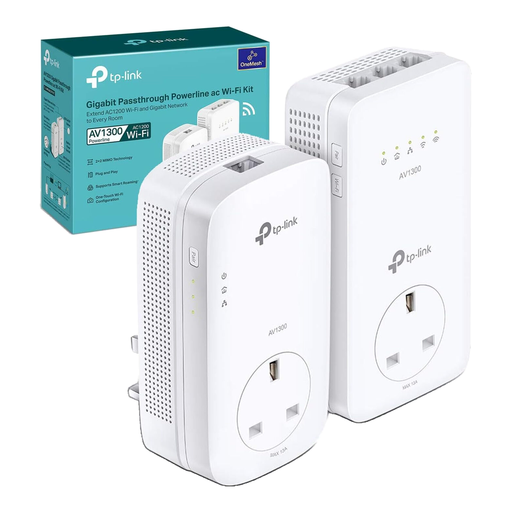 No image available
A choice for a lesson device that needs Wi-Fi on the upper floor. The named kit includes a powerline Wi-Fi extender and is specified as AV1300 Gigabit; those labels do not establish the speed or stability it will achieve in your rooms.
Plug the adapters directly into wall sockets and test near the lesson device at the usual lesson time.
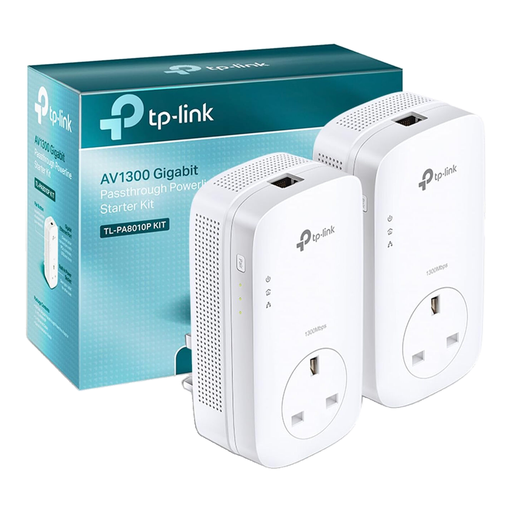 No image available
A choice for a lesson computer that can connect by Ethernet at a fixed desk. The AV1300 Gigabit kit has a pass-through socket, useful when the wall outlet also needs to power another device.
Check the connection in the lesson room before relying on it. If the lesson device needs wireless access, confirm that the setup you buy provides Wi-Fi.
Use Ethernet from the room-side powerline adapter if the computer stays at one desk and has an Ethernet port or compatible dock. Choose a powerline Wi-Fi kit when the lesson device needs to move around the floor, and test its wireless connection where it will be used.
Plan to use a direct wall socket instead. devolo advises against placing powerline adapters in an extension lead or power strip; if the outlet must also power another device, check for a kit with a pass-through socket.
Test the broadband connection at the router by Ethernet where possible, then install the powerline pair in the intended rooms and try the lesson connection at its usual time. Ofcom advises checking broadband performance on different days and at different times; a router-side test helps distinguish a broadband problem from an upstairs connection problem.
You can expand a setup when the additional adapter is compatible with its existing product family. Check the full model details before buying: devolo says its Magic and dLAN ranges are not compatible with each other.