People who take calls at a wired desk
If a work laptop or dock can connect by Ethernet, the priority is a usable connection at the garden-office socket rather than wider office Wi-Fi coverage.


A powerline kit is worth considering for garden-office video calls if the office socket and the socket near the router have a suitable electrical path, but the wiring alone cannot tell you how well calls will perform. Choose an Ethernet endpoint for a desk device that can use a cable, or a Wi-Fi-capable endpoint if other office devices need wireless coverage; check compatibility with any existing adapters and test calls from the office before relying on the connection.
If a work laptop or dock can connect by Ethernet, the priority is a usable connection at the garden-office socket rather than wider office Wi-Fi coverage.
A Wi-Fi-capable endpoint may suit an office where a phone or tablet needs local coverage alongside the main video-call device. The electrical path and Wi-Fi conditions still matter.
Check the technology and exact models already installed before buying an add-on. TP-Link says G.hn and HomePlug AV/AV2 adapters are incompatible; devolo says its Magic and older dLAN devices are incompatible.
Check the route between the two sockets before choosing between an Ethernet desk endpoint and local Wi-Fi. TP-Link and NETGEAR describe powerline setups using sockets on the same electrical circuit; a call test in the office is still needed to judge performance there.
| Concern | What to check | Who this matters to |
|---|---|---|
| Electrical path | Check the circuit arrangement between the router-side and office sockets. Follow the selected kit’s wall-socket instructions, then test from the office. | If I cannot establish a usable link to the office, the adapter’s other features will not help my calls. Around 36% of consumers put the electrical path first. |
| Wired call device | Check that the office endpoint has enough Ethernet ports and that the laptop or dock can connect by cable. | For a laptop used at one desk, I want an Ethernet connection for meetings rather than relying on a distant Wi-Fi signal; around 29% of consumers prioritise that wired endpoint. |
| Office Wi-Fi | Check that the kit includes a Wi-Fi-capable office endpoint, and test calls while the household uses its network normally. | When my phone and other devices also need a connection in the office, coverage matters alongside the main call device. Around 21% of consumers place that need first. |
| Existing adapters | Read the existing models’ labels and confirm their powerline technology in the manufacturer’s compatibility guidance. | If I am adding to a powerline network, I need the new unit to join it rather than merely fit the socket; around 14% of consumers make compatibility their primary concern. |
TP-Link describes the TL-PA9020P KIT’s powerline transfer rate as up to 2,000 Mbps. That figure does not establish the speed or stability of a connection through a particular garden office’s wiring; Ofcom also notes that lag can affect video calls.
Test calls from the intended office socket during normal household network use. Keep another connection available for important meetings until the setup has proved dependable there.
TP-Link and NETGEAR describe using adapters on the same electrical circuit. The distance to a detached office does not, by itself, establish how its sockets are connected.
If the circuit arrangement is unclear, ask the property owner or a qualified electrician before relying on powerline. Check the seller’s applicable returns terms before buying a kit to test at the property.
TP-Link’s installation guidance directs users to plug the adapter into a wall socket rather than use an extension cord between it and the power source.
Plan which wall sockets the kit will use and follow the instructions for the exact model. If retaining access to an outlet matters, check whether the model has a passthrough socket.
TP-Link states that G.hn devices are incompatible with HomePlug AV/AV2 adapters, while devolo says Magic and dLAN devices are incompatible.
Record the exact model numbers of the installed adapters and check the manufacturer’s compatibility guidance before ordering an additional unit.
Its HomePlug AV/AV2 range includes Ethernet-only and Wi-Fi-capable kit formats relevant to a wired desk or an office needing local wireless coverage.
Its G.hn-based Magic range is relevant when building or expanding a compatible Magic setup with an office Wi-Fi endpoint.
Its powerline setup guidance is useful when assessing the electrical path between a router and a remote room.
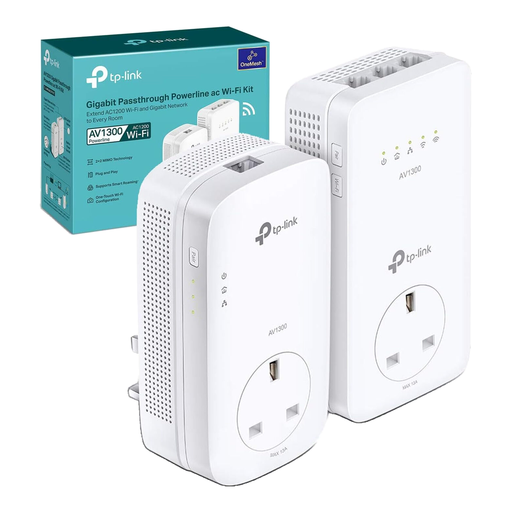
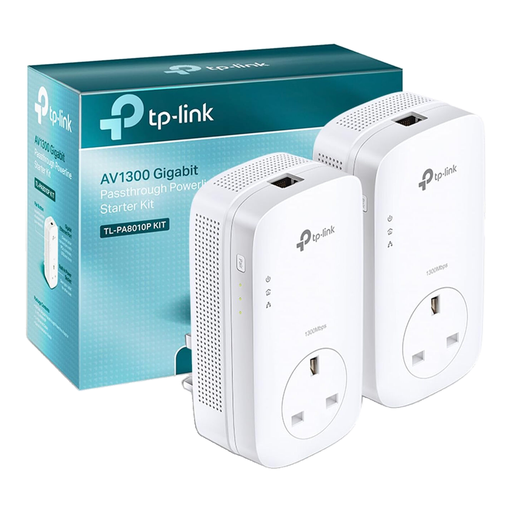
These kits cover a Wi-Fi-capable powerline option for several garden-office devices and a passthrough kit for a desk device that can use Ethernet. Neither can establish call performance at your property without checking the electrical path and testing from the office.
 No image available
Consider this kit if the garden office needs local Wi-Fi alongside the main video-call connection.
It is identified as an AV1300 Gigabit powerline Wi-Fi extender kit. Test calls from the office rather than treating the AV1300 designation as a measured connection speed.
 No image available
Consider this kit for a desk-bound conferencing device that can connect by Ethernet.
Its AV1300 Gigabit designation is not a measured garden-office call speed. The passthrough design is relevant if you need to retain access to the wall outlet; check Wi-Fi capability separately if other office devices need wireless coverage.
No connection or call quality is guaranteed by the kit alone. TP-Link and NETGEAR describe using adapters on the same electrical circuit, but the wiring at your property and performance during calls still need checking. Test repeated calls from the office before depending on the connection for important meetings.
TP-Link’s installation guidance says to plug its adapter directly into a wall socket, not through an extension cord. Follow the instructions for the model you choose and plan for the sockets the kit will occupy.
Do not buy on the assumption that those systems will join one network. devolo says Magic is incompatible with dLAN, and TP-Link says G.hn devices are incompatible with HomePlug AV/AV2 adapters. Identify your existing models before choosing an add-on.
They may matter if you plan to alter fixed wiring, rather than simply plug in an adapter. In England, GOV.UK’s Approved Document P covers electrical safety in dwellings, and Building Control Partnership advises that electrical work in gardens and outbuildings may need to comply with applicable requirements. Check the rules where the property is located before arranging wiring work; requirements differ across UK nations.