Choose a laptop whose battery test is relevant to your likely workload, then check the exact model’s charging method, display connections and presentation-software compatibility. A video-playback figure does not promise the same runtime while editing slides, using Wi-Fi or making calls. A compact Windows laptop, a Windows business model and a MacBook Air can each fit this task, but the right choice depends on your software and venue equipment.
Who is this for?
All-day slide editors
If you revise decks for long stretches in cafés, trains or shared workspaces, start with the battery test conditions and a workable charging plan. Screen brightness, Wi-Fi and the applications you use can change how long an unplugged session lasts.
Venue-ready presenters
If you regularly connect to unfamiliar projectors or meeting-room screens, check the exact laptop’s display output and test the cable or adapter you plan to carry.
Mobile business users
If your decks contain confidential work or rely on organisation-managed software, check the operating-system edition, required security features and ports of the particular configuration you intend to buy.
What matters when choosing?
Start with the time you need to work unplugged, then decide how much screen space you are willing to carry. Before ordering, check both your slide workflow and the connection available at your presentation venue.
| Concern |
What to check |
Who this matters to |
| Unplugged working time |
Compare the exact battery test workload with slide editing, and check the charging method before relying on a separate power source. |
If I am building a deck throughout the day, I need enough working time to finish it without an unexpected stop. Around 33% of consumers put unplugged preparation first. |
| Size and carry weight |
Check the weight and screen size of the exact configuration; consider how much space you need for slide layouts and notes. |
When I carry a laptop between locations, I want it manageable without making detailed slides awkward to review. Portability comes first for around 27% of consumers. |
| Display and workflow compatibility |
Confirm the laptop’s display output and any adapter needed, then test your presentation files, fonts, media and clicker. |
If I present using unfamiliar venue equipment, I need my deck and external display to work together. Around 27% of consumers chiefly prioritise connection and workflow compatibility. |
| Managed-work requirements |
Confirm the operating-system edition and any security or device-management features your organisation requires. |
For confidential or organisation-managed presentations, I need a configuration my workplace can use. Those requirements are the primary concern for around 13% of consumers. |
Buying pitfalls
-
Buying from the headline battery figure alone
Video playback and web browsing are different workloads from editing slides while using Wi-Fi, calls or a bright screen. Battery capacity can also decline with age and use.
Read the stated test conditions and plan a compatible charging option for a session that cannot be interrupted.
-
Assuming a USB-C port will connect to every projector
Display output depends on the laptop’s supported connection as well as the display, cable and adapter.
Check the exact port specification and test your deck with the cable or adapter you intend to take.
You may need to carry a compatible video adapter or cable.
-
Treating every configuration in a laptop family as identical
Screen, memory, storage, ports and operating-system edition can differ between configurations bearing the same family name.
Compare the full model number with your workplace and venue requirements before ordering.
-
Putting a power bank in checked baggage
The UK Civil Aviation Authority says power banks must travel in the cabin, not in checked luggage.
Keep the power bank in cabin baggage and check your airline’s requirements before travelling.
Relevant brands for reference
These product lines illustrate different ways to meet the slide-preparation brief. Check the particular model and configuration rather than applying a family-level feature to every laptop bearing the brand.
Apple
MacBook Air is a macOS option for consumers whose presentation software and venue connections fit that workflow.
- Apple lists up to 15 hours of wireless web use and up to 18 hours of video streaming for its cited MacBook Air specification, alongside Thunderbolt 4/USB-C ports.
- Those figures describe Apple’s test workloads, not a full day of slide editing. Check your files, accessories and any display adapter.
Microsoft
The 13-inch Surface Laptop is a compact Windows option for consumers who want USB-C and USB-A connections.
- Microsoft lists the cited 13-inch model at 1,225g, with two USB-C ports and one USB-A port.
- Microsoft’s up-to-22.5-hour video-playback claim is not a slide-editing result; the company says actual runtime varies significantly with usage, network, configuration and settings.
Lenovo
ThinkPad X1 Carbon is a Windows business-laptop line to consider when low carry weight and built-in meeting-room connections matter.
- Lenovo describes its cited X1 Carbon range as under 1kg and lists Thunderbolt 4, USB-C and HDMI.
- Listed configurations can differ, including whether they use Windows 11 Home or Pro. Confirm the exact model’s features.
HP
EliteBook is a Windows business line for consumers who need to select a specified work configuration.
- HP’s cited EliteBook 8 G2a configuration lists Windows 11 Pro, 16GB RAM, a 512GB SSD and a 14-inch 1920 x 1200 display.
- Those specifications belong to that configuration; HP’s description of mobile productivity is not an independent battery-runtime comparison.
Joybuy laptops for slide preparation
These laptops offer different screen sizes and software environments for preparing slides on the move. Check each configuration against your unplugged workload, presentation files and venue display before choosing.
 No image available
Acer Chromebook Plus 514 CB514-5H, Core i3-1315U, 8GB RAM, 256GB SSD, Iron
Consider this 14-inch, 1920 x 1200 Chromebook if your slide tools and files fit a Chromebook workflow. Check offline access, fonts and media before relying on it away from a connection.
Confirm battery-test conditions and whether its display output works with your venue equipment.
View on Joybuy
 No image available
ASUS Vivobook 14 X1407QA-LY003W, Snapdragon X, 16GB RAM, 512GB SSD, Quiet Blue
This 14-inch Copilot+ PC is worth checking if you prepare slides on Windows and carry your laptop between venues. Confirm that your presentation software and accessories work with this exact configuration.
Check a relevant battery-runtime measure and test the connection you will use with the venue display.
View on Joybuy
 No image available
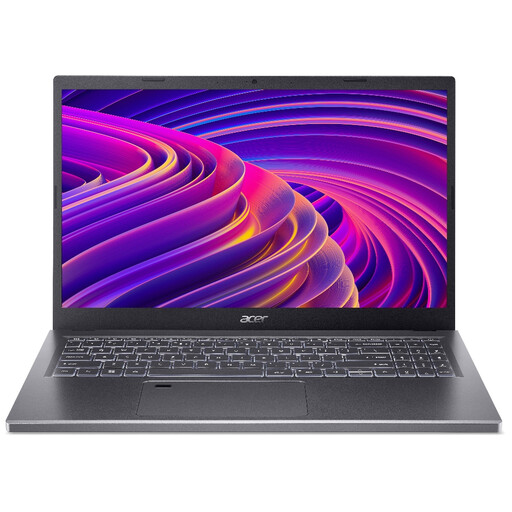
Acer Aspire 5 A515-48M, Ryzen 5 7530U, 16GB RAM, 512GB SSD, Silver
The 15.6-inch Full HD screen gives you a larger area for reviewing slide layouts, provided you are comfortable carrying that size between locations.
Check battery runtime for your workload and the exact charging method if you intend to use a USB-C power source.
View on Joybuy
 No image available
HP 15-fd0060na, Core i3-N305, 4GB RAM, 128GB UFS, Windows 11 Home in S Mode
For slide preparation on this Windows configuration, check your required applications before buying: the listed S Mode limits app installation to the Microsoft Store, and switching out is irreversible.
Also check runtime for slide editing and whether the laptop accepts the charging input you plan to use.
View on Joybuy
 No image available
Apple 13-inch MacBook Air (2026), M5 10-core CPU and 10-core GPU, 24GB memory, 1TB SSD, Midnight
This macOS model is a choice to examine if your presentation files, fonts and accessories work in your Mac workflow. Its listed configuration has a 13.6-inch, 2560 x 1664 display and two Thunderbolt 4 USB-C ports.
Check slide-editing runtime, the charging equipment you intend to carry and the adapter or cable required at the venue.
View on Joybuy
Frequently asked questions
Can I use a stated battery-life figure to plan a day of slide editing?
Use it as a benchmark for the stated test, not as a promise of slide-editing time. Apple gives separate wireless-web and video-streaming figures for its cited MacBook Air specification, while Microsoft says actual Surface runtime can vary significantly with usage, network, configuration and settings.
What should I test before presenting at a venue?
Test the exact deck and its fonts, media, clicker and display connection with the laptop you will use. Check its external-display support and take a compatible cable or adapter where the venue connection requires one; a built-in HDMI port does not remove the need to test the setup.
Where should I pack a power bank when flying?
Keep a power bank in cabin baggage, not checked luggage, as the UK Civil Aviation Authority advises. Check your airline’s requirements for your laptop and any batteries before travel.


