For photographs of a complete printed invitation, start with a camera and standard lens that can frame the card at your working distance; a screen you can view from above can make composition easier. If tiny lettering, foil or texture must fill the frame, compare true 1:1 macro lenses and the space they leave for lighting. Dependable paper and ink colour also calls for consistent lighting and deliberate white balance, with RAW capture useful when you plan to edit the files.
Who is this for?
Colour-critical invitation sellers
If photographs will be used in listings, client proofs or a portfolio, you need a repeatable way to judge how paper whites and printed colours appear. Adobe explains that white balance affects colour throughout an image.
Detail and finish photographers
If typography, foil, embossing or paper texture needs its own close-up photograph, lens magnification and room to position lights matter as much as the camera body.
Occasional flat-lay creators
If you mainly photograph the complete invitation, a standard-lens setup may meet the task without a dedicated macro lens. Check that you can frame and focus on the full card from your intended camera position.
What matters when choosing?
Decide whether your main photograph shows the whole invitation or a small printed detail, then plan how you will light and check its colour. A colour-managed workflow can accompany either lens choice.
Camera with a standard lens
Choose this when: Most images show the complete invitation rather than frame-filling details.
Bear in mind: The lens still needs to focus and frame the card at your working distance; being a kit lens does not establish its close-up magnification.
Camera with a 1:1 macro lens
Choose this when: Small lettering, foil or texture regularly needs to occupy much of the photograph.
Bear in mind: Confirm camera-mount compatibility and working distance before planning where lights will sit. Sony specifies a 2.4 cm minimum working distance for its E 30mm F3.5 Macro.
| Concern | What to check | Who this matters to |
|---|
| Paper and ink colour |
Check the camera’s white-balance controls and RAW support; plan consistent lighting and a neutral reference. |
For listings or client proofs, I need paper whites and ink tones to remain credible from one shoot to the next. Around 33% of consumers put repeatable colour first. |
| Fine details and finishes |
Compare the exact lens’s maximum magnification and working distance, as well as mount compatibility. |
When foil, embossing or fine type is the subject, I need a close crop with enough room to place my lights. Close-detail capture comes first for around 27% of consumers. |
| Overhead composition |
Check whether you can view the screen from your camera position and whether remote control is available. |
If I photograph several invitations from above, I want to check framing without repeatedly moving the camera. A repeatable overhead setup is the primary need for around 27% of consumers. |
| Simple whole-card setup |
Confirm the lens included in the bundle and whether it focuses at the distance needed to frame the entire invitation. |
For occasional full-card photographs, I would rather begin with a manageable camera-and-lens setup than buy close-up equipment I may not use. Around 13% of consumers prioritise that simpler route. |
Buying pitfalls
-
Choosing by megapixels alone
Resolution does not correct a colour cast or establish how closely the supplied lens can focus on small print.
Check the exact body’s RAW and white-balance options alongside the exact lens’s magnification, then plan your lighting.
-
Assuming every macro-labelled lens reaches 1:1
Canon specifies up to 1:2 magnification for the RF 35mm F1.8 Macro IS STM, while Nikon specifies 1:1 for the NIKKOR Z MC 50mm f/2.8 and Sony specifies 1:1 for the E 30mm F3.5 Macro.
Decide how tightly you need to photograph the detail, then compare maximum magnification for the exact lens rather than its name alone.
If the first lens cannot make the close crop you need, adding another lens becomes part of the setup.
-
Leaving invitation colour to automatic white balance
Different lighting can change how white paper and printed colours appear. Adobe explains that white balance adjusts the colour appearance of a photograph.
Use consistent lighting, set white balance deliberately and consider RAW capture when your camera supports it; compare the final image with the physical invitation.
-
Sharing a client’s invitation photographs without checking rights
The UK Intellectual Property Office says photographs and other images are generally protected by copyright. Permission to publish a photograph does not necessarily settle permission to reproduce artwork shown in it.
Before posting a listing or portfolio image, clarify in writing who may use the photograph and whether the invitation design may be shown.
Brands to consider for this setup
Canon
Canon’s EOS R50 is an APS-C body to consider for overhead composition, while the RF 35mm F1.8 Macro IS STM offers a close-focus lens option.
- Canon specifies a 24.2MP APS-C sensor and vari-angle touchscreen for the EOS R50.
- Canon specifies up to 1:2 magnification for the RF 35mm lens, not the 1:1 capture available from the macro lenses cited below.
Nikon
Nikon’s Z50II offers a vari-angle touchscreen; its NIKKOR Z MC 50mm f/2.8 is a separate option when close-detail photography is central to the purchase.
- Nikon specifies life-size 1:1 capture for the NIKKOR Z MC 50mm f/2.8.
- Nikon describes a very short minimum focusing distance for that lens, so check the space available for lights in a close tabletop setup.
Sony
Sony’s APS-C α6400 and E 30mm F3.5 Macro offer a body and separate close-detail lens to compare for invitation photography.
- Sony specifies approximately 24.2 effective megapixels and RAW options for the α6400, and 1:1 magnification for the E 30mm lens.
- Sony specifies a 2.4 cm minimum working distance for the E 30mm lens; check whether that leaves room to light reflective details.
Joybuy cameras for invitation photography
These cameras are listed with zoom lenses for photographing complete invitations. If close crops of print or finishes are essential, check the supplied lens’s focusing and magnification specifications before choosing; a camera-and-zoom bundle does not establish 1:1 macro capability.
 No image available
Sony Alpha 7 III full-frame camera with 28–70mm zoom lens
Consider this camera-and-zoom setup for photographs of the complete invitation. The title identifies a full-frame body and 28–70mm lens; if fine details must fill the frame, check the supplied lens’s maximum magnification and working distance.
View on Joybuy
 No image available
Sony Alpha ZV-E10 II K APS-C camera with 16–50 mm power zoom lens
The 16–50 mm kit zoom makes this a setup to assess for full-invitation photographs. The product title specifies a 26-megapixel APS-C camera and an f/3.5–5.6 lens; check the lens’s close-focus capability if you also need detailed crops.
View on Joybuy
 No image available
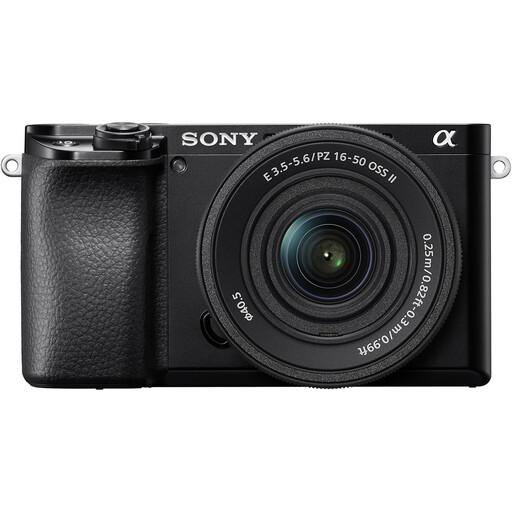
Sony A6400 APS-C camera with 16–50mm power zoom lens
Consider this zoom-lens setup for complete invitation images, particularly if you intend to edit colour after capture. Sony documents approximately 24.2 effective megapixels and 14-bit uncompressed RAW for the α6400; check the supplied lens’s magnification if close detail is important.
View on Joybuy
 No image available
Sony A6700 APS-C camera with 16–50mm lens
The named 16–50mm lens gives you a starting point for framing complete invitations. If colour editing or tight detail crops are part of your workflow, check the exact camera’s RAW and white-balance options and the included lens’s maximum magnification.
View on Joybuy
 No image available
Sony A6100 APS-C camera, listed with 16–55mm zoom lens
For whole-invitation photographs, confirm the exact lens supplied with this A6100 before deciding whether the bundle suits your working distance. The title lists a 16–55mm zoom; also check its close-focus specifications if you need images of small printed details.
View on Joybuy
Common questions
Do I need a macro lens to photograph a complete invitation?
Not necessarily: a standard lens may be enough if it frames the whole invitation at the required distance and keeps the layout sharp. For frame-filling photographs of small details, compare maximum magnification: Nikon and Sony specify 1:1 for the cited macro lenses, whereas Canon specifies 1:2 for its RF 35mm F1.8 Macro IS STM.
How can I keep paper and ink colours consistent?
Use consistent lighting, set white balance for that light and include a known neutral reference where practical. Adobe explains that white balance changes colour appearance and that RAW files allow white balance to be adjusted during processing; confirm RAW support on the camera you choose and compare the final image with the invitation.
Will more megapixels solve poor invitation photographs?
No: resolution alone will not correct colour casts, reflections, focus errors or a lens that cannot frame small details closely enough. Choose the camera alongside a suitable lens and lighting setup, checking magnification and colour-workflow options against the photographs you need to make.
Can I publish photographs of a client’s invitation online in the UK?
Check the relevant permissions before publishing a client’s invitation photograph in a listing or portfolio. The UK Intellectual Property Office says photographs and other images are generally protected by copyright and that copying or sharing online will usually require the copyright owner’s permission; clarify rights in both the photograph and any invitation artwork shown.


