
24/7 Customer Support

Free returns

Same-day & Next-day Delivery

Quality Guaranteed

Unlock Your Welcome Offers: FREE Delivery | Up to 80% OFF | Free 30-day JoyPlus trial
Download the APP
Choosing printer labels can seem straightforward until a roll does not fit the label maker, an adhesive lifts from packaging or printed text smudges during posting. Home users, online sellers, offices and retailers often buy based on price or label count alone, then discover that the format, printer type or backing material is unsuitable.
The practical approach is to match the label to the job before comparing pack sizes. Whether you need shipping labels, barcode labels, price tag labels, address stickers or craft supplies, three common buying traps deserve attention.
Printer labels are not interchangeable. A4 sheets are designed for inkjet, laser or copier trays, while label-maker rolls require a compatible device and width. For example, Phomemo M110 labels and Phomemo M220 labels are not automatically suitable for every compact printer. A roll may look similar but have a different width, core, sensor gap or backing layout.
For small thermal label makers, check the exact model and dimensions. D30 label maker tape is intended for a compatible D30-style device rather than a standard desktop printer.
A roll containing hundreds of small labels may offer good value for price tags or storage boxes, but it will not replace a larger parcel label. Similarly, a pack of A4 sheets can contain many labels while still being less convenient for occasional use if most of the sheet is left unused.
Look at label dimensions, count per roll or sheet and the area available for text or barcodes together.
A label that sticks well to clean cardboard may behave differently on plastic, glass, metal or textured packaging. Moisture, dust, cold storage and repeated handling can also affect adhesion. For parcels and product packaging, confirm whether you need a permanent adhesive or an option that can be removed more easily.
If you are labelling storage containers, folders or temporary displays, browse the easily removable labels range instead of assuming a permanent adhesive is suitable.
Start with the application:
Measure the usable print area rather than relying only on the outside dimensions. A barcode needs enough width and contrast to remain readable after printing.
Check whether the material is designed for:
Thermal rolls should match the label maker’s width and feed mechanism. A4 sheets must be loaded in the correct orientation, with the printable side facing the appropriate direction for your machine. When using inkjet and laser printer labels, confirm that the product description specifically supports your printer type. Some coatings are designed for one printing process and may not perform well with another.
For everyday office and parcel use, a smooth matte surface can make small text and barcodes easier to read. A quick-drying coating may help reduce smudging, but allow printed sheets to dry before stacking or applying them.
For adhesive labels, apply them to a clean, dry and reasonably smooth surface. If a label will be exposed to oil, moisture or outdoor conditions, check the material and adhesive information rather than assuming ordinary paper labels are waterproof. Store unused rolls and sheets in a cool, dry place to help preserve their condition.
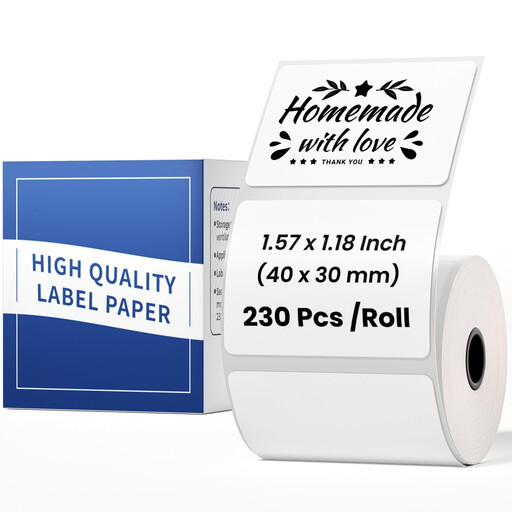
Why This Fits Their Persona: A compact roll format is practical for first-time label-maker owners, home organisation and small batches of product or price labels.
The stated 1.57 x 1.18-inch size and 230 labels per roll make the quantity easier to assess than a vague bulk listing. Check compatibility with an M110 or M220 before ordering.
White roll labels; 230 counts per roll; suitable dimensions for barcode and price-tag applications.
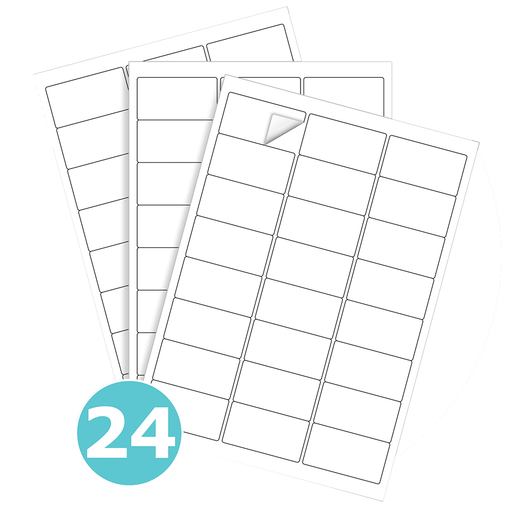
Why This Fits Their Persona: Offices, online sellers and organised home users can print multiple labels from a standard A4 workflow rather than feeding individual pieces manually.
The listing specifies compatibility with inkjet, laser and copier machines, plus a smooth matte finish. Confirm your printer feed and test one sheet before a large batch.
24 labels per A4 sheet; quick-drying coating; permanent hot-melt adhesive; suitable for addresses, barcodes and product stickers.
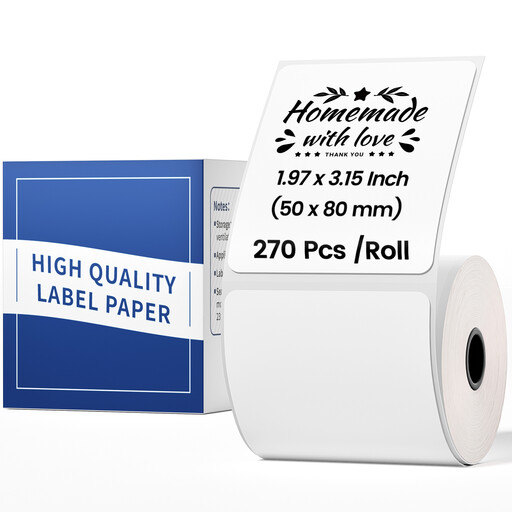
Why This Fits Their Persona: Larger labels provide more working space for parcels, stock identification and detailed product information in a busy small-business or warehouse setting.
Its stated 1.96 x 3.14-inch format is clearly separated from smaller price-label sizes, reducing the risk of ordering a roll that cannot hold the required information.
White labels; 100 counts per roll; designed for M110 and M220 applications; usable for barcodes, package labels and prices.
For a compact D30 device, the Phomemo 0.55 x 1.57-inch D30 label maker tape is supplied as three rolls, which may suit users who regularly print small identifiers. For logos, seals or packaging decoration, the Phomemo 1.96 x 1.96-inch round labels provide a circular format for compatible M110, M220 and PM241BT devices.
Mini-printer owners may prefer Phomemo sticker paper in a 50 mm x 3.5 m format for notes, photos and DIY projects. Confirm that your printer model is listed before purchase, as mini-printer refills are not interchangeable simply because they share a similar width.
We have compiled a complete, real-time list of products that fully satisfy these strict selection criteria and UK safety regulations.
Only when the product listing states compatibility with both types. Load the sheet according to your printer’s instructions and check alignment with a test page before printing a full batch.
Lifespan depends on paper quality, adhesive, storage and exposure to moisture, heat and handling. Keep unused labels flat or on the roll in a cool, dry place, and apply them to clean, dry surfaces.
Running cost depends on label size, pack quantity, printer purchase price and wasted material. Rolls can be convenient for repeated small labels, while A4 sheets may be more economical for batch printing from a computer. Compare the cost per usable label, not only the pack price.