Occasional puzzle printer with a small desk
You print a few A4 sheets at a time and want printing, copying and scanning without setting aside much desk space. Wireless printing may help if your files are on different devices.


For occasional A4 maths puzzles, a compact print, copy and scan inkjet is a sensible starting point if it fits your desk with room to load and collect paper. If you regularly print two-sided packs, consider automatic A4 duplexing and a larger paper cassette; check ink options and device compatibility before choosing.
You print a few A4 sheets at a time and want printing, copying and scanning without setting aside much desk space. Wireless printing may help if your files are on different devices.
You print multi-page packs often enough that automatic two-sided printing and a paper cassette could save you from turning sheets and reloading paper as frequently.
Several people need to print puzzles and other documents, so a larger input tray, mobile printing and stated ink yield matter alongside the space the printer occupies.
Start with A4 support and the space needed to operate the printer, then weigh how often you print packs, replace ink and send files from different devices.
| Concern | What to check | Who this matters to |
|---|---|---|
| Desk fit and A4 sheets | Measure usable desk width and depth. Confirm A4 support and leave room for the paper feed and output. | If I have little desk space, the printer must fit while I load and collect full-size puzzle sheets. Around 33% of consumers put desk fit and A4 use first. |
| Multi-page packs | Check whether double-sided printing is automatic for plain A4 paper and how much paper the input holds. | When I print packs regularly, turning every sheet or repeatedly refilling the tray becomes inconvenient. Around 25% of consumers prioritise easier batch printing. |
| Ink changes | Compare compatible cartridges and their stated yields for the exact model; review optional ink-plan terms separately. | If puzzle sheets are part of frequent household printing, I want to know how often I may need to replace ink. For around 25% of consumers, that is the primary concern. |
| Printing from devices | Confirm compatibility with your phone, tablet or laptop and check the required wireless or app setup. | My puzzle files are on more than one device, so sending them to the printer needs to suit how my household works. Around 17% of consumers place device connectivity first. |
A printer's stored dimensions are not the whole working space: paper may load behind it, and finished sheets need somewhere to go.
Measure the usable desk and compare the exact model's dimensions and paper path before ordering.
Canon lists manual two-sided printing for the PIXMA TS3750i, while the PIXMA TS6550i automatically duplexes plain A4 or Letter paper. That distinction matters when you print two-sided packs often.
Check the duplex mode for the paper size and type you intend to use.
Turning sheets by hand also takes time and can mean reprinting a sheet fed back in the wrong orientation.
Cartridge size affects how often ink needs replacing. Canon lists different black-page yields for standard and XL cartridges used with the PIXMA TS3750i; Brother also publishes stated yields for the ink supplied with the DCP-J1200W.
Check the compatible cartridges and their yield conditions against how frequently you expect to print.
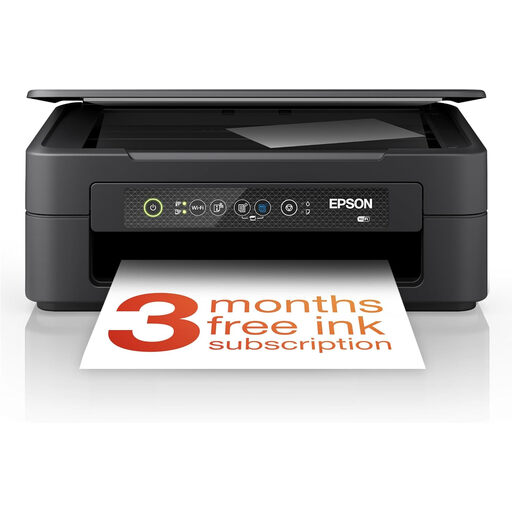
The Expression XP-2200 represents a compact A4 multifunction option for occasional home printing.
The PIXMA TS3750i and TS6550i illustrate different paper-handling choices for occasional sheets and regular packs.
The DCP-J1200W is a reference point for households interested in mobile operation and fewer paper reloads.
These choices cover occasional A4 puzzle printing and models to consider for more frequent household document use. Compare their operating space before deciding which belongs on a small desk.
 No image available
Consider this model if you regularly print two-sided A4 puzzle packs. Canon specifies automatic duplexing for plain A4 paper and a 100-sheet cassette; measure the desk space needed to load paper and collect output.
 No image available
For occasional A4 puzzle sheets, this print, copy and scan model offers the Wi-Fi and Wi-Fi Direct options described by Epson. Confirm its dimensions and paper clearance for your desk, and check its double-sided printing mode if you make packs.
 No image available
If puzzles are part of broader household document printing, assess this all-in-one inkjet against your available desk space before choosing it. Confirm A4 support, paper clearance, double-sided printing options and compatible ink for the exact model.
No, not if you mainly print occasional one-sided sheets. For regular two-sided packs, automatic duplexing avoids turning each sheet yourself: Canon specifies manual duplexing for the PIXMA TS3750i and automatic duplexing for plain A4 or Letter paper on the PIXMA TS6550i.
Measure the usable width and depth, then allow space to load paper and collect printed sheets. Compare dimensions for the exact model rather than relying on a compact label alone.
Yes, if the printer supports your device and the connection method you plan to use. Epson lists Wi-Fi and Wi-Fi Direct for the XP-2200, while Brother describes mobile management through Brother Mobile Connect for the DCP-J1200W; check compatibility for your exact device and printer.
Change-of-mind cancellation and remedies for faults are different. GOV.UK says customers buying online can cancel within 14 days of receiving an item, while goods that are faulty or misdescribed have separate refund protections. Keep your order details and check the applicable return steps.