Households with a small study space
If spelling sheets will be printed on a narrow desk, shelf or shared work surface, compare the printer’s body dimensions and leave room to load A4 paper, collect pages and open any scanner lid.


For spelling worksheets on a small desk, start with a compact colour multifunction inkjet if you also need to scan, copy or print in colour, but measure the printer and allow room to handle paper. A mono laser suits black-text sheets when its functions meet your needs; a refillable-tank multifunction is worth considering for frequent printing if its body fits.
If spelling sheets will be printed on a narrow desk, shelf or shared work surface, compare the printer’s body dimensions and leave room to load A4 paper, collect pages and open any scanner lid.
If worksheets are almost entirely black text, the print-only Brother HL-L1240W is one route to consider. Brother lists a 150-sheet tray and output of up to 20 pages per minute for this model, but it cannot print in colour, scan or copy.
If you expect regular printing and still need colour, scanning and copying, a refillable-tank multifunction such as the Epson ET-2870 may suit the task. Check its desk depth alongside the practical demands of refilling ink.
Choose when: Spelling resources need colour, or you occasionally copy or scan worksheets.
Trade-off: The Epson XP-2200 has manual two-sided printing, so double-sided sheets need your help.
Choose when: Most sheets are black text and a monochrome printer covers the functions you need.
Trade-off: The compact Brother HL-L1240W is print-only; other mono laser models may offer additional functions.
Choose when: You expect frequent worksheet printing and still need colour, copying and scanning.
Trade-off: Epson lists the ET-2870 at 347 mm deep, compared with 300 mm for the XP-2200; check whether the extra depth leaves room for paper handling.
| Concern | What to check | Who this matters to |
|---|---|---|
| Desk space and paper access | Measure the available width and depth, then allow space to load and collect A4 sheets and open any scanner lid. | If the desk is shared, I need to use the printer without moving everything around it. Around 42% of consumers would put usable desk space first. |
| Black-text output and functions | Check whether you need colour, scanning or copying; then compare tray capacity and whether two-sided printing is manual. | When I print batches of text-led exercises, I want the right functions without repeated interruptions. Roughly 33% of consumers would make this their primary concern. |
| Repeat printing and refills | Consider how often you print, the compatible consumables and their stated yields; check the printer’s dimensions too. | With worksheets to print regularly, I would rather plan around refills than discover they interrupt the routine. About 25% of consumers would prioritise managing consumables. |
Printer bodies vary: Epson lists the XP-2200 at 390 × 300 × 146 mm, while the Canon TS3750i is listed at 435 × 327 × 145 mm. Neither set of body dimensions tells you how much room you need to handle paper.
Measure your desk in millimetres and check where paper enters and exits before deciding whether a model fits.
Brother’s HL-L1240W prints in monochrome and does not scan or copy. The Epson XP-2200 and Canon TS3750i offer print, scan and copy functions.
Look through a typical week’s resources. If colour sheets, copies or scans recur, compare multifunction models before settling on print-only.
Epson describes individual replacement inks for the XP-2200 and refillable tanks for the ET-2870. Epson’s stated page yields for the ET-2870 are manufacturer ratings, not a prediction of your household’s results.
Estimate how many black and colour pages you print, then check compatible consumables, stated yields and any optional subscription terms for the exact model.
Epson lists the XP-2200 with manual duplexing; Brother lists manual two-sided printing for the HL-L1240W, and the Canon TS3750i is listed with manual duplexing.
If you often print on both sides of A4 sheets, confirm that the exact model specifies automatic duplexing for that paper type.
Epson’s XP-2200 represents the compact colour print, scan and copy route; its ET-2870 represents the refillable-tank multifunction route.
Brother’s HL-L1240W is a compact mono laser example for households that only need to print black-text sheets.
Canon’s PIXMA TS3750i is a colour print, copy and scan option for occasional worksheet use.
These models offer different routes for A4 spelling worksheets, including colour multifunction, monochrome laser and refillable-tank printing. Compare each model’s functions and the space needed to use it, not just its body size.
 No image available
Consider this model for repeated A4 worksheet printing if you also need copying or scanning. Check that its listed 399 × 410 × 254 mm body leaves enough room on your desk for paper and access.
 No image available
Consider this monochrome model for text-led spelling sheets if copying or scanning is also useful. Its listed body measures 385 × 340 × 255 mm; check paper access, and allow for manual handling when printing on both sides.
 No image available
Consider this model for black-text worksheets when wireless and two-sided printing matter. The product name specifies a 150-sheet input tray; measure space for its listed 43 × 33 × 27 cm body and confirm the exact copy and scan functions before relying on either.
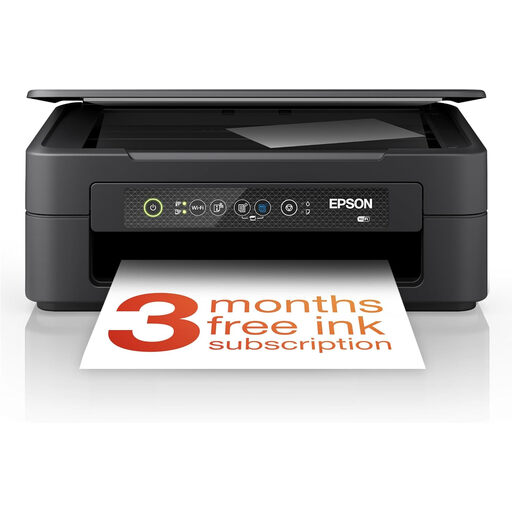 No image available
This A4 print, scan and copy model suits spelling sheets that sometimes need colour or copying. Epson lists a 390 × 300 × 146 mm body, Wi-Fi and Wi-Fi Direct; two-sided printing is manual. Measure paper clearance and confirm tray capacity for the exact listing.
Yes, if the exercises are almost entirely black text and the model has the functions you need. Brother’s print-only HL-L1240W has a 150-sheet tray and rated output of up to 20 pages per minute, but cannot print colour, scan or copy.
You can with a model that supports an appropriate direct connection: Epson lists Wi-Fi Direct for the XP-2200. Check the exact printer’s phone-printing options rather than assuming ordinary Wi-Fi support includes Wi-Fi Direct.
Not necessarily. Epson lists manual duplexing for the XP-2200, Brother lists manual two-sided printing for the HL-L1240W, and the Canon TS3750i is listed with manual duplexing. Check for automatic A4 duplexing if you do not want to turn sheets yourself.
Check your council’s current electrical-equipment recycling arrangements or an available retailer take-back option before taking it anywhere. UK government guidance on waste electrical and electronic equipment explains that the rules aim to reduce electrical equipment sent to landfill.