Regular worksheet coordinators
People preparing black-text spelling sheets for scheduled sessions who want fewer interruptions to reload paper or replenish ink.


For recurring spelling handouts, choose a printer around the number of sheets prepared per session, how often volunteers print, and whether the exercises use both sides of the page. A refillable ink-tank model is worth considering for repeated batches; prioritise tray capacity and automatic duplex printing for preparing packs, but choose an automatic document feeder only if the group also scans or copies paper originals.
People preparing black-text spelling sheets for scheduled sessions who want fewer interruptions to reload paper or replenish ink.
People printing modest batches who may occasionally need to copy or scan an original and share printing duties with other volunteers.
People finding room for a printer in a hall, library room or home workspace while keeping handout preparation manageable.
Start with a typical session’s handout count, then check how the printer will handle that batch and how volunteers will send files to it. An automatic document feeder matters separately, when someone needs to scan or copy paper originals.
| Concern | What to check | Who this matters to |
|---|---|---|
| Ink and refills | Compare supplied and replacement ink yields on the same basis, and confirm the compatible ink code for the exact model. | If I print exercises every session, I want ink changes to interrupt preparation as little as possible. Around 44% of consumers put refill frequency first. |
| Preparing batches | Check tray capacity, rated mono print speed and automatic duplex printing if exercises use both sides of a sheet. | When several learners need packs at once, I want to avoid repeatedly reloading paper or turning pages by hand. Around 33% of consumers prioritise batch handling. |
| Shared use | Confirm compatibility with volunteers’ devices and the venue’s connection; assess scan and copy functions only if they will be used. | If different volunteers prepare the sheets, I need a workable way for each of them to print. Around 23% of consumers put straightforward shared use first. |
A printer’s ink yield does not tell you how often a volunteer will reload paper or wait for a set of handouts. The tray, duplex function and rated mono speed address different parts of that task.
Work out the pages per learner, the number of learners and the sessions between print runs. Compare the exact models against that workload.
A small tray can mean more volunteer time spent reloading paper during a print run.
Epson says some supplied EcoTank ink is used during initial setup, so a supplied-bottle yield should not be treated as the yield of a later replacement bottle.
Check which bottles each quoted yield describes and note the replacement code for the model you choose.
The first refill may be needed sooner than a replacement-bottle yield suggests.
An automatic document feeder handles paper originals for scanning or copying. It does not make a worksheet sent from a computer print faster.
If volunteers only print prepared files, focus on paper input, duplex printing and the batch size instead.
Ink systems vary by model. A bottle intended for another printer should not be chosen just because its brand, colour or shape looks familiar.
Check the exact model and its compatible replacement ink code before obtaining supplies.
These examples show different paper-handling arrangements within refillable printer ranges; check the exact model rather than assuming a feature applies across a brand.
Brother UK specifies the DCP-T780DW as a refillable print, scan and copy model relevant to recurring handouts.
Epson’s EcoTank ET-2850 offers a refillable print, scan and copy approach for modest recurring A4 batches.
Canon’s MAXIFY MegaTank GX6550 is an office-oriented refillable model to consider when the group regularly prepares larger packs.
These printers offer refillable ink-tank and wireless inkjet approaches to preparing spelling handouts. Match each model’s workflow to the group’s batch size and check ink compatibility before choosing.
 No image available
Consider this model for recurring worksheet packs if volunteers also need to copy or scan paper originals.
Brother UK specifies a 150-sheet tray, automatic duplex printing and a 20-sheet automatic document feeder. Check that its connection options work with the devices used at the venue.
 No image available
Consider the GX6150 if the group prepares frequent or larger worksheet packs, and check that its paper handling and footprint suit the available space.
Confirm its exact ink-bottle compatibility before choosing. The specifications of the separate GX6550 model do not establish those of the GX6150.
 No image available
This is a refillable option to assess for regular exercises when the group also wants printing, scanning and copying in one device.
If volunteers often handle multipage paper originals, check whether the model’s scanning workflow suits them; also confirm the compatible replacement ink.
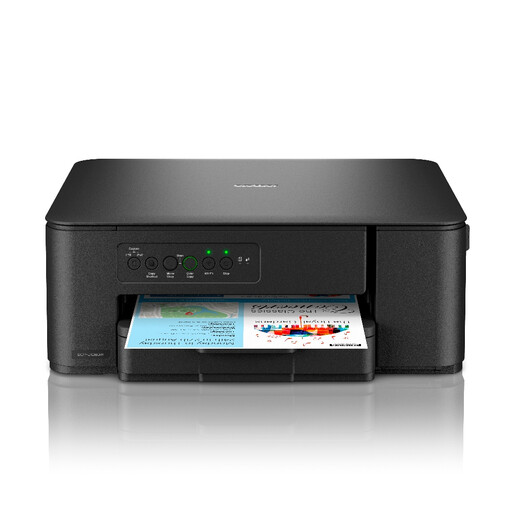 No image available
Consider this wireless inkjet for shared handout preparation if its paper-handling arrangement fits the group’s sessions.
For repeated batches, compare the compatible cartridge replacement needs with a refillable model before deciding.
 No image available
Consider this all-in-one inkjet if the group has room for a larger document-handling device and regularly prepares substantial packs.
Check its replacement cartridges against the expected print volume, and plan a suitable place for the stated 20.2 kg device.
Not if volunteers only print files that are already prepared. An automatic document feeder is useful for repeatedly scanning or copying paper originals; check the paper tray, duplex function and print speed separately for digital handout batches.
Check that the volunteers’ actual computers or mobile devices can use the selected printer and that the venue’s network arrangement permits the intended connection. Brother lists 2.4 GHz and 5 GHz Wi-Fi plus USB for the DCP-T780DW, but those features alone do not establish compatibility with every device or venue.
Some supplied ink can be used during initial setup. Epson makes this distinction for its EcoTank supplies, so check whether a quoted page yield applies to supplied or replacement bottles before planning refills.
Follow the selected model’s maintenance instructions and keep an eye on ink levels. Epson warns that running cleaning cycles with low ink can damage the printer; procedures vary by model.