
24/7 Customer Support

Free returns

Same-day & Next-day Delivery

Quality Guaranteed

Unlock Your Welcome Offers: FREE Delivery | Up to 80% OFF | Free 30-day JoyPlus trial
Download the APP
Buying a printer can look straightforward until you compare ink costs, connectivity, print speeds and paper handling. A compact home printer may suit occasional schoolwork, while a small business could quickly outgrow it. 3D printing, labels and instant photos require entirely different technologies.
The most common mistake is choosing a model based on one impressive specification. A high maximum print speed may only apply in draft mode, a low purchase price can hide expensive cartridges and wireless printing may not work smoothly with every device. Use this guide to compare the practical details before selecting from the available range of printers.
Printer packaging may show a maximum speed measured in pages per minute, but this figure can relate to draft-quality documents rather than standard black text or colour images. For regular use, check whether the quoted figure is an ISO speed, a draft speed or a label-printing speed.
If you often print multi-page documents, also check for automatic duplex printing, an automatic document feeder and a suitable paper tray capacity. These features can save more time than a headline speed figure.
Cartridge-based inkjet printers can be suitable for light use, but frequent printing may make replacement ink a major ongoing expense. Individual cartridges are more practical than combined colour cartridges because you replace only the colour that has run out.
For higher volumes, a refillable EcoTank printer can reduce the frequency of consumable purchases. However, compare the initial price, included ink, replacement bottle costs and your expected monthly page count rather than assuming every tank printer will be economical for every household.
A Wi-Fi printer should support the devices you actually use. Look for compatibility with Windows, macOS, Android and iOS, plus features such as Wi-Fi Direct, Apple AirPrint or a dedicated mobile app. A USB connection can also be useful as a backup if your home network changes.
For a label printer, Bluetooth or Wi-Fi may be more convenient than USB. For a portable photo printer, smartphone pairing and app compatibility matter more than A4 paper support.
For text, a high resolution is not the only consideration; ink formulation, print-head technology and paper compatibility also affect clarity. Photo users should check supported paper sizes, borderless printing and colour management.
For labels, resolution should be considered alongside barcode compatibility and maximum print width. For 3D printers, layer height, nozzle temperature, build-plate design and calibration systems are more relevant than DPI.
Calculate likely costs using your own habits:

Why This Fits Their Persona: This compact all-in-one suits UK households, students and occasional home-office users who need A4 printing, scanning and copying without a large footprint.
Individual ink cartridges help avoid replacing a full colour set when one colour is depleted, while automatic duplex printing can reduce paper use.
Print, scan and copy functions; Wi-Fi and mobile printing; automatic duplex printing; 100-sheet rear tray.

Why This Fits Their Persona: Home offices and small businesses with regular document workloads can benefit from refillable tanks, a 250-sheet tray and an automatic document feeder.
Its refillable ink-tank design is intended for higher-volume use, so buyers can compare bottle yields rather than relying only on a low initial price.
Wi-Fi, Wi-Fi Direct and Ethernet; automatic duplex printing; 35-page ADF; 250-sheet input capacity.

Why This Fits Their Persona: Online retailers, small businesses and home offices printing shipping, filing or address labels can use a dedicated wired label printer instead of a general-purpose device.
Direct thermal printing does not require ink, toner or ribbons, although users still need compatible DK label rolls.
Up to 71 mm per second; 300 × 600 DPI; integrated cutter; USB connectivity; support for multiple barcode formats.
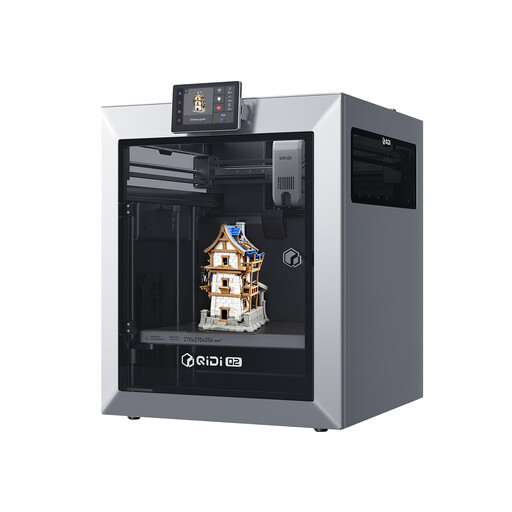
Why This Fits Their Persona: Makers, educators and engineers seeking high-speed 3D printing features can consider an enclosed FDM machine with a heated chamber and larger build space.
The specification lists auto-levelling, filament detection and power-loss recovery, which address common setup and interrupted-print problems.
Up to 600 mm/s listed speed; 65°C enclosed heated chamber; 370°C all-metal hotend; optional multi-colour printing through QIDI BOX.
We have compiled a complete, real-time list of products that fully satisfy these strict selection criteria and UK safety regulations.
Yes, an inkjet home printer is suitable for documents, schoolwork and photographs, particularly when monthly volumes are moderate. Choose a multifunction printer if you also need scanning and copying. For frequent monochrome documents, compare running costs with laser alternatives where available.
Use automatic duplex printing, print only the pages required and compare replacement ink or toner yields before buying. An ink-tank printer may suit regular users, while a direct thermal label printer avoids ink purchases but requires dedicated label rolls. Always check the cost of the correct consumables rather than relying on general low-cost printing claims.
Place it on a stable, heat-resistant surface with suitable ventilation and clear access to the power connection. Keep children, flammable materials and moisture away from the machine. Follow the manufacturer’s instructions for filament storage, heated components and routine maintenance.