An encrypted local copy alongside a separately protected cloud backup gives household financial records two recovery paths rather than relying on one drive or account. Choose how to use each according to your priorities: offline control, access across devices and the ability to restore older files. Check password recovery and test a restore before relying on either copy.
Who each approach suits
Privacy-first local archivists
If you want statements primarily under your physical control and do not need frequent access away from home, an encrypted local drive may suit your everyday archive. Keep another protected copy so that loss of the drive does not mean loss of the records.
Multi-device document organisers
If you retrieve records from a home computer and mobile devices, cloud storage can make an organised folder archive easier to access. Check which devices can open any protected area and how you would regain account access.
Recovery-focused backup planners
If accidental deletion, damaged files, device failure or theft is your main worry, prioritise a separately recoverable copy and usable version history. The National Cyber Security Centre advises that neither local nor cloud backups resist destructive attacks by default.
What matters when choosing
Decide where you want to access your records, then check how each route protects the files and lets you recover them.
Encrypted external storage
Consider it: When you want a disconnected archive under your physical control.
Allow for: A drive can be lost or damaged, and access depends on managing its credentials.
Cloud storage
Consider it: When you need records on several devices; choose between an account-protected area and end-to-end encryption according to your privacy needs.
Allow for: Account access and recovery matter, while some encryption arrangements require separately kept recovery material.
Local and cloud copies
Consider it: When you want a local archive and another path to recover records after a device or account problem.
Allow for: Two copies take ongoing organisation; synchronisation alone does not ensure an older file can be restored.
| Concern |
What to check |
Who this matters to |
| Recovering records |
Check whether earlier and deleted files can be restored, for how long, and whether a separate copy survives changes to the everyday archive. |
If a statement is deleted or damaged, I need an older copy I can actually retrieve. Around 42% of consumers would put recovery first. |
| Privacy and access control |
Compare the encryption model, two-step verification and what happens if a password or recovery credential is lost. |
For sensitive account documents, I want to control who can open the files without locking myself out. Around 33% of consumers would make privacy and access control their primary concern. |
| Organisation and access |
Confirm that your devices, connectors or apps can open the archive and that its folder arrangement is practical to maintain. |
When I need a document on another household device, I want to find and open the right version without reorganising everything. Around 25% of consumers would prioritise routine organisation and access. |
Backup mistakes to avoid
-
Treating one encrypted drive as the whole backup
Encryption restricts access; it does not create another copy if the drive is lost or damaged. The National Cyber Security Centre also warns that backups need protection against destructive action.
Maintain a separately protected copy and periodically restore a test document from each backup path.
-
Confusing synchronisation with recoverable history
An unwanted change or deletion can reach synchronised files. Microsoft describes a 30-day version history for personal OneDrive files; Backblaze documents different history settings for its backup service.
Check the applicable history period, deleted-file handling and restore process for the service and plan you intend to use.
-
Choosing encryption without planning recovery
Resetting an account password does not necessarily unlock files encrypted under the previous credentials. Proton says access to earlier Proton Drive files after a reset requires the previous password, a recovery phrase or a recovery file.
Set up and safely store the relevant recovery material before moving your only copy; keep it apart from the everyday device.
-
Reusing a cloud-storage password
A reused password can expose more than one account. The National Cyber Security Centre recommends two-step verification for important accounts.
Use unique credentials, enable two-step verification for storage and recovery email accounts, and keep recovery methods current.
Relevant brands to consider
Kingston IronKey
Encrypted external storage for a physically controlled local archive.
- Kingston describes its Vault Privacy 80ES as an OS-independent external SSD with XTS-AES 256-bit encryption, a touch screen and administrator and user password options.
- Those details concern the Vault Privacy 80ES, not every IronKey model. Check the exact model’s capacity and access-recovery process, and maintain another copy.
Samsung
Portable SSDs for households organising a local document archive.
- Samsung identifies fingerprint or password unlock on selected T7 Touch variants.
- Do not assume those unlock options apply to other T7 variants. A portable SSD still needs a separate recovery copy.
Microsoft OneDrive
Cloud document access for households using supported web, mobile and Windows routes.
- Microsoft says Personal Vault adds a further verification step and locks after inactivity.
- Check whether Personal Vault works on the devices you use. Microsoft describes 30 days of version history for personal files, so confirm whether that meets your recovery needs.
Proton Drive
End-to-end encrypted cloud storage for remote access with a focus on limiting provider access to file contents.
- Proton says only you and chosen recipients can open files protected by its end-to-end encryption.
- Proton says a password reset requires the previous password, recovery phrase or recovery file to unlock earlier files. Plan where to keep that material.
Backblaze
Computer backup for households concerned with restoring historical copies of files.
- Backblaze documents 30-day and one-year version-history settings for its Personal Backup service.
- Check which devices and external drives are covered, the selected history setting and the conditions for continued access before relying on it as a long-term archive.
External drives for a local copy
These portable drives are options for keeping household records locally. Choose the capacity and access method that fit your archive, then arrange a separately protected copy and check how you would regain access if credentials are lost.
 No image available
Samsung T7 Shield Portable SSD, 1 TB, Blue
Consider this for a portable local archive of statements. The named variant has 1 TB of storage and USB 3.2 Gen 2 connectivity. Check password setup and recovery for this variant, and keep another recoverable copy.
View on Joybuy
 No image available
Samsung Portable SSD T7, 2 TB, Grey
Consider the 2 TB variant if your local archive needs that stated capacity. Its name specifies USB Type-C 3.2 Gen 2. Confirm how password protection is enabled and recovered before relying on the drive, and maintain another copy.
View on Joybuy
 No image available
Samsung Portable SSD T7, 1 TB, Blue
Consider this 1 TB T7 variant for a portable local document archive. Its name specifies USB Type-C 3.2 Gen 2. Check password setup and recovery for the drive, and do not rely on it as your only copy.
View on Joybuy
 No image available
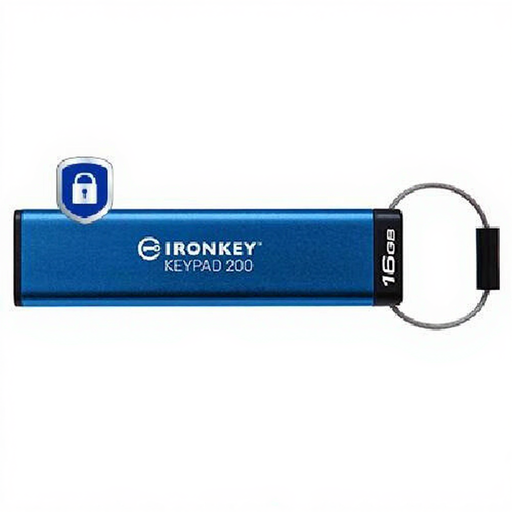
Kingston IronKey Keypad 200, 16 GB
Consider this for a compact local archive if its 16 GB capacity covers your files. The product name identifies an encrypted Keypad 200 variant; check its PIN-recovery process and connector compatibility before making it part of your backup arrangement.
View on Joybuy
Questions about private backups
Is cloud synchronisation enough to back up financial documents?
Not on its own if you need to recover files after unwanted changes or deletion. The National Cyber Security Centre says cloud and on-premises backups are not ransomware-resistant by default; check whether you can restore an earlier version and maintain an independent recovery path.
What should I do before uploading sensitive statements?
Secure the storage account with a unique password and two-step verification, and check the recovery email account too. The National Cyber Security Centre notes that two-step verification makes access harder for someone who knows a password; also confirm that your recovery methods remain usable.
Will resetting my password restore access to encrypted files?
Not necessarily. Proton says that, after a Proton Drive password reset, unlocking earlier files requires the previous password, a recovery phrase or a recovery file. Check the recovery procedure for your chosen drive or service before storing your only copy.


