TV owners checking compatibility
If you use an existing TV, soundbar, console or set-top box, identify where its sound can leave the system before choosing headphones or a transmitter.


Choose a private-listening route by checking which device supplies the sound and which audio outputs it offers. Direct Bluetooth needs compatible headphone-audio support; a wired connection needs a usable socket; and a transmitter needs an output and signal format it accepts. If someone else must hear the room speakers or soundbar, check simultaneous playback for the exact equipment rather than assuming headphones will leave it playing.
If you use an existing TV, soundbar, console or set-top box, identify where its sound can leave the system before choosing headphones or a transmitter.
If only you need to hear the programme, a supported TV or streaming-device headphone feature may suffice. Check whether connecting headphones mutes the room speakers.
If two people need headphones, or one needs headphones while another uses room audio, check the exact device and connection for simultaneous output.
Start with the device playing your programme, then check its headphone-audio options. If a soundbar is part of the setup, confirm that any private-listening feature or optical passthrough covers that source and preserves room audio if needed.
| Concern | Buying checks | Who this matters to |
|---|---|---|
| Connection compatibility | Check the exact TV for Bluetooth headphone audio or a usable wired output. Match any transmitter to the TV’s optical or analogue output. | If my TV uses a soundbar or several viewing devices, I need to know where headphone audio can come from before choosing a connection. Around 36% of consumers put connection compatibility first. |
| Solo private listening | Check whether the TV or main streamer supports your headphone method and whether connecting it mutes room audio. | When I watch alone after others have settled down, I want to hear my programme without relying on the shared-room speakers. For around 29% of consumers, simple solo listening is the primary need. |
| Listening together | Confirm support for two headphone listeners or for headphones and room audio at the same time; these are different requirements. | If someone watches with me, I need to know whether we can both use headphones or whether they can keep hearing the soundbar. Around 21% of consumers prioritise shared listening or room-audio coexistence. |
| Lip-sync and source coverage | Check codec compatibility at both ends of a transmitter connection and whether a streamer’s listening feature covers external devices. | For games or video where audio delay distracts me, I also need private sound from the device I actually use. Around 14% of consumers put timing or coverage of their viewing sources first. |
Samsung UK advises checking TV Bluetooth support. Sony UK says relevant Android and Google TV models need A2DP support to pair with Bluetooth audio devices.
Find your exact TV model and confirm Bluetooth headphone-audio support in its manual before buying for direct pairing.
Roku mobile Headphone Mode mutes TV speakers, and Apple says connecting headphones to Apple TV 4K turns off other device speakers. Sony UK says simultaneous output depends on the TV model and connection.
If another person needs room audio, confirm headphone-and-speaker playback for your exact TV, soundbar and connection.
Avantree’s stated low-latency capability for its Oasis Plus 2 depends on compatible headphone codecs. Its optical input also requires PCM rather than Dolby or DTS.
Check the codecs of both devices and whether your TV can supply the transmitter’s required optical format.
If the codecs do not match, using the claimed low-latency mode may require different headphones or a different transmitter.
Roku says mobile Headphone Mode does not support external games consoles, Blu-ray players or cable and satellite set-top boxes.
List the devices you watch before choosing streamer-based listening; consider an appropriate TV-audio output route if external inputs must be included.
A reference point if you are considering direct Bluetooth pairing from a Samsung Smart TV.
Useful guidance for checking TV Bluetooth audio and whether headphones can coexist with room speakers.
Relevant when most viewing comes through a compatible Roku device rather than another TV input.
Relevant to Apple TV 4K viewing with Bluetooth headphones or compatible AirPods and Beats.
Its Oasis Plus 2 illustrates the connection checks involved in a dedicated TV Bluetooth transmitter.
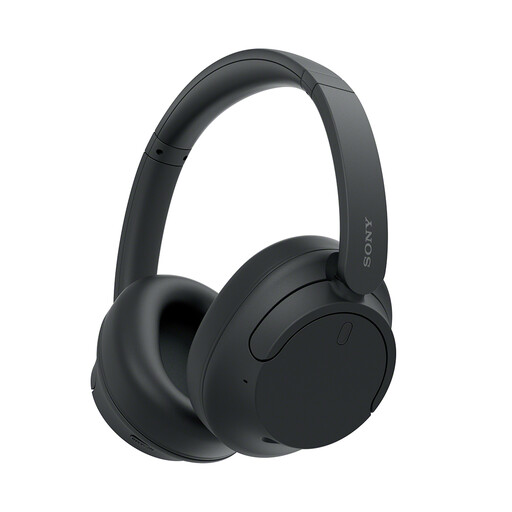
These headphones are a choice to consider for one-person TV listening if your television or viewing device offers a compatible audio connection. Check that connection before relying on them for late-night viewing.
 No image available
For solo TV listening, consider these headphones only after checking that your TV or viewing device provides a compatible audio route.
If using a wired connection, check the TV’s headphone output and the distance to your seat. If someone else needs room audio, confirm simultaneous playback for your exact setup.
No. Check the exact model for Bluetooth headphone-audio support. Samsung UK advises confirming Bluetooth support, while Sony UK specifies A2DP for relevant Android and Google TV models and does not guarantee connection with every Bluetooth device.
Only if the exact equipment and connection support simultaneous output. Sony UK says some TVs do not; Roku mobile Headphone Mode mutes TV speakers, and Apple TV 4K turns off other device speakers when headphones connect.
Check the transmitter’s inputs rather than assuming it will. Avantree says its Oasis Plus 2 accepts optical or 3.5 mm AUX input but does not support HDMI-only TVs or HDMI ARC/eARC; match any transmitter to an output your TV actually provides.
No, not when the console is an external device connected to the TV. Roku says mobile Headphone Mode also excludes external Blu-ray players and cable or satellite set-top boxes, so check which device supplies each programme you watch.
Yes, with equipment that explicitly supports the two headphone connections you intend to use. Apple UK documents sharing Apple TV 4K audio with up to two compatible pairs of AirPods or Beats, while Avantree specifies two-headphone connection for its Oasis Plus 2 transmitter; check the exact devices and connection before buying.