
24/7 Customer Support

Free returns

Same-day & Next-day Delivery

Quality Guaranteed

Unlock Your Welcome Offers: FREE Delivery | Up to 80% OFF | Free 30-day JoyPlus trial
Download the APP
A professional car diagnostic scanner can do far more than switch off a dashboard warning light. The right automotive diagnostic tool can scan multiple control modules, display live data, run active tests, complete service resets and, on compatible vehicles, support ECU coding.
However, comparing scanners is not straightforward. Product listings often use terms such as “full system”, “99% coverage” and “bi-directional” without explaining what those features include. For UK mechanics, independent garages and advanced DIY users, three purchasing traps deserve particular attention.
A basic OBD2 scanner may read emissions-related engine codes but have no access to the transmission, ABS, SRS, body control or air-conditioning modules. If you need a genuine full-system car scanner, check whether the product specifically lists access to the vehicle’s available ECUs.
The phrase “all systems” does not mean every function will work on every vehicle. Coverage can vary by make, model, engine, control module and software version.
A bi-directional OBD2 scanner sends commands to a vehicle ECU to activate supported components. This may help you test cooling fans, fuel pumps, windows, solenoids or air-conditioning clutches without dismantling parts.
The available tests depend on the vehicle. A scanner may support active testing in general but offer only a limited selection for a particular UK vehicle. Always check compatibility by VIN or ask the seller before using this feature for a customer repair.
A low purchase price can become less attractive if updates are subscription-based or if secured vehicle gateways require separate authorisation. Some FCA vehicles require an AutoAuth account for protected functions, and that access may involve an additional charge from the vehicle manufacturer.
A lifetime free updates OBD2 scanner can reduce long-term software costs, but read the wording carefully. Updates may cover certain functions or vehicle packages only, while advanced services may still vary by model.
For workshop use, look beyond the words “car fault code reader”. Confirm whether the scanner can:
A vehicle diagnostic tool with 15 service functions may suit routine maintenance, while a unit with more resets and coding features may be more practical for a busy independent garage.
An active test diagnostic scanner should state which components it can command. Typical examples include injectors, cooling fans, valves, lamps, locks and motors. These tests can help separate an electrical or control fault from a mechanical problem, but they should be used with the manufacturer’s service procedures.
An ECU coding tool is a different requirement from code reading. Coding, module replacement and adaptations can affect vehicle operation. Use a stable power supply during programming and confirm the exact vehicle support before starting. Never assume that coding is available simply because the product description mentions it.
Newer vehicles may use CAN-FD or DoIP communication. CAN-FD supports larger and faster data frames, while a DoIP diagnostic tool communicates through automotive Ethernet-based systems. These protocols can be important when working on newer models, but protocol support alone does not guarantee access to every ECU or special function.
For UK use, also check EOBD compatibility, FCA AutoAuth requirements, supported languages, warranty terms and whether the interface works through Bluetooth, Wi-Fi or a supplied cable.
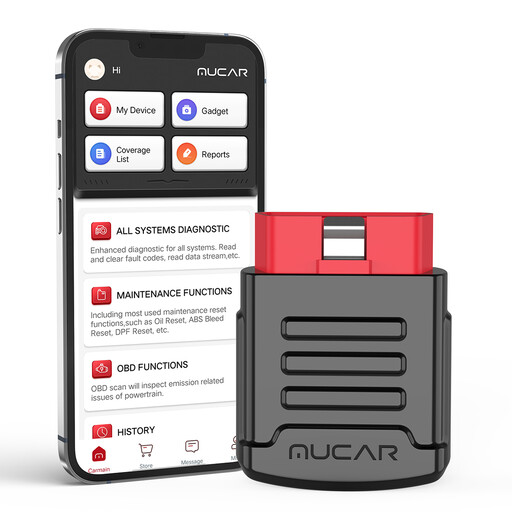
Why This Fits Their Persona: A compact Bluetooth option for home mechanics, mobile users and small garages that want full-system access through an Android or iOS device.
It specifies full-system diagnostics separately from its 15 reset services, making the scope easier to assess. Reset availability remains vehicle-dependent.
Bluetooth operation, support for 128+ brands and lifetime access to core diagnostic functions.
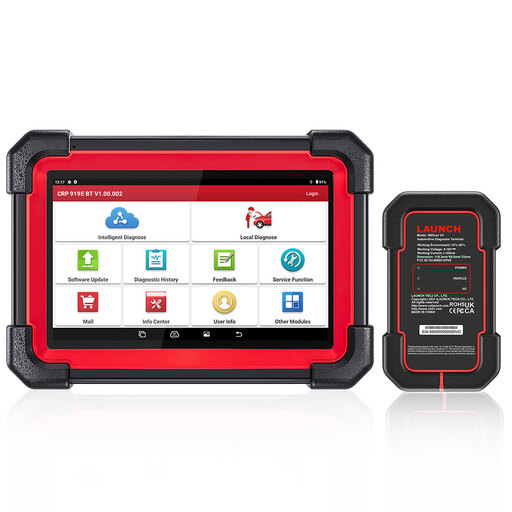
Why This Fits Their Persona: Suitable for technicians who need a dedicated tablet, wireless VCI and broader workshop functions rather than a phone-based reader.
It clearly identifies CAN-FD, DoIP, ECU coding and active testing as separate capabilities, while noting that tests vary by vehicle.
7-inch touchscreen, wireless or wired communication, 31+ listed reset services and FCA access as an optional extension.
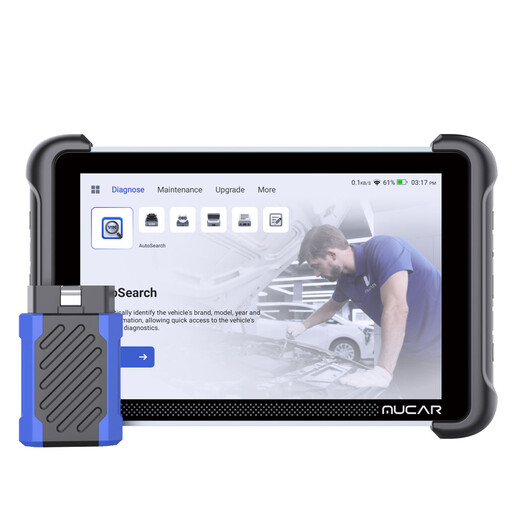
Why This Fits Their Persona: Designed for garages handling varied vehicles, deeper diagnostics and repeated service work on a dedicated tablet.
Its listed coverage includes CAN-FD, DoIP, ECU coding and bi-directional tests, while the product information still advises checking vehicle compatibility.
8-inch touchscreen, 34+ service functions, magnetic VCI and lifetime free updates without annual software fees.
We have compiled a complete, real-time list of products that fully satisfy these strict selection criteria and UK safety regulations.
Before connecting any automotive diagnostic tool, identify the vehicle correctly and keep the battery voltage stable. Programming, coding and some active tests may fail if voltage drops during operation. Follow the scanner instructions and the vehicle manufacturer’s service procedure.
Store the device away from damp, excessive heat and direct sunlight. For Bluetooth models, keep the app and operating system compatible with the scanner, and allow sufficient phone or tablet storage for software packages.
Yes, provided the user understands the limits of each function. A full-system scanner can help with fault-code investigation and routine resets, but active tests, coding and safety-related repairs require suitable knowledge and procedures.
Some do, while others offer lifetime free updates for specified functions. Check whether the advertised free period covers all software, service functions and vehicle packages. FCA AutoAuth access may require separate registration or payment.
The hardware can remain useful for several years when stored and handled correctly. Its practical lifespan depends more on software support, protocol updates, battery condition, app compatibility and continued coverage of the vehicles you service.