
24/7 Customer Support

Free returns

Same-day & Next-day Delivery

Quality Guaranteed

Unlock Your Welcome Offers: FREE Delivery | Up to 80% OFF | Free 30-day JoyPlus trial
Download the APP
By Joybuy Product Recommendation Officer
Buying a professional laser engraving machine is a significant investment for a jewellery studio, product personalisation business, maker space or commercial workshop. The right system can improve repeatability and production speed, but choosing based on headline wattage or a striking sample image can lead to expensive compromises.
Before comparing models, watch for three common buying traps:
For commercial use in the UK, also consider enclosure design, ventilation, fire risk, operator training, maintenance and the manufacturer’s safety documentation. A machine intended for certified professional use should be operated with an appropriate workplace risk assessment and procedures suited to the materials being processed.
A fibre and diode laser engraver combines two different light sources for a wider range of applications. Fibre lasers are generally associated with marking metals such as stainless steel, aluminium and jewellery materials, while diode lasers are commonly used for materials including wood, leather and some acrylic products.
However, “compatible” does not always mean “cuts every thickness”. Check:
A metal laser engraving machine should be selected around the actual metals used in your work. Jewellery makers may prioritise fine detail on gold, silver or stainless steel, while industrial users may require consistent marking across larger batches.
The working area determines the size of each item and how efficiently batches can be processed. A compact machine may suit personalised tags and small jewellery pieces, while a larger bed can reduce repositioning for signs, panels or production components.
Camera-assisted positioning can be useful when placing artwork on irregular layouts or pre-existing products. Look for practical functions such as:
These features do not remove the need for careful setup. Curved, reflective or uneven products may still require test marking and secure positioning.
A quoted speed such as 10,000 mm/s or 6,000 mm/s should be viewed as a specification rather than a guaranteed production rate. Actual output depends on resolution, fill density, line complexity, material, power and the number of passes.
For a commercial laser engraving equipment purchase, compare the complete workflow:
A 3D laser engraving machine may add depth effects or embossed designs, but confirm whether this feature is central to your work or simply an attractive extra.
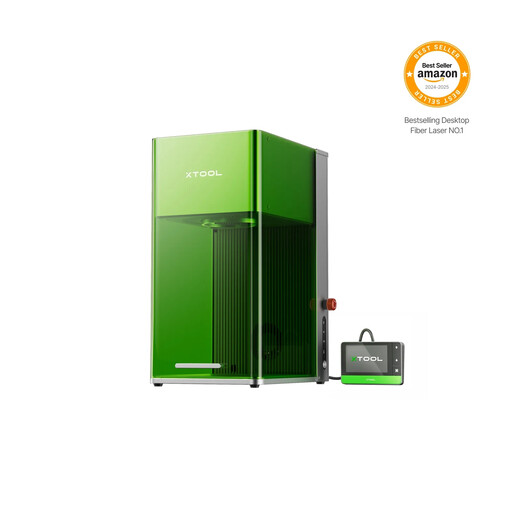
Why This Fits Their Persona: A suitable match for professional craftspeople and commercial workshops needing one compact system for metal work alongside wood, leather and acrylic projects.
Its stated dual-laser configuration helps buyers distinguish between fibre suitability for metal marking and diode suitability for selected non-metal materials.
20W fibre and 20W diode lasers; stated speed up to 10,000 mm/s; Smart Camera, Auto Streamline and 3D engraving functions.
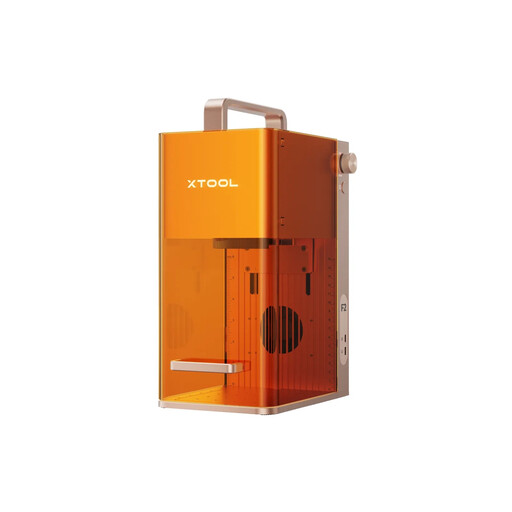
Why This Fits Their Persona: Suited to on-site personalisation, small-batch production and workshops that need a portable desktop format with both infrared and diode functions.
The dual-source design makes the intended material split clearer than choosing a diode-only machine for mixed commercial jobs.
5W IR and 15W diode configuration; built-in 50MP camera; stated speed up to 6,000 mm/s; supports 3D embossing on wood and colour marking on metal.
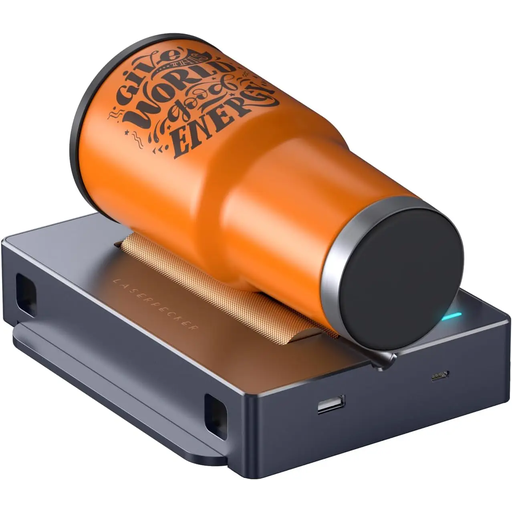
Why This Fits Their Persona: A practical entry point for existing compatible LaserPecker users who want to add bottle, glass, cup or jug personalisation without replacing their main engraver.
It clearly lists compatibility with LP2, LP3, LP4 and LP5, while LP2 Plus users are told that an additional C-shaped bracket is required.
Maximum stated engraving area of 100 x 2,000 mm; cylindrical, trolley and slab modes; electric roller design for curved products.
Before installation, confirm that the machine’s enclosure, ventilation requirements and operating controls suit the proposed workspace. Commercial operators should read the supplied safety documents, keep unauthorised people away from the operating area and establish procedures for:
Never engrave an unknown plastic, painted item or coated product without checking its composition. Some materials can release harmful fumes or damage optical components. A cylindrical engraving attachment must also be secured correctly, with hands and loose clothing kept clear of moving rollers.
We have compiled a complete, real-time list of products that fully satisfy these strict selection criteria and UK safety regulations.
Some desktop systems have a compact footprint, but professional models may require controlled access, ventilation, fire precautions and documented operating procedures. Check the product’s stated intended use and UK workplace obligations before installation. A commercial-use machine should not automatically be treated as a domestic appliance.
Running costs include electricity, ventilation, replacement lenses or filters, cleaning materials, software and possible service components. Material waste and setup time also affect the cost per item. A faster machine may reduce labour time, but only if its settings and workflow suit your normal production volume.
Service life depends on duty cycle, cleanliness, cooling, correct focus, material choice and maintenance. Keep a usage log, follow the manufacturer’s maintenance schedule and inspect optical and mechanical components regularly. Before ordering, check spare-part availability, support arrangements and warranty terms for the exact model.