
24/7 Customer Support

Free returns

Same-day & Next-day Delivery

Quality Guaranteed

Unlock Your Welcome Offers: FREE Delivery | Up to 80% OFF | Free 30-day JoyPlus trial
Download the APP
A professional OBD2 car diagnostic scanner can do much more than switch off a dashboard warning light. Depending on the vehicle and software package, it may access multiple control modules, display live data, run active tests and perform service procedures such as battery registration or DPF regeneration.
However, buying by headline feature count alone can lead to unnecessary expense. The practical choice depends on your vehicles, the functions you actually need and the ongoing cost of keeping the software current.
A full-system car diagnostic tool may communicate with available engine, transmission, ABS, SRS, body or air-conditioning modules. That does not mean every reset, coding procedure or active test is supported across all makes and models.
Functions can vary according to:
Before ordering, provide the seller with the vehicle identification number and the specific procedures you need, such as ECU coding, DPF regeneration or battery registration.
A bidirectional OBD2 scanner sends commands to a vehicle ECU to operate selected components. Examples may include cooling fans, fuel pumps, windows, door locks, lights or air-conditioning clutches.
Yet active test availability is vehicle-dependent. A tool may offer bidirectional control on one model but only code reading and live data on another. Use the phrase “active test diagnostic tool” as a starting point, not proof that every actuator will be available.
Some handheld scanners include updates for a defined period, while others advertise lifetime updates for particular functions. A tool can remain usable after an update period ends, but newer vehicle coverage and newly added functions may require renewal.
Wireless models may also require:
Check the complete ownership cost rather than comparing only the purchase price.
A simple car code reader usually focuses on standard OBD2 engine emissions data. For broader troubleshooting, look for access to multiple modules, including ABS, SRS, transmission, TPMS, steering and battery systems.
Live data is equally important. Graphs and data logging can help you observe sensor readings while the vehicle is running, rather than relying on a stored fault code alone. A scanner that displays several parameters together is useful for comparing values such as engine speed, coolant temperature, fuel trims or transmission data.
Newer vehicle architectures may use CAN FD, which allows larger data frames and higher data rates than conventional CAN in supported applications. A CAN FD diagnostic scanner can therefore be more suitable for vehicles using this communication standard.
DoIP, or Diagnostics over Internet Protocol, transmits diagnostic communication over Ethernet-based vehicle networks. It is relevant to selected newer European vehicles and some complex programming or diagnostic procedures.
These protocols do not automatically guarantee compatibility. Confirm support for your exact vehicle before buying, especially if you need a DoIP diagnostic tool for BMW, Volvo, Jaguar or Land Rover applications.
A vehicle service reset tool may include oil reset, EPB reset, SAS calibration, ABS bleeding, throttle relearn, injector coding, gearbox matching, DPF regeneration or battery registration.
These functions can alter learned values or operate vehicle components. During coding, relearning or active tests, maintain a stable battery supply and follow the vehicle manufacturer’s procedure. A battery registration tool is not a substitute for checking battery condition, charging voltage or correct battery specification.
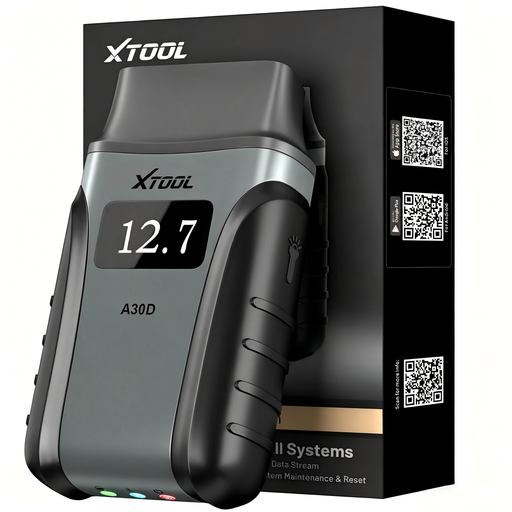
Why This Fits Their Persona: Its wireless phone-and-tablet design suits DIY owners working in a driveway or home garage, while full-system scans cover more than a basic engine code reader.
It specifies bidirectional control, full-system diagnostics, CAN FD and 19 reset functions, while clearly noting that availability varies by vehicle.
Bluetooth connection, live-data graphing and stated lifetime software updates for the supported app functions.
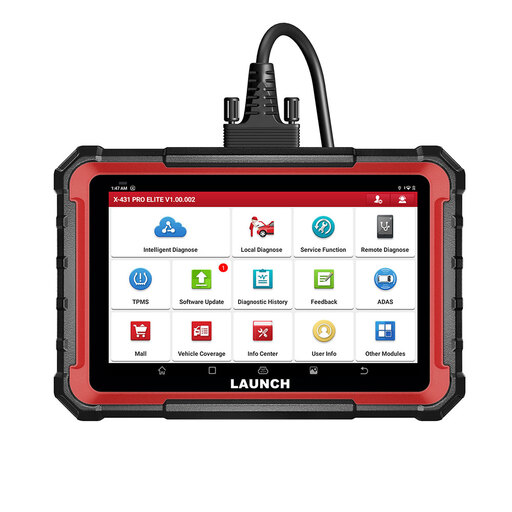
Why This Fits Their Persona: The larger touchscreen, wired connection and tablet format are suited to independent garages and technicians handling repeated diagnostic sessions.
It identifies CAN FD, DoIP, ECU coding and active testing separately, making it easier to check the exact function required rather than relying on a vague “professional” label.
8-inch display, 4GB RAM, 64GB storage, active tests, ECU coding and 31 listed service functions.
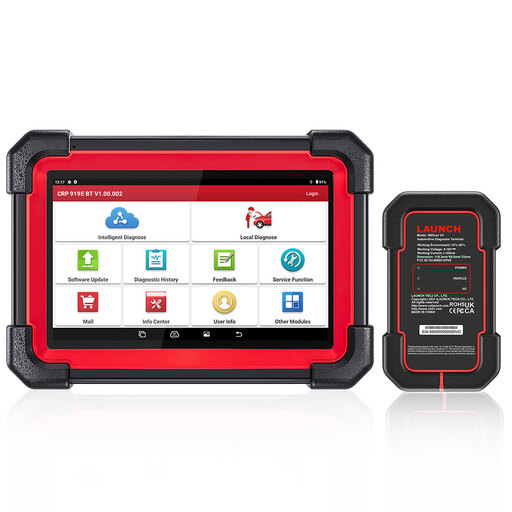
Why This Fits Their Persona: Its wireless VCI, broad reset list and support for selected CAN FD and DoIP vehicles suit mobile mechanics, enthusiasts with several cars and small workshops.
The product information distinguishes wireless and wired communication and states that ECU coding and tests require vehicle-specific compatibility checks.
7-inch touchscreen, 4GB RAM, 64GB storage, Auto VIN, active tests and more than 31 listed service functions.
We have compiled a complete, real-time list of products that fully satisfy these strict selection criteria and UK safety regulations.
Before using any professional automotive scan tool:
Clearing a code removes the warning indication but does not repair the underlying fault. For ABS, SRS, steering or high-voltage systems, seek appropriate qualified vehicle support if the procedure is outside your training or equipment.
Yes, if you select functions that match your ability and vehicle. Live data, code reading and service resets are commonly useful to DIY owners. Bidirectional tests, ECU coding and immobiliser work require greater care, stable power and vehicle-specific instructions.
Not always. Some Bluetooth models provide lifetime updates for standard or listed functions, while others include updates for a fixed period. Separate charges may still apply for manufacturer authorisation or optional software. Check the product terms before purchase.
Some tools list all three functions, but availability is not universal. The vehicle’s make, model, system and software version determine whether the operation appears and works. Confirm compatibility using your vehicle details before relying on a scanner for a particular service task.