
24/7 Customer Support

Free returns

Same-day & Next-day Delivery

Quality Guaranteed

Unlock Your Welcome Offers: FREE Delivery | Up to 80% OFF | Free 30-day JoyPlus trial
Download the APP
A professional OBD2 car diagnostic scanner can do far more than switch off a warning light. Depending on the vehicle and software coverage, an advanced tool may scan multiple control modules, display live data, activate components, perform service resets and support ECU coding.
However, buying the most feature-heavy-looking car diagnostic tool is not always the right decision. Marketing descriptions often combine standard OBD2 code-reading functions with advanced features that may only work on selected makes, models and production years. Before purchasing, UK car owners, mobile mechanics and independent garages should check the following points.
A basic car code reader may only access the engine ECU. That can be useful for a check-engine warning, but it may not communicate with the ABS, SRS, transmission, body control or air-conditioning modules.
If you need broader fault-finding, look for a full-system diagnostic scanner that clearly lists the systems it supports. “All-system” does not necessarily mean every function is available for every car, so compatibility still needs checking.
A scanner may list 15, 20 or more service functions, including oil reset, EPB reset, BMS registration, ABS bleeding, DPF regeneration and injector coding. These functions are dependent on the vehicle’s ECU, software version and market configuration.
Likewise, a bi-directional scan tool or active test scanner can send commands to components such as cooling fans, windows, fuel pumps or valves, but the available tests vary between vehicles. Treat the function list as potential coverage rather than a guarantee.
“Free updates” can refer only to a limited period, a basic OBD2 section or selected vehicle packs. Check whether lifetime free updates cover the functions you actually need.
Some newer vehicles use secured gateways. FCA AutoAuth access, for example, may require a separate account or manufacturer-related charge, even when the diagnostic scanner itself has no subscription fee. This is particularly important for garages working on several brands.
For workshop use or used-car inspections, choose a tool that can read and clear diagnostic trouble codes across relevant modules, retrieve ECU information and display live data. Graphs can make changing sensor values easier to interpret than static numbers.
A capable vehicle fault code reader should also offer freeze-frame information, which records operating conditions when a fault was logged. Standard OBD2 functions such as oxygen-sensor checks, onboard monitor tests and emissions-readiness information can help with preliminary checks. They do not guarantee that a vehicle will pass a UK MOT.
Active testing is useful when a fault cannot be isolated through code reading alone. The scanner may command an actuator and allow you to observe its response without immediately removing parts.
ECU coding scanners go further, but coding and programming require extra care. Maintain stable battery voltage with a suitable charger or battery maintainer, follow the vehicle manufacturer’s procedure and confirm compatibility by VIN. An interrupted coding operation can create additional faults.
Modern vehicles may use newer communication networks. CAN FD diagnostic tools and DoIP scanners can communicate with selected newer ECUs that older OBD2 scanners may not recognise. Protocol support is useful, but it does not automatically provide complete brand coverage.
For UK use, check compatibility with your petrol, diesel, hybrid or light-commercial vehicle before ordering. Pay attention to the vehicle’s OBD2 port, voltage requirements, supported operating system and whether the device is wired, tablet-based or smartphone-operated.
The following recommendations are arranged by practical user profile rather than by a universal ranking. Product functions remain subject to make, model, system and software availability.
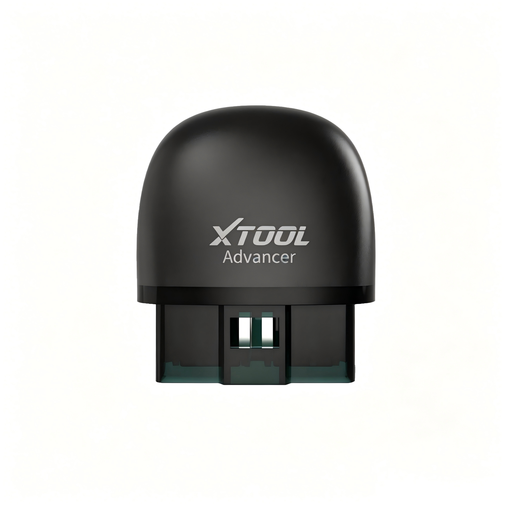
Why This Fits Their Persona: A compact Bluetooth option for DIY owners, used-car checks and households that prefer using an iOS or Android phone rather than carrying a dedicated tablet.
It specifies full-system scanning rather than engine-only code reading, with no ongoing subscription required for its standard diagnostic access. App and phone compatibility should be checked before purchase.
Bluetooth 5.0 connection, CAN FD support, battery monitoring, live data and oil reset functions.
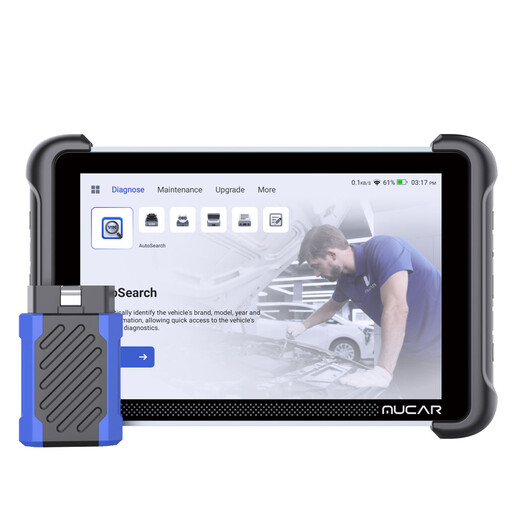
Why This Fits Their Persona: Its tablet format and magnetic VCI suit independent garages and technicians who need a larger display for reports, live data and workshop-based diagnosis.
The listed specification separates full-system diagnosis, ECU coding and bi-directional testing from ordinary OBD2 functions. Lifetime free updates are stated, with a one-year limited warranty.
8-inch touchscreen, CAN FD and DoIP support, more than 34 service functions and expandable workshop-tool connectivity.
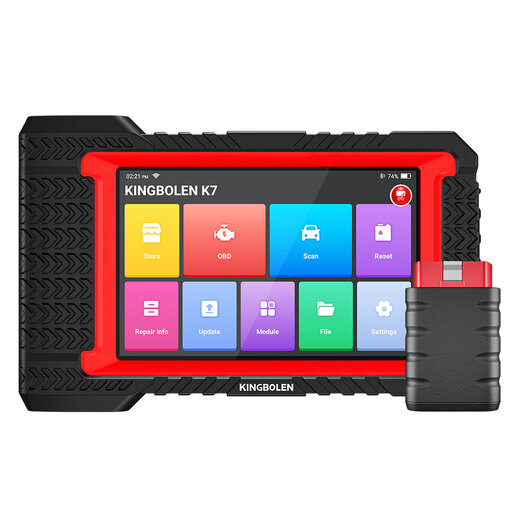
Why This Fits Their Persona: A tablet-based choice for mobile mechanics, repair workshops and advanced DIY users requiring active tests, ECU coding and a broad reset menu.
The specification identifies lifetime updates, CAN FD and DoIP support, while noting that ECU coding and FCA AutoAuth depend on vehicle compatibility and separate registration requirements.
Bi-directional control, online and offline ECU coding, 28 listed reset functions and support for more than 100 vehicle brands.
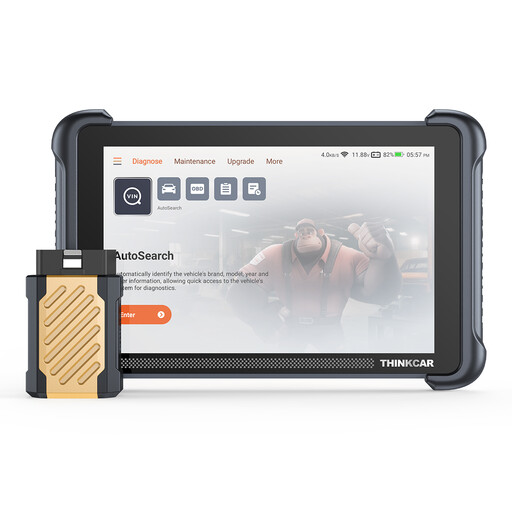
Why This Fits Their Persona: The large-screen design and wireless interface are suited to garages handling repeated diagnostic jobs and needing clear access to multiple systems.
Its listed features distinguish full-system diagnostics, ECU coding and bi-directional control from simple code reading, and state that some advanced operations may need internet access or vehicle-specific support.
8-inch display, 4GB RAM, 64GB storage, CAN FD and DoIP protocols, plus 34 listed maintenance functions.
Before using a scanner:
It can be useful for owners who maintain several vehicles, inspect used cars or carry out routine servicing. For occasional check-engine warnings, a simpler OBD2 scanner may be sufficient. Bi-directional testing and ECU coding require greater technical care.
Not always. Several listed products specify lifetime free updates or no subscription for standard diagnostics. Nevertheless, manufacturer authentication, optional accessories and certain vehicle-specific services may involve separate requirements. Read the update terms before purchase.
Hardware lifespan depends on battery care, storage conditions, connector handling and software support. A wired tablet may suit frequent workshop use, while a Bluetooth dongle is easier to carry. Regular updates can help maintain vehicle coverage, but they cannot guarantee compatibility with every future model.