For adventure films in a dark room, put credible evidence of black levels, shadow detail and colour ahead of the highest light-output figure alone. Then check whether the projector can produce your intended image size from its proposed position: a cinema-focused picture, flexible placement and automated setup solve different problems, and each brings trade-offs.
Who is choosing?
Dark-room film enthusiasts
If shaded detail and convincing blacks matter during cave, forest and night scenes, give dark-scene picture evidence priority over a brightness figure alone. AVForums assessed the BenQ W4000i specifically for critical film viewing in a dark room.
Flexible living-room cinema buyers
If an existing shelf, sofa or ceiling position dictates where the projector goes, check image size and placement adjustments early. Epson lists lens shift, optical zoom and two HDMI inputs for the EH-TW7100, illustrating the features worth checking against your room.
Low-fuss smart-projector users
If the projector moves between positions, automatic focus and alignment may matter more to you than a carefully fixed installation. XGIMI lists automated screen-adaptation features for the HORIZON Ultra; check the exact model’s availability and published support information before ordering.
What matters when buying?
Choose the picture and setup approach that fits your room, then check the image size, source connections and sound route for the exact model.
Cinema-focused projector
Choose it when: The room stays dark and film colour, blacks and shadow detail take priority. AVForums found the BenQ W4000i suited to critical dark-room viewing.
Trade-off: In AVForums’ W4000i review, the wide-colour-gamut filter reduced brightness by 50%, and HDR highlights remained limited compared with a direct-view display.
Flexible-placement home cinema
Choose it when: A fixed shelf or ceiling position and several physical sources make lens shift, zoom and connections important. The Epson EH-TW7100 is one example.
Trade-off: Home Cinema Choice notes that the EH-TW7100 plays 4K sources without native 4K optics and identifies HDR and black-level compromises.
Automated smart projector
Choose it when: Frequent repositioning makes automatic focus and screen alignment especially useful. XGIMI lists these conveniences for the HORIZON Ultra.
Trade-off: Confirm current availability, the exact model and its published software-support information before treating smart features as a reason to buy.
| Concern |
What to check |
Who this matters to |
| Dark-scene picture |
Look for independent observations of black levels and colour, and check whether a preferred picture mode changes light output. |
When a film moves from daylight into a dim cave, I want to distinguish objects without losing the colour of brighter scenes. Around 31% of consumers put dark-scene picture quality first. |
| Image size and placement |
Measure lens-to-screen distance and target image size; check the exact model’s throw range, zoom and lens shift. |
If the projector has to sit on an existing shelf, I need the image to fit without moving the furniture. Placement is the primary concern for around 31% of consumers. |
| Sources and sound |
Check inputs for your planned devices and an audio-output route compatible with your sound system. |
I want to switch between my film sources and use my chosen speakers without discovering a connection problem after installation. Around 23% of consumers prioritise source and sound integration. |
| Setup and smart support |
Check focus and alignment features, plus published support information for network-connected functions. |
When I move the projector, I would rather spend less time readjusting the picture and know where to find software-support details. That convenience is the main priority for around 15% of consumers. |
Buying pitfalls
-
Treating all lumen figures as interchangeable
ISO lumens, ANSI lumens and figures labelled only as “lumens” should not be compared as though they share an identical measurement basis. The image size and room lighting also affect what you see on screen.
Compare like-for-like output claims where possible, assess brightness at your intended image size and seek dark-scene picture evidence for this light-controlled setting.
-
Assuming a wider-colour setting has no downside
AVForums found that engaging the BenQ W4000i’s wide-colour-gamut filter reduced its brightness by 50%, even though the setting served its colour performance.
Check the behaviour of the picture mode you expect to use. If possible, view dark and bright scenes in a dark-room demonstration before deciding which setting you prefer.
-
Choosing a projector before measuring the room
Zoom, lens shift and automatic keystone correction differ by model; none means every image size is possible from every position.
Measure the projection path, mounting position and intended image size, then check the exact model’s throw and adjustment ranges.
Your planned position may also call for a suitable mount, a longer HDMI cable or a screen.
-
Treating a smart-projector listing as a ready-to-order option
A page can continue to show specifications when the model is unavailable. Connected features also make the exact variant and its published support information relevant to the decision.
Check current availability, model identity and seller information, alongside the published security-update information, immediately before ordering.
Relevant projector brands
BenQ
The W4000i is a cinema-focused example for a controlled-dark room. BenQ describes it as a 4K HDR LED home-theatre projector with DCI-P3 coverage.
- AVForums found the W4000i suited to critical dark-room film viewing, noting its image accuracy, contrast and black levels.
- The same review found that its wide-colour-gamut filter cut brightness by 50% and noted limitations in HDR brightness compared with a direct-view display.
Epson
The EH-TW7100 is a reference point for buyers balancing home-cinema viewing with placement flexibility and several physical sources.
- Epson lists lens shift, optical zoom, two HDMI inputs and Bluetooth audio support for the EH-TW7100.
- Home Cinema Choice reports that the model accepts 4K sources but does not have native 4K optics, and notes compromises in HDR and black-level performance.
XGIMI
The HORIZON Ultra illustrates a smart-projector approach for buyers interested in automated alignment and focus rather than a fixed cinema installation.
- XGIMI lists optical zoom, automated screen adaptation and dual 12 W speakers for this model.
- Confirm current availability and the exact model’s support terms before purchase; its listed features are not, by themselves, evidence of dark-scene picture performance.
Joybuy projector choices
These 1080p smart projectors are choices for film viewing where straightforward setup may matter. Compare the picture settings and required projection distance for your dark room before choosing either model.
 No image available
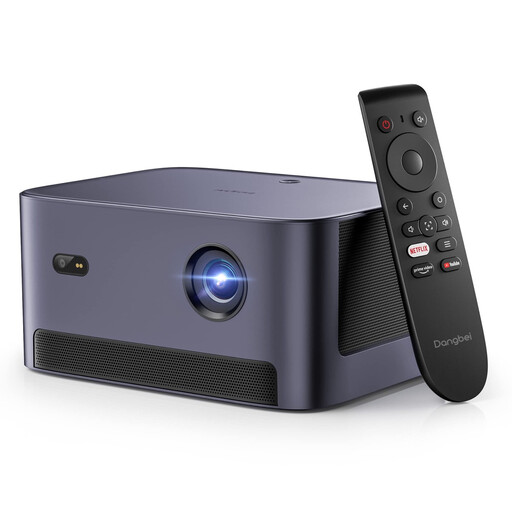
Dangbei Neo 1080p DLP Smart Projector, 540 ISO Lumens
Consider this model if you want film streaming and automated setup in a room where the projector may be moved.
The product name specifies 1080p Full HD, Netflix access, autofocus, keystone correction, Wi-Fi, Bluetooth and Dolby Audio.
Check the projection distance for your intended image size and seek picture evidence for dark scenes on the exact model.
View on Joybuy
 No image available
TCL C1 1080p Smart Projector, Grey
Consider this portable model if a smart projector suits the way you plan to set up film nights.
Its product name states 1080p FHD and 4K support; check what that support means for your intended source rather than assuming a 4K projected resolution.
Confirm that the required image size fits your proposed position and assess dark-scene picture performance for the exact model.
View on Joybuy
Frequently asked questions
Should I choose the highest lumen figure for a dark room?
No. A light-output figure alone does not tell you how adventure films will look at your chosen image size. Compare claims using the same measurement basis where possible, then consider contrast, colour and independent observations of dark scenes alongside the planned screen size.
What should I measure before ordering a projector?
Measure the lens-to-screen distance, intended image size and available mounting height. Check those measurements against the exact model’s throw range, zoom and lens-shift limits, and plan where power and source cables will run.
Will built-in speakers be enough for adventure films?
They may suit an occasional or compact setup, but decide how you want to hear dialogue and film sound before buying. Epson lists built-in speakers and Bluetooth audio support for the EH-TW7100, while XGIMI lists dual 12 W speakers for the HORIZON Ultra; check the connection method for your intended sound system rather than judging sound from those features alone.
What should I check on a network-connected projector?
Check the exact model’s published security-update information, connected features and seller details. GOV.UK states that the UK consumer connectable product security regime came into effect on 29 April 2024 for relevant consumer connectable products; that does not establish the status or support period of a particular projector.


