What matters when choosing?
Decide where the projector can go before comparing picture specifications: the viewing wall, available distance and room lighting set the limits for every screening.
Conventional home-cinema projector
Consider it when: You can dim the room, keep a clear projection path and want to examine model-specific colour and calibration information.
Trade-off: It needs a suitable distance from the wall; stated colour coverage does not guarantee the same appearance in your room.
Short-throw projector
Consider it when: A position nearer the wall would keep the projector out of a walkway. ViewSonic specifies a 100-inch image from 1.5 metres for the X2-4KE Pro.
Trade-off: A shorter throw addresses placement, not colour accuracy; the intended image must still fit the wall.
Ultra-short-throw projector
Consider it when: The projector can stay on a media unit close to the wall. Epson positions the EH-LS650B for this arrangement.
Trade-off: The cabinet position and projection surface still need to suit the exact model, and the unit remains part of the shared room.
| Concern |
What to check |
Who this matters to |
| Colour and image detail |
Check native resolution and colour or calibration information for the exact model; assess the picture with the room dimmed. |
If I use close-ups to study artwork, I want fine detail and subtle tones to remain visible. Around 40% of consumers put colour and image detail first. |
| Room fit and light |
Measure the projector-to-wall distance and usable image area; check the model’s image size at that distance. |
When furniture and walkways restrict the viewing position, I need an image that fits without obstructing the room. Room fit is the primary concern for around 40% of consumers. |
| Shared streaming and sound |
Confirm access to your documentary services and a suitable HDMI or external-audio connection. |
If flatmates take turns starting screenings, I want a setup they can use without changing cables each time. Around 20% of consumers place shared-use convenience first. |
Joybuy projector choices for shared viewing
These projectors offer different approaches to a shared viewing setup, including adjustable placement and built-in or external streaming. Check each model against your wall, room light and picture priorities rather than treating supported input resolution as native image resolution.
 No image available
Magcubic HY350Max Smart Projector
Consider this model if a compact placement position and automatic adjustment would help in the shared room; check the intended image size against your measured wall.
The product title specifies native 1080P, 8K input support, Android 14, Wi-Fi 6, Bluetooth 5.4 and automatic keystone correction. Input support is not native resolution.
If artwork colour is decisive, check model-specific colour and calibration information before choosing. Confirm that the built-in apps include the services your flat uses.
View on Joybuy
 No image available
Wimius K1 1080P Projector
This is an option to assess if you can provide a suitable projection position and plan to connect an external streaming source.
The product title states FHD1080P, 4K input support and vertical and horizontal keystone correction. Check the required projection distance against your room measurements.
The listing describes no built-in streaming system. If colour is your priority, examine the exact model’s colour and calibration information rather than relying on resolution alone.
View on Joybuy
 No image available
Magcubic HY300 Pro Mini Projector, Grey
The rotating stand makes this model worth considering if the projector position changes between shared screenings; verify the resulting image size at each position.
The product title specifies native 720p, 1080p input support, Android 14, Wi-Fi 6 and a 180° rotating stand. Supported 1080p input does not make the projected image native 1080p.
Check whether the available room light and the model’s colour information meet your expectations for detailed art footage.
View on Joybuy
 No image available
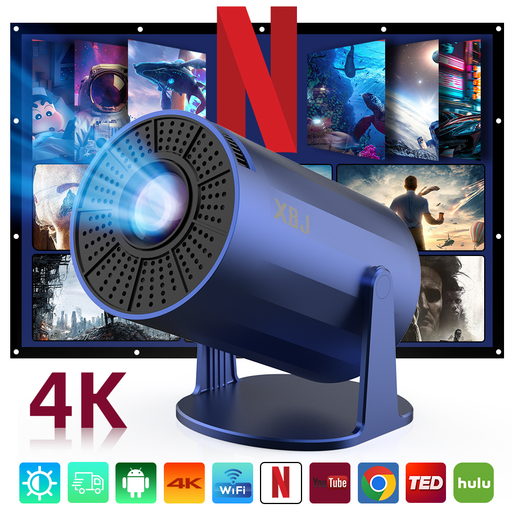
XBJ Portable Blue Projector, Android 11
Consider this model if temporary placement matters, while checking whether its image and connections meet the flat’s documentary-viewing needs.
The product title lists Wi-Fi 6, Bluetooth 5.2, automatic keystone correction and 180° rotation. Its 1080P HD and 4K decoding wording should not be taken as confirmation of native resolution; confirm that specification for the exact model.
The listing describes restrictions on direct wireless mirroring of streaming services from phones and recommends a separate TV stick. Check that route before planning a shared screening.
View on Joybuy
Frequently asked questions
What should we measure before ordering a projector?
Measure the proposed lens-to-wall distance, the clear wall or screen area, and any furniture or walking route between them. Then check the exact model’s image size at that distance: ViewSonic specifies a 100-inch image from 1.5 metres for its X2-4KE Pro, whereas Epson’s EH-LS650B is designed for a position close to the wall.
Do art documentaries on a projector require a TV Licence?
A projector alone does not determine whether you need one. GOV.UK says watching or recording live television requires a TV Licence, and BBC iPlayer viewing also requires one; an on-demand documentary on another service does not require a licence solely because it is projected.
Will a projector’s built-in speaker be enough for a group?
That depends on whether dialogue is clear at a volume acceptable in your shared flat. Check the exact model’s route to external sound if needed: Epson lists Yamaha sound on the EH-LS650B and Bluetooth soundbar connection on the EH-TW7000, while ViewSonic lists HDMI eARC on the X2-4KE Pro.
What if an online projector order does not suit the room?
For a change of mind, check the applicable cancellation conditions before ordering and follow the seller’s return process. GOV.UK describes cancellation rights for most online orders; remedies for goods that are faulty, damaged or misdescribed are a separate matter and should not be confused with a retailer’s voluntary returns policy.


