What matters when choosing?
Check room fit before narrowing down picture detail and streaming convenience. For a dark-room cookery show, those choices determine whether you can position the image and follow what appears on screen.
| Concern | Buying check | Who this matters to |
|---|
| Readable picture detail |
Check native resolution, then assess brightness against your intended image size and room lighting. |
I want to read ingredient captions and follow close-up demonstrations without relying on a small picture. Around 46% of consumers put picture detail and readability first. |
| Placement that fits |
Measure lens-to-wall distance and check the exact model's image size at that distance; assess angle adjustment if placement is off-centre. |
If my only practical spot is a side table or a shelf close to the wall, the projector has to work from there. Room fit is the primary concern for around 36% of consumers. |
| Simple streaming and sound |
Confirm your preferred service or external-device connection, plus the available audio connections. |
I want to start a programme without arranging separate equipment each time, while still being able to hear it comfortably. Around 18% of consumers prioritise that streaming-and-sound convenience. |
Projectors for these viewing needs
These Joybuy listings cover portable projectors for dark-room streaming and models with adjustable positioning. Compare each one against your wall distance, preferred service and intended image size rather than treating portability alone as a room-fit check.
 No image available
Soundcore Nebula Mars 3 Air + Carry Case Bundle
Consider this bundle if you expect to move the projector between viewing positions. Check the image size it can produce from your planned spot before relying on it for recipe captions.
The bundle includes a carry case. If you plan to watch without mains power, check whether the stated battery playback duration suits your sessions.
View on Joybuy
 No image available
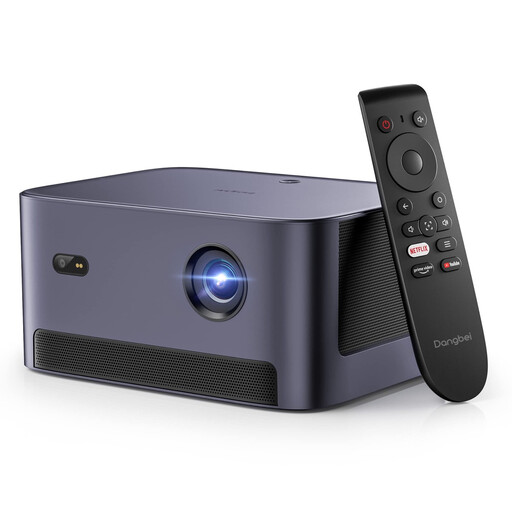
Dangbei Neo DLP Full HD Projector
This is a portable option if Netflix access and automatic image adjustment matter to your cookery-show setup. Confirm its software environment if you need other particular apps.
The product name specifies 1080p Full HD, 540 ISO lumens, Netflix, autofocus, keystone correction and Dolby Audio. Check the projected size at your available wall distance.
View on Joybuy
 No image available
XBJ 360° Portable Full HD Projector, European Version
The rotating design is relevant if your available surface is beside the viewing position or you want to aim towards a ceiling. Check whether the resulting image fits the surface you intend to use.
The product name specifies 1080p Full HD, 360° rotation, automatic keystone correction, Wi-Fi, Bluetooth and HDMI. Confirm access to the streaming service you prefer.
View on Joybuy
 No image available
Magcubic HY350Max Native 1080p Projector
If the projector needs to sit relatively close to the wall, compare its projection guidance with the image width you want. Confirm that your preferred streaming services work with its software.
The product name specifies native 1080p, Android 14, 180° rotation and automatic keystone correction. Its 8K-supported wording describes supported content, not native 8K resolution.
View on Joybuy
 No image available
Yaber T2 Plus GTV Portable Projector with Battery
Consider this portable model if you may move the viewing position or use it away from a socket. Check brightness and the image size possible at your intended wall distance.
The product name specifies native 1080p, JBL sound, a built-in battery and Wi-Fi 6. Check that its streaming arrangement and battery playback duration suit your programmes.
View on Joybuy
Frequently asked questions
Do I need a high-lumen projector for a dark room?
Not automatically: assess brightness alongside the image size you intend to project. BenQ's home-theatre guidance gives 1,500–2,000 lumens for many 100–120-inch dark-room setups, but that general guidance does not establish how a particular projector will look at your chosen size.
How can I tell whether a projector will fit my room?
Measure from the planned lens position to the wall and compare that distance with the exact model's stated image size or throw chart. BenQ defines throw ratio as throw distance divided by image width; a claimed maximum screen size alone cannot confirm the fit.
Will built-in streaming show my preferred cookery programmes?
Check the exact service and projector before relying on built-in streaming. An app platform, a compatible external-device connection and a subscription are separate considerations, so confirm the route you intend to use.
Can I cancel an online projector purchase after delivery?
For most online goods purchases covered by UK distance-selling rules, GOV.UK states that you can cancel up to 14 days after delivery without giving a reason. Check the seller's cancellation instructions and distinguish a change-of-mind cancellation from remedies if goods are faulty, damaged or misdescribed.
What should I do with an old projector?
Look for an electrical-equipment recycling or take-back route rather than placing the projector in general waste. GOV.UK identifies electrical and electronic equipment as subject to waste-reduction rules; check your local authority's current collection instructions for the practical options where you live.


