What matters when choosing?
Decide where the audience can see the screen before choosing a projector position. The throw route then follows from the measured space; screen size, lighting and the way volunteers will set up the equipment still need separate checks.
Conventional throw
Choose when: A clear rear or assessed ceiling position can produce the intended image without people crossing the beam.
Allow for: Uninterrupted sightlines and a protected cable or mounting arrangement.
Short or ultra-short throw
Choose when: The room is shallow or a projector farther back would shine across presenters or attendees.
Allow for: Careful alignment and a suitable projection surface close to the projector; confirm the exact model’s geometry.
Portable projector and screen
Choose when: Equipment must move between rooms or be stored after use.
Allow for: Setting up the image and managing cables each time rather than relying on a permanent position.
| Concern |
What to check |
Who this matters to |
| Image legibility |
Assess daylight and lighting controls at the intended screen size. Compare brightness figures stated on the same measurement basis where possible. |
If daylight reaches my screen, I need slides to remain legible at the size the audience needs. Around 36% of consumers would put image legibility first. |
| Throw and sightlines |
Measure lens-to-screen distance and intended image width; check the exact model’s throw range and whether anyone will cross the beam. |
When people move in front of the presentation area, I need a position that keeps the beam clear. For around 29% of consumers, room geometry is the primary concern. |
| Repeatable, safe use |
Before planning a fixed position, check venue permission, mount and structure suitability, servicing access and a manageable power route. |
Our volunteers will use the room regularly, so I need an arrangement they can operate without improvised access or cable runs. Safe, repeatable use comes first for around 21% of consumers. |
| Flexible setup |
Check storage space, screen setup and connections against the devices presenters will actually bring. |
We share the room and must clear it afterwards, so moving and storing the equipment matters more to me than a fixed image position. Around 14% of consumers would prioritise that flexibility. |
Brands to consider
Manufacturer ranges and planning tools can help establish which projector layouts are feasible; assess specifications and installation instructions for the particular model.
Epson
Epson United Kingdom offers a throw-distance calculator and guidance on screen size and viewing distance, alongside ultra-short-throw projector models.
- Its model-specific planning tools can help compare a measured projector position with the intended image.
- An ultra-short-throw range listing does not establish the mounting method, screen suitability or brightness needed for a particular hall; check the chosen model.
BenQ
BenQ UK publishes guidance on throw ratio and brightness measurement, as well as short-throw installation-projector specifications.
- The stated throw ratio and brightness unit for a named model provide figures to check against the room measurements and other comparable specifications.
- Manufacturer figures alone do not show how legible slides will be at the venue’s intended screen size and light level.
Portable projectors on Joybuy
These portable projectors are options to examine if the venue needs equipment it can move or store. They are not a substitute for choosing a screen or checking the measured throw distance, lighting and presenter-device connections.
 No image available
Magcubic HY350Max portable projector, native 1080P
Consider it for a room where the projector must be put away between presentations; confirm the required screen width at the planned position.
The listing states a 1:1 throw ratio, 900 ANSI lumens, auto focus and HDMI/USB compatibility. Those figures do not establish legibility under the hall’s lighting; check the achievable image size and any intended mounting arrangement.
View on Joybuy
 No image available
Wimius K1 projector, FHD1080P, 1200 ANSI lumens
It is worth checking for laptop-led presentations if its inputs match the presenters’ devices and there is a workable projector position.
The listing describes HDMI, USB and AV inputs and an approximate three-metre projection distance. Confirm the image width achievable at the venue’s measured distance; the stated brightness is not a room-specific legibility test.
View on Joybuy
 No image available
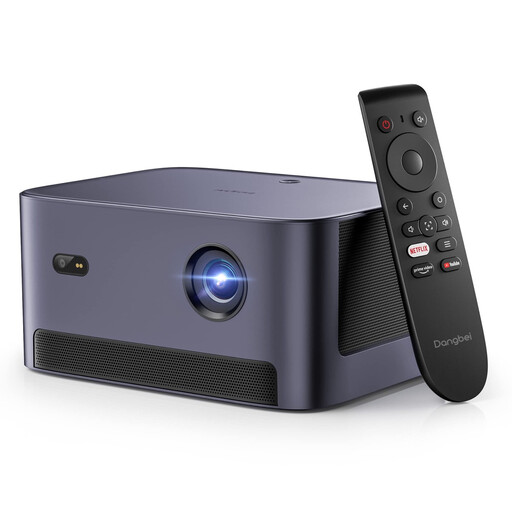
Dangbei Neo DLP projector, 1080P, 540 ISO lumens
Its compact format may suit a setup stored between sessions, provided an external presenter device and the room layout work with it.
The listing states HDMI, LAN and USB connections and a projection range of 37.5–120 inches. Its 540 ISO-lumen figure should not be treated as directly interchangeable with figures using another brightness unit; check the throw range and any required software compatibility.
View on Joybuy
 No image available
XBJ 360° portable projector, 1080P, European Version
Its rotating design is relevant where a portable projector needs flexible placement, but the venue still needs a stable position and suitable screen.
The listing states 360° rotation, HDMI and USB connections, and a 120-inch display claim. Confirm the required image size at the measured distance and assess brightness in the room rather than relying on the display-size claim.
View on Joybuy
 No image available
XBJ A5Pro Gray portable projector, native 1080P
Consider it for presentations where equipment is moved between uses, after checking that the intended source device and projector position work together.
The listing describes a 180° rotatable base, auto focus, HDMI/USB compatibility and Wi-Fi 6. Its brightness descriptions conflict, so confirm the specification for this exact variant and the achievable image size before using either claim to plan for a daylit hall.
View on Joybuy
Frequently asked questions
What should we measure before choosing a projector and screen?
Measure each realistic lens-to-screen distance, the intended image width, the screen position and the distance to the furthest seats. Mark windows, lighting controls, aisles and the presenter’s position too. BenQ UK defines throw ratio as throw distance divided by image width; use the exact model’s range to check the position you measured.
Will a higher brightness figure fix a daylit hall?
Not on its own: ambient light and the chosen image size both affect how bright the projected image appears. BenQ UK advises considering those conditions together. Control light where practical, compare figures using the same stated brightness unit and assess readability at the screen size you intend to use.
Can we ceiling-mount a projector in a shared venue?
A ceiling installation is an option only if the venue permits it and the projector, mount, structure and fixing method are suitable. The Health and Safety Executive advises avoiding work at height where possible and planning and supervising work that cannot be avoided. Arrange competent assessment of installation and future service access before buying a bracket.
How should accessibility affect the screen position?
Choose a screen position and text size with attendees’ sightlines in mind, and keep equipment and cables from obstructing routes. GOV.UK guidance says disability-related responsibilities also apply to voluntary and community-sector service providers; the appropriate adjustments depend on the service and attendees, not on a single projector specification.
What should we ask about insurance before a fixed installation?
Ask the venue owner and its insurer or broker whether the proposed installation triggers any policy conditions, such as notification, installer requirements or equipment-cover terms. Check the conditions for that venue’s own policy before work begins rather than assuming another venue’s arrangements apply.


