What matters when choosing?
Start with the light in your usual viewing room, then check how you will access programmes, where the projector can stand and how much image detail you want.
| Concern |
What to check |
Who this matters to |
| Room light |
Note when you watch and check the stated brightness unit and measurement method. Epson’s UK guide suggests 500–1,500 lumens for portable use in controlled light and 2,500–3,500 lumens for a living room with some ambient light. |
I often watch with window or lamp light present, so a picture that remains usable matters more to me than a compact projector. Around 37% of consumers put room-light suitability first. |
| Streaming access |
Check the exact model’s platform and your required apps, plus HDMI if you might use an external player. |
I want to start a gardening programme without routinely setting up another device. For around 27% of consumers, straightforward streaming is the primary need. |
| Placement |
Measure the projector-to-wall distance and usable image area; check the model’s throw ratio and aiming options. |
If I move the projector between rooms, it needs to fit different positions even if I have to control the light. Placement flexibility comes first for around 18% of consumers. |
| Image detail |
Confirm native resolution rather than a supported input resolution. Consider the planned image size and seating distance. |
I want to see foliage and garden layouts clearly on a large image, so native detail takes priority over portability. Around 18% of consumers make image detail their main concern. |
Joybuy projector choices
These projectors are relevant to watching gardening programmes where you can control room light or need flexible placement. Compare their native resolution, streaming setup and stated brightness on the exact variant; this selection does not establish how any model will look in a lit room.
 No image available
Magcubic HY350Max Native 1080P Projector
Consider this model if you want a Full HD projector for viewing with the room light controlled. Its title states native 1080P, 900 ANSI brightness, Android 14 and 180° rotation. It also says 8K is supported, which should not be confused with its stated native resolution. Check the apps you need and the planned projection distance before buying.
Joybuy
 No image available
XBJ 360° Portable Projector, European Version
Consider this model if moving or re-aiming the projector matters more than viewing with the room lights on. Its title states Full HD 1080P, 360° rotation and automatic keystone correction. Check the precise brightness specification, your intended apps and the space needed for the image.
Joybuy
 No image available
Wimius K1 FHD 1080P Projector
Consider this model if you are willing to connect an external device to watch programmes. Its title states FHD 1080P, 1200 ANSI lumens and support for a 4K signal; 4K support is not a claim of native 4K resolution. The listing says it has no built-in system, so plan for an external streaming device and check which cables you will need.
Joybuy
 No image available
TCL C1 1080P FHD Smart Projector, Grey
Consider this portable model if Full HD viewing and a built-in smart platform suit your setup. Its title states 1080P FHD and 4K support; the latter does not mean native 4K. Check that your preferred UK apps are available and that the stated brightness suits the light in your room.
Joybuy
 No image available
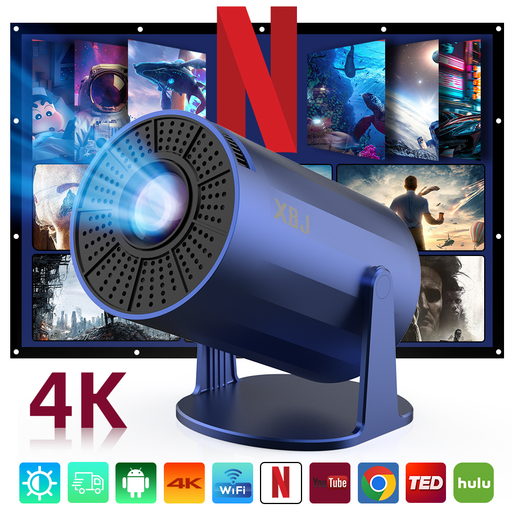
XBJ Portable Blue Projector, Android 11
Consider this model if adjustable aiming in a controlled-light room is the priority. Its title states 200 ANSI lumens and automatic keystone correction, but its 1080P and 4K-decoding wording should not be read as native resolution: the listing describes the model as native 720P. Focus is manual, and the intended streaming apps should be checked before purchase.
Joybuy
Frequently asked questions
Do I need a TV Licence to watch gardening shows on a projector in the UK?
The projector itself does not determine whether you need one. GOV.UK says a TV Licence is required to watch or record programmes as they are broadcast, or to watch on-demand BBC programmes on iPlayer, on a TV, computer or other device. Check how you will watch, rather than whether the picture comes from a projector.
How bright should a projector be for a living room with windows?
Start with the amount of light present when you actually watch. Epson’s UK buying guide puts portable indoor projectors used with controlled lighting at 500–1,500 lumens and points to 2,500–3,500 lumens for living rooms with some ambient light. Neither range guarantees a clear picture in direct sunlight; check the model’s brightness measurement and consider whether you can darken the room.
Is Full HD enough for gardening programmes?
Native Full HD is a starting point for regular programme viewing. Consider 4K if you plan a larger image or closer seating and value the additional detail; check native resolution rather than a claim that the projector accepts a 4K signal.
Can I rely on a projector’s built-in streaming apps?
Rely on them only after checking that the exact model offers the services you use. Epson lists Google TV on the EF-21G, for example, but a named platform alone does not confirm every app. Check whether HDMI provides a workable connection for an external player if needed.
Do I need a short-throw projector or a separate screen?
A short-throw model is worth considering if the projector must stand close to the image area; a separate screen is not a substitute for measuring that space. Check the exact model’s throw ratio and image-size guidance against your wall or screen and furniture position. ViewSonic, for instance, specifies a 0.69–0.83 throw ratio for its X2-4KE Pro.


