What matters when choosing?
Set the screen and seating positions before comparing projectors: they determine both the image you need to illuminate and the space available for the projector.
| Concern |
What to check |
Who this matters to |
| Brightness and room light |
Compare brightness figures on a clearly identified measurement basis, then assess the planned screen size and light you can control. |
If some lights must stay on, I need the shared image to remain watchable without relying on the largest advertised screen size. For around 31% of consumers, brightness and light control are the primary concern. |
| Screen and placement |
Measure lens-to-screen distance and use the exact model’s throw range; plan sightlines for the front and back seats. |
With limited room depth, I need an image everyone can see from a projector position that actually fits. Room fit comes first for roughly 25% of consumers. |
| Dark-scene clarity |
Distinguish native resolution from supported input resolution, and check HDR compatibility with the intended source. |
I can darken the room, so I care more about following fine detail in astronomy footage than using the biggest possible image. Around 25% of consumers put dark-scene clarity first. |
| Playback and sound |
Confirm the programme service, source device and connection path, plus an audio output suitable for your speaker setup. |
When hosting a group, I want the programme to play through my chosen device and be audible throughout the seating area. That makes playback and sound the leading concern for about 19% of consumers. |
Joybuy projector choices
These projector listings offer different brightness claims, placement clues and connection options for group astronomy viewing. Match any choice to your planned screen, room lighting, programme source and speakers before ordering.
 No image available
Wimius K1 1080P projector
Consider this for a shared image if its brightness and placement suit your planned screen and room light.
The listing states 1,200 ANSI lumens, FHD 1080P, 4K input support and dual speakers. Its 300-inch maximum claim does not establish a suitable image at that size; check the image size achievable from your lens position.
View on Joybuy
 No image available
Magcubic HY350Max native 1080P projector
Consider the stated short-placement arrangement if group seating leaves limited depth between projector and screen.
The listing states 900 ANSI lumens, native 1080P, a 1:1 throw ratio and a 1.35 m placement claim. Its 8K support describes accepted content, not native 8K resolution; check the image size at your intended distance.
View on Joybuy
 No image available
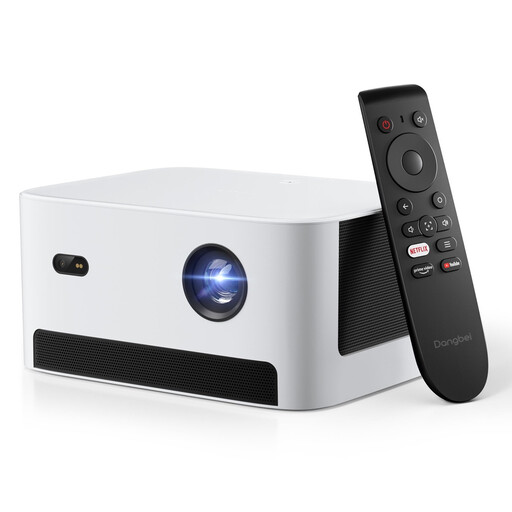
Dangbei Neo 1080P DLP projector
Consider this for a room you can darken, while checking that its programme services and audio connections suit your group.
The listing states 540 ISO lumens, 1080P, automatic focus and a screen-size claim up to 120 inches. ISO- and ANSI-lumen figures should not be treated as directly interchangeable; confirm the throw distance for your chosen image size.
View on Joybuy
 No image available
XBJ 360° portable projector, European Version
Consider its rotating design if you need to assess several possible projection positions in a room you can darken.
The listing states Full HD 1080P, a 500-lumen claim, HDMI and a 120-inch display claim. Check the measurement basis for brightness, the throw distance at your intended screen size and whether the speaker arrangement reaches the group.
View on Joybuy
 No image available
XBJ Gray A5Pro projector with touch tablet
Consider this arrangement only after checking the exact projection and playback setup you need for the group.
The listing states native 1080P, 4K input support, automatic focus and Wi-Fi 6. Confirm the brightness figure, achievable image size and throw distance for this exact variant before choosing a screen or projector position.
View on Joybuy
Frequently asked questions
How bright should a projector be for group astronomy viewing?
There is no single useful lumen target without a screen size and lighting plan. ProjectorCentral’s guidance relates required brightness to the intended image, so compare clearly identified brightness figures for your planned screen and reduce room light where possible; a high rating alone does not settle dark-scene clarity.
How can I tell whether a projector will fit the room?
Measure the proposed lens-to-screen distance and check the exact model’s image size at that position. BenQ states that a 100-inch image takes 2.5 m with its TK710 but 1.5 m with its TK710STi; those distances should not be assumed for other projectors.
Will built-in streaming play my astronomy programmes?
Check the specific programme service and playback device rather than assuming built-in streaming will work. Confirm the service’s requirements, the projector’s connection to your source and the audio path to the speakers you intend to use.
Should I choose a laser or lamp projector?
Choose by the exact model’s room fit, image requirements and light-source terms, not the label alone. BenQ states a 20,000-hour laser-light-source figure for the TK710, while Epson describes the EH-TW7100 lamp in years under its own assumptions; these manufacturer claims use different conditions and are not directly comparable lifetime tests.
How can I check projector safety before ordering?
Identify the exact model and supplier, check the listed electrical details and keep proof of purchase. If you are concerned about a particular model, the UK government’s product-safety alerts and recalls service can help you check for a relevant notice.


