What matters when choosing?
Start with room light and the image size your group needs, then establish where the projector can sit and how you will handle sound. These choices distinguish conventional, ultra-short-throw and portable models more usefully than a single headline specification.
Conventional placement
Choose when: There is a clear projector-to-screen path. Epson lists an image of up to 337 inches for its Full HD EB-FH08.
Allow for: Placement distance must fit the room, and that maximum image size does not establish visibility at every size. Epson specifies a 2W mono speaker for the EB-FH08.
Ultra-short-throw placement
Choose when: A projector across the room would obstruct guests. Epson specifies that its EH-LS650B projects from close to the wall.
Allow for: Epson states a maximum image size of 120 inches for that model; its integrated sound should still be assessed for your room and seating distance.
Portable smart projection
Choose when: You can darken the room and value a movable setup for occasional screenings.
Allow for: Confirm the selected model’s output before relying on it for a group. The Joybuy listing for the XBJ A5Pro gives conflicting brightness figures and describes dim-room use.
| Concern |
What to check |
Who this matters to |
| Image visibility |
Check native resolution, the stated brightness unit and visibility at your intended image size with the room lights as they will be during the screening. |
I need guests to read subtitles and make out stage detail even when I cannot fully darken the room. Roughly 31% of consumers put image visibility first. |
| Group sound |
Check the selected model’s audio outputs and decide whether its speakers or a separate sound system will serve the seating area. |
I want voices and orchestral passages to reach everyone, not just the seats nearest the projector. For around 25% of consumers, group sound is the primary concern. |
| Room layout |
Measure the screen wall, projector position and seating paths; use the exact model’s throw specification. |
If guests will cross the projection path, I need a position that keeps the image unobstructed. Placement comes first for roughly 25% of consumers. |
| Occasional use |
Check light-source type, the conditions attached to stated operating life and whether the selected variant suits a darkened-room setup. |
I screen recordings occasionally and need a setup I can put away between uses. Around 19% of consumers primarily weigh that flexibility and ongoing upkeep. |
Projectors on Joybuy
These projectors offer different portable or home-screening setups for opera recordings. Compare each one with your room’s light, available placement and sound arrangement; a feature in a listing does not establish how it will perform for a large group.
 No image available
Magcubic HY350Max smart projector
Consider this model if you want a movable setup with native 1080p listed for subtitle and stage detail. Its title also states 900 ANSI, 180° rotation and automatic keystone correction; check visibility at your intended image size and plan how the group will hear the recording.
View on Joybuy
 No image available
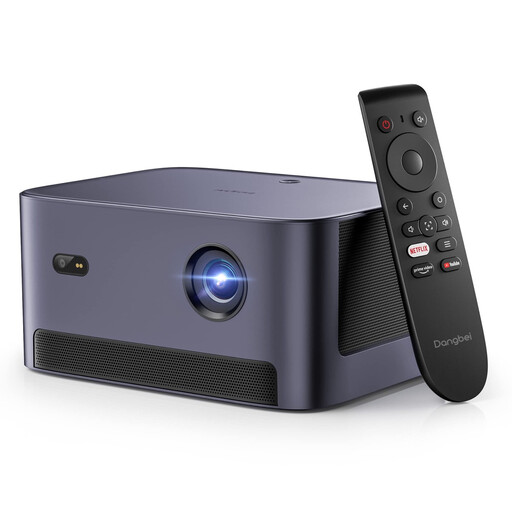
Dangbei Neo DLP projector
This is an option if a stated 120-inch screen size fits your group. The title lists 1080p Full HD, 540 ISO lumens, autofocus and keystone correction; confirm the required projection distance and assess visibility in your room.
View on Joybuy
 No image available
XBJ 360° portable projector, European Version
Consider its rotating design where flexible positioning matters. The title lists Full HD 1080p, 500 lumens and a 120-inch display; verify the projection distance and whether the stated output suits your room lighting.
View on Joybuy
 No image available
Yaber T2 Plus GTV portable projector
Its built-in battery may be useful when mains power is inconvenient. The title states native 1080p and sound by JBL; check battery runtime for the full recording, as well as image size, brightness and sound for the group.
View on Joybuy
 No image available
TCL C1 smart projector, grey
Consider this portable model if its placement and image will suit your screening space. The title states 1080p Full HD and 4K support; check native resolution separately from supported input, along with throw distance, visibility and audio for your group.
View on Joybuy
Common questions
Should I choose ultra-short-throw for a large group?
Choose ultra-short-throw if a conventional projector would obstruct seating or a walkway. Epson says its EH-LS650B sits close to the wall and projects up to 120 inches; if you need a larger stated image size and can accommodate conventional placement, Epson lists up to 337 inches for the EB-FH08. Check visibility at your chosen size either way.
Does 4K support mean the projector has native 4K resolution?
No. A projector may accept a 4K input without displaying at native 4K resolution. Check the native-resolution specification for the selected model; the Joybuy XBJ A5Pro listing, for example, describes native 1080p alongside 4K support.
Will built-in speakers be enough for an opera screening?
Do not assume built-in speakers will serve every seat. Epson specifies 2W mono for the EB-FH08, BenQ lists 10W for the TH575i, and Epson describes integrated Yamaha sound for the EH-LS650B. Check the exact model’s audio connections and decide whether your room needs a separate sound system.
Which conformity marking should I check for delivery to Great Britain?
GOV.UK guidance for electrical equipment placed on the Great Britain market lists UKCA or CE marking. Its March 2026 sector guidance distinguishes Northern Ireland, where it lists CE, or UKNI and CE; check the delivery destination and product documentation rather than applying the Great Britain marking choice to every UK address.


