Communal-room film-night organisers
You need an image that remains watchable when the shared room cannot be fully darkened, with a setup several people can use. Room lighting matters as much as the projector’s stated image size.


Choose a brighter home-projector route if the communal room has unavoidable light and the projector can usually stay in one place. A portable model makes more sense if you need to move it between rooms and put it away; either way, check the image at your intended size and whether vocals and dialogue remain clear at a volume considerate to flatmates.
You need an image that remains watchable when the shared room cannot be fully darkened, with a setup several people can use. Room lighting matters as much as the projector’s stated image size.
You need a placement that works around furniture and can be repeated without permanently rearranging the room. An adjustable base or automatic image alignment may help, but you still need a suitable wall and enough distance.
You want to hear dialogue, vocals and music clearly without turning the volume up beyond what suits the flat. Compare the built-in speakers and check how you would connect separate audio if needed.
Decide where the projector will sit and how much you can dim the room before comparing image specifications. Then consider sound and streaming: neither a large stated image size nor built-in apps settles those questions.
Choose when: Some room light is unavoidable and the projector can usually stay in a predictable position.
Trade-off: This route gives less priority to moving and storing the projector after every film.
Choose when: The projector must move between rooms or be put away after use.
Trade-off: Easier repositioning does not remove the need for a clear wall, suitable projection distance and manageable room light.
| Concern | What to check | Who this matters to |
|---|---|---|
| Image visibility | Note the exact brightness measurement label and native resolution. Check the intended image size against the light you can control in the room. | When lamps or daylight remain on, I need to follow the action and read subtitles without relying on the largest advertised image size. Around 30% of consumers put visibility first. |
| Placement and storage | Measure the projector-to-wall distance and check how the stand and image-alignment features work in the intended position. | If the room needs its furniture back after a film, I want a setup I can move and repeat without a permanent mount. For around 30% of consumers, convenient placement is the primary concern. |
| Music and dialogue | Compare the stated speaker configuration and confirm compatible audio connections if you might use separate sound. | I want vocals and dialogue to remain clear at a volume that works for the people sharing the flat. Sound is the main priority for around 30% of consumers. |
| Streaming and support | Confirm the services you use, the exact model’s software-support information and the supplied power equipment. | If several housemates will use the projector, I need its apps and setup to remain practical for us. Around 10% of consumers place streaming access and support first. |
Manufacturers describe the models discussed here with different brightness labels, including ISO lumens and lumens. A larger figure alone cannot tell you how an image will look at your chosen size and room-light level.
Record the exact label, native resolution and intended image size, then consider how far you can dim the communal room.
Speaker configurations differ, and a wattage figure does not establish how clearly you will hear vocals and dialogue at a considerate volume. Which? also treats projector sound quality as a separate assessment factor.
Check the exact model’s speakers and audio connections, particularly if you expect to use a separate speaker or headphones.
Separate audio can add equipment to store, connect and, where applicable, charge.
A smart platform is useful only if it supports the services your household intends to use. The supplied power equipment and model-specific product information also matter when choosing a projector for use in the UK.
Before ordering, confirm the exact model, required services, software-support information where available, supplied plug or adaptor and applicable product information.
Screen-fitting features and adjustable bases can help position an image, but they cannot provide a clear wall or change the distance available between the projector and that wall.
Measure and try the intended position before choosing a model or mounting arrangement.
A stand, freestanding screen or a change to the room’s lighting may be necessary if the intended position does not work.
Epson lists its EF-21 range as a portable smart-projector option with Google TV and a 1,000-lumen specification.
BenQ specifies the GV50 as a 1080p portable projector with an adjustable base, Google TV and an 18W 2.1-channel speaker system.
XGIMI specifies its Full HD HORIZON home projector at 1,500 ISO lumens, with two 8W speakers and automatic image-adjustment features.
These Joybuy projectors are portable or offer flexible placement for a shared-flat film night. Compare their stated features with your room measurements, lighting and sound needs rather than assuming that one specification settles the choice.
 No image available
Consider this portable model if you need to aim the image from a temporary position. Its title states 900 ANSI lumens, 180° rotation, auto keystone, Android 14 and a native 1080p display; confirm visibility at your intended image size and whether its sound suits a considerate listening level.
 No image available
The rotating design is relevant if the viewing position changes between a wall and ceiling. The title states 500 lumens, auto keystone and Wi-Fi, Bluetooth and HDMI connectivity; check the room-light fit and the exact audio arrangement you would use.
 No image available
This portable model is an option to assess when the room can be dimmed and the projector needs to move. Its title states 1080p FHD and 4K input support; check the intended image size, room lighting and sound setup before choosing it.
 No image available
A built-in battery may be useful when a temporary position is away from a convenient socket. The title states native 1080p, Wi-Fi 6, Bluetooth and JBL sound; confirm battery duration for your film nights, brightness for your room and audio clarity at a considerate volume.
 No image available
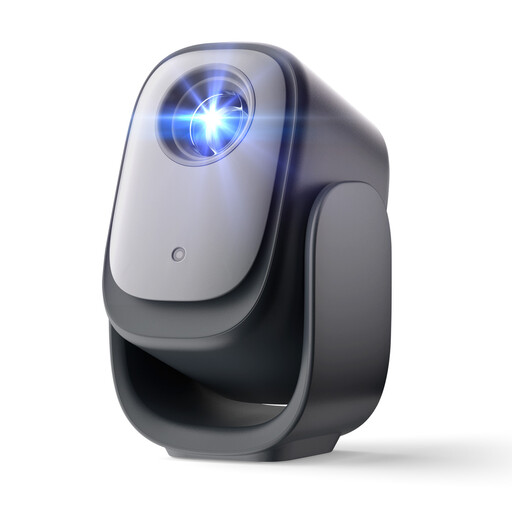
Consider this compact option if temporary placement and built-in streaming are priorities. Its title lists Wi-Fi, Bluetooth, auto focus and auto keystone; check that your required apps are available and that the image and sound suit your intended room.
No: compare the exact brightness measurement labels before drawing conclusions from the figures. XGIMI labels the HORIZON at 1,500 ISO lumens, while Epson lists 1,000 lumens for the EF-21 range and BenQ lists 500 lumens for the GV50; your room light, placement and intended image size also affect the decision.
They may suit your setup, but speaker wattage cannot establish whether vocals will be clear at a considerate volume in your flat. Check the exact configuration and compatible audio connections if you might use separate sound.
Measure the distance from your intended projector position to a clear wall and decide how large an image will fit. Leave room for ventilation and check the model’s placement guidance; automatic correction and an adjustable base do not remove those physical constraints.
Yes: confirm that the exact model supports the services your household plans to use and check its available software-support information. A named smart platform alone does not establish access to every app or account feature you need.
Check the supplied power equipment, instructions and applicable conformity information for the exact model. The UK Office for Product Safety and Standards states that the Electrical Equipment (Safety) Regulations 2016 set requirements before electrical equipment is placed on the Great Britain market; do not assume a particular listing satisfies them solely because it is described as a UK-use projector.