Viewers with limited placement space
If a projector cannot sit far into the room, start with the available lens-to-screen distance. An ultra-short-throw model may suit a cabinet near the wall; a shorter-throw model still needs a clear light path.


Choose a projector route only after measuring the lens-to-screen distance and the image width your wall can accommodate. An ultra-short-throw model suits a cabinet close to the wall; shorter-throw and conventional models need their own placement calculations. For opera recordings, weigh picture detail and colour alongside a workable connection to external audio, rather than judging the setup by built-in speaker specifications alone.
If a projector cannot sit far into the room, start with the available lens-to-screen distance. An ultra-short-throw model may suit a cabinet near the wall; a shorter-throw model still needs a clear light path.
Close-ups, costumes, surtitles and dark scenes make resolution, colour specifications and room lighting worth checking together. A brightness figure alone will not tell you how those details will look on your wall or screen.
If vocal clarity and orchestral sound matter more than an all-in-one setup, plan the audio connection before choosing the projector. Check that its output works with the soundbar, receiver or speakers you intend to use.
Placement is the first decision: ProjectorCentral defines throw ratio as projection distance divided by image width, so use the intended lens position and the exact model when working out whether your preferred image will fit.
Choose it when: The projector needs to sit on furniture close to the wall, keeping the middle of the room clear. Epson describes its EH-LS650W and EH-LS670W as close-to-wall models.
Allow for: Careful positioning and image alignment at the chosen wall or screen.
Choose it when: There is space between projector and screen, but a longer conventional placement is awkward. BenQ UK specifies a 0.69–0.83 throw ratio for the TK710STi.
Allow for: A clear projection path through the room; shorter-throw does not mean wall-side placement.
Choose it when: The room accommodates the exact model’s projection distance and you want installation features such as the optical zoom and lens shift Epson lists for the EH-TW7100.
Allow for: A suitable shelf or mount and a practical route for cables away from the screen wall.
| Concern | What to check | Who this matters to |
|---|---|---|
| Placement and image size | Measure from the intended lens position to the image surface. Check the exact model’s throw-ratio range against your intended image width. | I need an image that fits my wall without putting the projector in the way. Around 40% of consumers put placement and achievable image size first. |
| Picture detail and surtitles | Check resolution and stated colour support, then consider the intended image size and the light conditions during viewing. | When watching close-ups and reading surtitles, I want costumes, text and stage scenes to remain clear. Picture fidelity comes first for around 30% of consumers. |
| External audio | Trace the connection from playback device to projector and sound system; confirm the required HDMI ARC or eARC, audio output or Bluetooth compatibility. | I want to use my own sound system for voices and orchestra without discovering a connection problem later. Roughly 20% of consumers prioritise the audio route. |
| Ambient light and everyday use | Consider when curtains or blinds can be used. Read manufacturer brightness figures alongside the intended screen or wall and image size. | If I sometimes watch with room light present, I need a setup that remains practical outside a darkened session. Around 10% of consumers make that their primary concern. |
The available lens-to-screen distance determines the image width through that model’s throw ratio and zoom range. A room’s overall length is not necessarily its usable projection distance.
Measure the intended lens position and use a projection calculator for the exact model before deciding where the projector will go.
Changing the planned cabinet or mount later can add installation work.
Speaker specifications differ between projectors, but a wattage figure alone cannot establish how vocals and orchestra will sound in your room.
Decide whether you will use the built-in speakers or an existing sound system, then check the complete audio connection path before purchase.
Adding separate speakers later may also mean finding space for equipment and routing more cables.
Manufacturer-rated lumens do not, by themselves, predict colour or shadow detail on your chosen surface under your room lighting.
Consider light control, resolution and stated colour support alongside brightness, particularly if dark stage scenes matter to you.
Projector ranges change: Epson United Kingdom identifies the EH-TW6150 as discontinued. An older recommendation may therefore lead you to a different variant than intended.
Check the exact model and variant on the seller’s product page, including the warranty terms, before committing to it.
These brands provide examples of different placement and audio approaches; the features below apply to the named models, not every projector in each range.
Epson United Kingdom lists close-to-wall EH-LS650W and EH-LS670W models as well as the conventional EH-TW7100.
BenQ UK’s TK710STi is a shorter-throw option with a specified 0.69–0.83 throw-ratio range.
XGIMI UK presents the HORIZON Ultra as an all-in-one home projector with built-in audio.
These Full HD projectors offer different built-in features for watching recordings. Neither should be chosen for a small room until its image size at your available projection distance and your intended audio connection have been checked.
 No image available
Consider this model if Full HD recordings and built-in stereo audio are part of your plan, provided its projected image fits your wall at the available distance.
The product title lists 1,200 ANSI lumens, keystone correction and support for 4K input; that input support does not change its stated Full HD resolution. Confirm the image width at your intended lens position before choosing it.
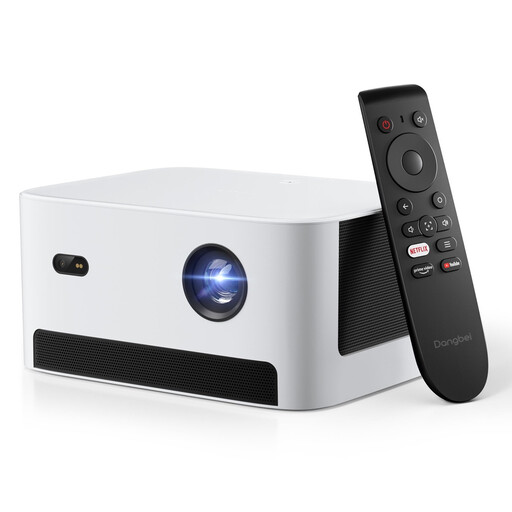 No image available
Consider this model if automatic focus and a stated Bluetooth connection suit your setup, while checking how your chosen audio equipment will connect.
The product title lists 540 ISO lumens, keystone correction and Wi-Fi. Its brightness figure uses a different stated unit from the Wimius listing, so the two figures should not be treated as a direct comparison. Confirm the required projection distance and image width before purchase.
Measure from the intended projector lens position to the image surface, then check the exact model’s throw-ratio and zoom range against your desired image width. ProjectorCentral defines throw ratio as projection distance divided by image width; a generic short-throw label cannot replace that calculation.
An ultra-short-throw projector is worth considering when it must sit close to the wall and the central floor area needs to stay clear. If you have more usable lens-to-screen distance, a shorter-throw or conventional model may also fit; calculate the image size for the specific projector before choosing a route.
Built-in speakers may suit a simpler viewing setup, but their specifications alone cannot settle whether they meet your expectations for voices and orchestra. If you intend to use separate sound equipment, check its compatibility with the projector’s available audio connections before buying.